
Introduction
Base URL
https://api.ais.techUAT URL
https://uat-api.aisdev.techOAuth URL
https://oauth.ais.techUAT OAuth URL
https://uat-oauth.aisdev.techWelcome to the AIS API Documentation.
The objective of this guide is to get you up and running with the AIS API. We'll start off going through the core concepts of the API, then we'll go through the recommended usage.
Finally, we have the reference section which will show you every endpoint in detail with all the required parameters and sample responses.
How It Works
The AIS API is made up of four main sections:
- Clients
- Claims
- Workflows
- Reports
Clients
A client in our system is the company/organisation you are creating claims for, not a party involved in the claim.
Registering your clients can be helpful as it can allow you to customise the self-serve theme, the forms, and the workflows per client. This can allow your clients to have a completely different data collection process using the same API.
You can also create a single client and then register all of your claims under that one client.
Occasionally, you may work with a client that is made of multiple departments or might be a group of companies. In this case you may want to have a single client but customise the self-serve theme per department. To do that you can add multiple departments to the client, and then when you create a claim you supply the department id you want to register the claim to.
For more information about clients see the "Clients" section of the documentation.
Claims
A claim has no set structure in our system as the claim details can be customised for each client. To handle this a claim as a data property which is a JSON object containing the claim details.
We recommend that the claim data matches the structure of a claim form that has been built using our form builder. If you are using the forms API this will happen for you. If you are using the REST API you can get the JSON structure for a form from the AIS platform.
Creating Claims
There are two ways of creating claims.
You can either use the REST API to submit the claim details. This can be useful if you already have a process for capturing claim details and you just want to send them through to us.
Alternatively you can use our forms API. With the forms API you build a claim form in the AIS platform and then you can make a request to our rendered forms API to get the form as a JSON object. We then have a Javascript package where you can pass in the form JSON and it will render the form for you. We highly recommend using the Javascript package if you are using the forms API as we make fairly frequent updates to the available form controls and conditions.
Once you have a claim you need to send us the details of the parties involved in the claim. You can do that in the same way by either using the REST API or using the forms API.
If you are using the forms API you can nest party forms into the claim form and capture all the details within the same form.
Workflows
Workflows allow you to define which forms need to be captured for a party and in which order.
Workflows are made up of two sections; templates and stages.
A template is a collection of forms that should be completed by/for a party. Templates are split up into pages, and on each page you can have multiple components. In a template you can get a user to fill out a form, or ask them to confirm details of a previously captured form. This can be useful if you are sending a self-serve to a party to confirm details that you collected while they were on the phone.
Once you've built out the templates you need you can create a workflow.
A workflow is made up of multiple stages. At each stage you can select the templates that can be used to complete that stage. You can also add conditions to say when a template should be used for that stage. You can also register webhooks that should be fired when a stage is completed.
Reports
A report is a collection of statements taken by/for a party.
You start a report by selecting the workflow you want to use for the party. Once you have started a report we will tell you the next stage that needs to be completed for the party and which templates can be used.
You can then either use the forms API and our statement renderer Javascript package to take a statement within your own platform, or you can use our self-serve system to send a link to the party for them to complete the statement themselves.
Once a statement is completed we will return the next stage that needs to be completed for the report. This process continues until you have completed all the stages in the report.
When a statement is completed we will trigger the webhooks that are configured in the workflow builder. This allows you to get the statement data back into your system and notify the relevant users.
Liability
One of the default modules we offer is the liability resolver module. This will give a diagnosis on which party we think is liable in a motor incident.
The liability resolver is run when the Motor Liability form is added to a template. When the liability resolver is run we will also compare the liability outcome for each party and give advice on what we think the likely outcome will be for the overall claim.
If a liability decision has been reached we will return it as a JSON object. The liability outcome can be accessed in three different ways:
- From the claim
- From the report
- Via the statement completed webhook
To get the liability outcome for a claim you have to request the liability part. The liability
is always returned
with the report in the liability property. The liability is always returned via the statement
webhook and can be
accessed via the liability property.
Report Liability
Report liability example
{
"outcome": "100\/0 Fault",
"image": "https:\/\/api.ais.tech\/storage\/accident-circumstances\/car-park-024.jpg",
"liable_party_id": "60ae23166sh55980a18fd1723",
"type": "fault",
"split": "100\/0",
"meta": "<blockquote>\n<p>Reverse slowly while<\/p>\n<\/blockquote>\n<blockquote>\n<ul>\n<li>checking all around<\/li>\n<li>looking mainly through the rear window<\/li>\n<li>being aware that the front of your vehicle will swing out as you turn."<\/li>\n<\/ul>\n<\/blockquote>\n<p><strong>Highway Code Rule 202<\/strong><\/p>\n<blockquote>\n<p>"Look carefully before you start reversing. You should<\/p>\n<ul>\n<li>use all your mirrors<\/li>\n<li>check the \u2018blind spot\u2019 behind you (the part of the road you cannot see easily in the mirrors)\nReverse slowly while<\/li>\n<li>checking all around<\/li>\n<li>looking mainly through the rear window<\/li>\n<li>being aware that the front of your vehicle will swing out as you turn."<\/li>\n<\/ul>\n<\/blockquote>\n<p>Car parks to which the public have access will generally fall under the jurisdiction of the Road Traffic Act and Highway Code.<\/p>\n",
"potential_outcomes": [],
"potential_outcome_description": null
}The report and statement webhook liability has the following properties.
| Field | Description |
|---|---|
| outcome | Provides the likely liability outcome for your policyholder. |
| image | A link to an image of what we think happened in the incident. |
| liable_party_id | The id of the party we deem to be at fault in the claim. If the outcome is a 50/50 split this will be null. |
| type | The type of outcome. Can be fault, non_fault, or split. |
| split | The likely liability outcome split. |
| meta | Some advisory text around how we've come to the outcome. This is an HTML string. |
| potential_outcomes | If we haven't be provided with enough data to match a specific outcome we will return an array of all possible outcomes. |
| potential_outcome_description | A description of the potential outcomes. |
Potential Outcomes
Potential outcomes example
{
"outcome": "100\/0 Fault",
"image": "https:\/\/api.ais.tech\/storage\/accident-circumstances\/car-park-024.jpg",
"liable_party_id": "60ae23166sh55980a18fd1723",
"type": "fault",
"split": "100\/0",
"meta": "<blockquote>\n<p>Reverse slowly while<\/p>\n<\/blockquote>\n<blockquote>\n<ul>\n<li>checking all around<\/li>\n<li>looking mainly through the rear window<\/li>\n<li>being aware that the front of your vehicle will swing out as you turn."<\/li>\n<\/ul>\n<\/blockquote>\n<p><strong>Highway Code Rule 202<\/strong><\/p>\n<blockquote>\n<p>"Look carefully before you start reversing. You should<\/p>\n<ul>\n<li>use all your mirrors<\/li>\n<li>check the \u2018blind spot\u2019 behind you (the part of the road you cannot see easily in the mirrors)\nReverse slowly while<\/li>\n<li>checking all around<\/li>\n<li>looking mainly through the rear window<\/li>\n<li>being aware that the front of your vehicle will swing out as you turn."<\/li>\n<\/ul>\n<\/blockquote>\n<p>Car parks to which the public have access will generally fall under the jurisdiction of the Road Traffic Act and Highway Code.<\/p>\n",
"potential_outcomes": [
{
"type": "non_fault",
"split": "100/0",
"liable_party_id": "60ae23166sh55980a18fd1723",
"missing_fields": [
"what_was_the_primary_impact_area_of_the_vehicle"
]
}
],
"potential_outcome_description": "From the data provided in the statement the likely liability outcome is 100\/0 Fault. However, the outcome could be 100\/0 Non-Fault. If you can provide us with answers to 'What was the primary impact area of the vehicle?' we can give you a more accurate outcome."
}Occasionally the user may not provide enough information to diagnose a specific outcome. When this happens we will return an array of potential outcomes and a description.
Claim Liability
Liability outcomes match
{
    "match_type": "full",
    "outcome": "100\/0 Fault",
    "split": "100\/0",
    "type": "fault",
    "liable_party_id": "60ae23166sh55980a18fd1723"
  }
Liability outcomes do not match
{
    "match_type": "further_investigation_required",
    "outcome": null,
    "split": null,
    "type": null,
    "liable_party_id": null
  }
The claim liability JSON object is different to the other two, this is because it checks if the liability outcomes match for each party.
Authentication
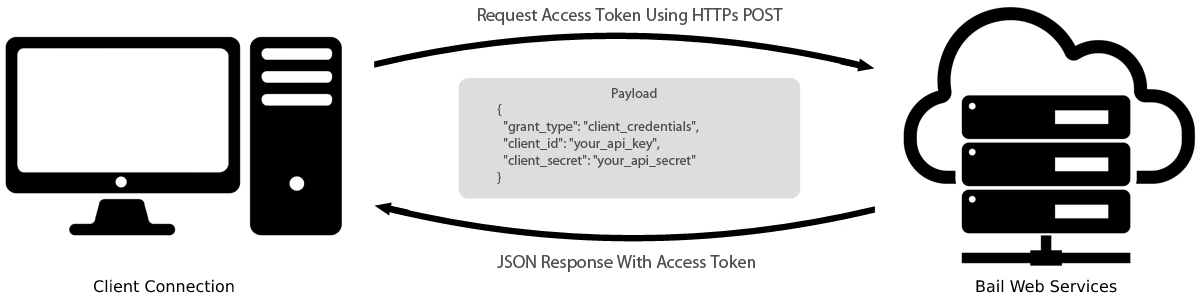
The AIS API is authenticated using the OAuth 2 specification and implements the client credentials grant.
To access authenticated endpoints you will need to supply an access token. Access tokens are valid for 1 hour and then you will need to generate a new token.
If you haven't used OAuth 2 before the diagrams below should you understand the flow.
Firstly, if you don't already have a valid access token you will need to request one. You do so by sending your API key and secret to our authentication, the server will then return you an access token. We will provide you with your API key and secret when your API access is approved.
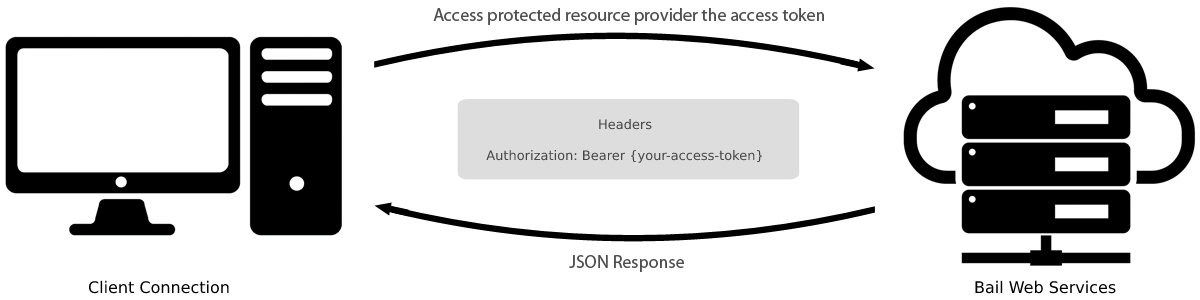
You should then store this access token your end and provide it in the Authorization header
whenever you are making
requests to authenticated endpoints.
Generating An Access Token
Example request:
curl -X POST \
"https://oauth.ais.tech/token" \
-H "Content-Type: application/json" \
-H "Accept: application/json" \
-d '{"client_id":"60341sgdg57d124af7f6g6512","client_secret":"Aoj7wDH48Ov91Aue2wHCaHFA45T4AcHo4aTad8hF","grant_type":"client_credentials","scopes":"[*]"}'
const url = new URL(
"https://oauth.ais.tech/token"
);
let headers = {
"Content-Type": "application/json",
"Accept": "application/json"
};
let body = {
"client_id": "60341sgdg57d124af7f6g6512",
"client_secret": "Aoj7wDH48Ov91Aue2wHCaHFA45T4AcHo4aTad8hF",
"grant_type": "client_credentials",
"scopes": "[*]"
}
fetch(url, {
method: "POST",
headers: headers,
body: body
})
.then(response => response.json())
.then(json => console.log(json));$client = new \GuzzleHttp\Client();
$response = $client->post(
'https://oauth.ais.tech/token',
[
'headers' => [
'Content-Type' => 'application/json',
'Accept' => 'application/json',
],
'json' => [
'client_id' => '60341sgdg57d124af7f6g6512',
'client_secret' => 'Aoj7wDH48Ov91Aue2wHCaHFA45T4AcHo4aTad8hF',
'grant_type' => 'client_credentials',
'scopes' => '[*]',
],
]
);
$body = $response->getBody();
print_r(json_decode((string) $body));import requests
import json
url = 'https://oauth.ais.tech/token'
payload = {
"client_id": "60341sgdg57d124af7f6g6512",
"client_secret": "Aoj7wDH48Ov91Aue2wHCaHFA45T4AcHo4aTad8hF",
"grant_type": "client_credentials",
"scopes": "[*]"
}
headers = {
'Content-Type': 'application/json',
'Accept': 'application/json'
}
response = requests.request('POST', url, headers=headers, json=payload)
response.json()Example response (200 oauth/token):
{
"token_type": "Bearer",
"expires_in": 3600,
"access_token": "eyJ0eXAiOiJKV1QiLCJhbGciOiJSUzI1NiJ9.eyJhdWQiOiI2MDMzOGM5NWZjNjBmNjY5YjQ3ZjE4YzIiLCJqdGkiOiI1ZmZhNzMyYTIxMDkwZTkyOWU2ODk2YzY5NzlhODdhODVmNGRiYjZkMjMxMjA0YTNhZjUwYjM5OTY3YjYwN2IyYTU0MTU4MjkwYzNmNjVjNSIsImlhdCI6MTYyMTk1NTg0OC4zNzc1MzIsIm5iZiI6MTYyMTk1NTg0OC4zNzc1MzUsImV4cCI6MTYyMTk1OTQ0OC4zNzI2MSwic3ViIjoiNjAxMGEwMzdhMTEyODM3YzZhNGNjNTUyIiwic2NvcGVzIjpbXX0.AQq8Ej44l-3YKA74MW2TYlhkhEqa6HpPlJ0F6O9EoCs5Gjk0-XNRA3DWyBkMGZRf11VP3TBnpc_TruM9doIZOcsbz6B9IXtZix6igq9Bbkz4M4lnGbZdk606MV64oxbxTGl1nHYOAxPeQ4szd01NHnLu3WV-1cbZkiaP35AIiVf16PdhSG2YB-x1HbY9dRch-o_pYUTK7oA9VryAESvrL-RD77urf8xdXDbLLHvVFJKXYIqDjvht6BAaAuCsN0BNI3sRXxzzqogcvjy3ZBmCVbkh4CB4c4up-6QoVsFP0wMlNbBTbgA6xN_5tdNtMYbXeAe6u4o5jmjoh9MKQrXYXfqD2rRjD_mCC9CSdrLqBm35CEkJvnwZXm1mZSeX1yMhLZy4u9LKvl0DKR8rnbzS0q2fy87lPyBCcBjkAWnh-ZBZFhhZbI0GzHOYt6KCDG3f2L16eErIe3t9aAVfc_njMO5V51syFwHY5nDIXTBRmhttmqAMlJVTTZ9PaC28EolWAV2KRTUYf-YyXRYFEaHDcuM9YrPE0837aKAQZ6hNNwp4KN1IuUGT2PW6xtkXXgMvDB6ct0KQidkmRY2JIt7DXK7wAwSMFw_y7FqESp-J7qE40VmakYpH_U4eY50AGCRGc4CMYSrBQmBTuTtuIoiwdT9M8gdXQr5McDbBl2IqVIA"
}
To generate an access token you make a POST request to our OAuth server
https://oauth.ais.tech/token.
If you are using our UAT environment the URL is https://uat-oauth.ais.tech/token.
You need to send your OAuth client id and secret. The grant_type must be "client_credentials".
We will return an
access token and the amount of time in seconds when the access token will expire.
When a token expires there is no way to refresh, you must generate a new token.
Recommended Integrations
Currently, we recommend four types of integrations; batch-import, self-serve, forms integration, and a liability only integration.
The batch import API is our recommend integration for most applications. This allows you to send us a JSON array of operations that we then execute for you asynchronously. We then return you the results of each operation. This allows you to integration a single API endpoint, but utilise the majority of the functionality within our API.
The self-serve integration involves you registering the basic claim details through the API, and then starting a report for a party and sending them a self-serve link to complete the forms themselves. AIS will then handle the workflow for the party and will get them to complete the relevant templates. Each time a statement is completed we can send the data to you via a webhook. If you plan to have users logging into AIS we recommend using the batch import API instead, but if you just interested in sending our self-serve forms from your application then this integration is a great choice.
The forms integration allows you to take statements within your own platform using our statement renderer Javascript package. This is a more complicated integration as it involves you having to collect the statement details within your platform. We have simplified this process by building a Javascript package that will take the statement JSON object and will render the statement for you, but you will still need to use our API to register the claim details.
The liability only integration is used when you only want to use AIS to get a liability decision. This involves you interacting with our liability resolver microservice to get a liability decision. Do not use this integration if you need to use any AIS workflows.
Batch Imports Integration
Our batch imports API is an asynchronous API that allows you to send us a list of operations to run as a batch.
Once we've run the operations we will make a callback to an endpoint in your system with the results of the operations.
This is the recommended integration to use for most applications as it allows you to integrate a single endpoint and customise the operations to create your AIS resources.
Starting a Batch
To start a batch you send us a JSON array of operations to run and the endpoint we should call when we've finished processing the batch.
When you start a batch you must either provide a "create_claim" operation to create a new claim, or a "find_claim" operation so that we know which claim we need to run the following operations against.
You can only create one policyholder on a claim in our system, so you can only provide a "create_policyholder" action once.
| Field | Required | Description |
|---|---|---|
| endpoint | Yes | The endpoint in your application that we will make a POST request to when we've finished processing the batch. |
| operations | Yes | The operations you want to run. See all of the [available operations here](#available-operations). |
| client_metadata | No | A JSON object of custom fields that you can send to us. We will pass this JSON object back to you when we call the callback endpoint. |
Create Claim Example Request
Example request:
POST https://api.ais.tech/claims/batch-import

Authorization: Bearer {your-access-token}
Content-Type: application/json

{
  "endpoint": "https://your-app/callback",
  "operations": [
    {
      "action": "create_claim",
      "client_id": "60140a975085cb649f219a80",
      "form_id": "60109f95f3d94c2e7b4302bc",
      "reference": "your-claim-reference",
      "incident_date": "2024-01-01T10:00:00+00:00",
      "location": "1 Prince of Wales Rd, Norwich, NR1 1BD"
    },
    {
      "action": "create_policyholder",
      "name": "John Doe",
      "email": "john@example.com",
      "mobile": "07123 123123",
      "vehicle": "AA20 ABC",
      "vehicle_type": "car"
    },
    {
      "action": "create_third_party",
      "name": "Jane Doe",
      "email": "jane@example.com",
      "mobile": null,
      "vehicle": null,
      "vehicle_type": null
    },
    {
      "action": "start_workflow",
      "type": "third_party_intervention",
      "party_type": "third_party",
      "send_first_stage": true
    }
  ],
  "client_metadata": {
    "your-id": 1
  }
}
Example response:
{
  "batch_id": "60587472ed01fb44294c8f63",
  "client_metadata": {
    "your-id": 1
  }
}
This example creates a new claim, adds a policyholder and third party, and then starts a third party intervention workflow for the third party.
Find Claim Example Request
Example request:
POST https://api.ais.tech/claims/batch-import

Authorization: Bearer {your-access-token}
Content-Type: application/json

{
  "endpoint": "https://your-app/callback",
  "operations": [
    {
      "action": "find_claim",
      "id": "6057830b737cf347e139ffb4"
    },
    {
      "action": "create_witness",
      "name": "Joe Bloggs",
      "email": "joe@example.com",
      "mobile": "07123 456789"
    },
    {
      "action": "start_workflow",
      "type": "accident_report_form",
      "party_type": "witness",
      "send_first_stage": true
    }
  ],
  "client_metadata": {
    "your-id": 1
  }
}
Example response:
{
  "batch_id": "60587472ed01fb44294c8f65",
  "client_metadata": {
    "your-id": 1
  }
}
This example creates a finds a previously created claim, adds a witness, and then sends an accident report form to the witness.
Batch Callback
Example response:
POST https://your-app/callback

Content-Type: application/json

{
  "status": "success",
  "operations": [
    {
      "action": "create_claim",
      "claim_id": "6057830b737cf347e139ffb4",
      "reference": "your-claim-reference"
    },
    {
      "action": "create_policyholder",
      "party_id": "6057830c737cf347e139ffb7"
    },
    {
      "action": "create_third_party",
      "party_id": "6057830c737cf347e139ffb9"
    },
    {
      "action": "start_workflow",
      "type": "third_party_intervention",
      "reports": [
        {
          "party_id": "6057830c737cf347e139ffb9",
          "report_id": "60578313737cf347e139ffbb"
        }
      ]
    }
  ],
  "client_metadata": {
    "your-id": 1
  }
}
Batch failed response:
POST https://your-app/callback

Content-Type: application/json

{
  "status": "failed",
  "error": "An error occurred while sending the workflow.",
  "client_metadata": {
    "your-id": 1
  }
}
Once we've finished processing the batch we will make a request back to your callback endpoint with the result of batch import.
We can apply authentication to the requests back to your application. We currently support a fixed api token or basic authentication, but we can add other authentication methods as required.
Available Operations
Below we've listed all of the available operations with their properties.
Create Claim Operations
Example operation:
[
  {
    "action": "create_claim",
    "client_id": "60140a975085cb649f219a80",
    "form_id": "60109f95f3d94c2e7b4302bc",
    "department_name": "Acme",
    "reference": "your-claim-reference",
    "incident_date": "2024-01-01T10:00:00+00:00",
    "location": "1 Prince of Wales Rd, Norwich, NR1 1BD"
  }
]
The "create_claim" operation creates a new claim within AIS.
| Field | Required | Description |
|---|---|---|
| action | Yes | Must be 'create_claim' |
| client_id | Yes | The AIS client ID of the client (e.g. insurer) you want to create the claim for |
| form_id | Yes | The AIS form ID of the form you want to use to create the claim |
| department_name | No | If your client has multiple brands we can set them up with multiple departments in bail, this allows us to whitelist self-serve forms etc. for the brand. You can then provide the name of the department here. |
| reference | Yes | Your claim reference |
| incident_date | No | The date of the incident in ISO 8601 format |
| location | No | A text description of the location |
Find Claim Operation
Example Operation:
[
  {
    "action": "find_claim",
    "claim_id": "6057830b737cf347e139ffb4"
  }
]
The "find_claim" operation finds the claim you want to run the following operations against.
| Field | Required | Description |
|---|---|---|
| action | Yes | Must be 'find_claim' |
| claim_id | Yes | Your AIS claim id |
Create Policyholder Operation
Example Operation:
[
  {
    "action": "create_policyholder",
    "name": "John Doe",
    "email": "john@example.com",
    "mobile": "07123 123123",
    "vehicle": "AA20 ABC",
    "vehicle_type": "car"
  }
]
Example operation response:
[
  {
    "action": "create_policyholder",
    "party_id": "6057830b737cf347e139ffb4"
  }
]
The "create_policyholder" operation adds your primary policyholder to the claim. You can only have one policyholder per claim.
| Field | Required | Description |
|---|---|---|
| action | Yes | Must be 'create_policyholder' |
| name | Yes | The policyholder's name |
| No | The email address for the policyholder | |
| mobile | No | The mobile phone number for the policyholder |
| vehicle | No | The policyholder's VRN |
| vehicle_type | No | The type of vehicle, must be one of: car, truck, van, motorcycle, other |
Create Third Party Operation
Example operation:
[
  {
    "action": "create_third_party",
    "name": "John Doe",
    "email": "john@example.com",
    "mobile": "07123 123123",
    "vehicle": "AA20 ABC",
    "vehicle_type": "car"
  }
]
Example operation response:
[
  {
    "action": "create_third_party",
    "party_id": "6057830b737cf347e139ffb4"
  }
]
The "create_third_party" operation adds a third party to your claim. You can provide multiple create third party operations in your operations.
| Field | Required | Description |
|---|---|---|
| action | Yes | Must be 'create_third_party' |
| name | Yes | The third party's name |
| No | The email address for the third party | |
| mobile | No | The mobile phone number for the third party |
| vehicle | No | The third party's VRN |
| vehicle_type | No | The type of vehicle, must be one of: car, truck, van, motorcycle, other |
Create Witness Operation
Example operation:
[
  {
    "action": "create_witness",
    "name": "John Doe",
    "email": "john@example.com",
    "mobile": "07123 123123"
  }
]
Example operation response:
[
  {
    "action": "create_witness",
    "party_id": "6057830b737cf347e139ffb4"
  }
]| Field | Required | Description |
|---|---|---|
| action | Yes | Must be 'create_witness' |
| name | Yes | The witness's name |
| No | The email address for the witness | |
| mobile | No | The mobile phone number for the witness |
Create Broker Operation
Example operation:
[
  {
    "action": "create_broker",
    "name": "John Doe",
    "email": "john@example.com",
    "mobile": "07123 123123"
  }
]
Example operation response:
[
  {
    "action": "create_broker",
    "party_id": "6057830b737cf347e139ffb4"
  }
]
The "create_broker" operation adds a witness to your claim. You can provide multiple create broker operations in your operations.
| Field | Required | Description |
|---|---|---|
| action | Yes | Must be 'create_broker' |
| name | Yes | The broker's name |
| No | The email address for the broker | |
| mobile | No | The mobile phone number for the broker |
Create Third Party Insurer Operation
Example operation:
[
  {
    "action": "create_third_party_insurer",
    "name": "John Doe",
    "email": "john@example.com",
    "mobile": "07123 123123"
  }
]
Example operation response:
[
  {
    "action": "create_third_party_insurer",
    "party_id": "6057830b737cf347e139ffb4"
  }
]
The "create_third_party_insurer" operation adds a witness to your claim. You can provide multiple create third party insurer operations in your operations.
| Field | Required | Description |
|---|---|---|
| action | Yes | Must be 'create_third_party_insurer' |
| name | Yes | The third party insurer's name |
| No | The email address for the third party insurer | |
| mobile | No | The mobile phone number for the third party insurer |
Start Workflow Operation
Example operation:
[
  {
    "action": "start_workflow",
    "type": "third_party_intervention",
    "party_type": "third_party",
    "send_first_stage": true
  }
]
Example operation response:
[
  {
    "action": "start_workflow",
    "type": "third_party_intervention",
    "reports": [
      {
        "party_id": "6057830b737cf347e139ffb4",
        "report_id": "60578313737cf347e139ffbb"
      }
    ]
  }
]
The "start_workflow" operation starts a workflow on a claim. You either need to provide a specific party ID or a party type to start the workflow for. If you provide a party type then we will start the workflow for all parties on the claim of the given type.
When you start a workflow in AIS we create a report instance. This operation will return an array of report results. You will get a result for each party we have started the workflow for.
| Field | Required | Description |
|---|---|---|
| action | Yes | Must be 'start_workflow' |
| type | Yes | The type of workflow you want to start |
| party_id | No | If you want to start a workflow for a specific party then provide their AIS id here |
| party_type | No | The type of party you want to start the workflow for. This must be either: policyholder, third_party, witness, broker, or third_party_insurer |
| send_first_stage | No | A boolean value that indicates that the first stage of the workflow should be sent automatically, most of the time you'll want this to be true |
Resend Self-Serve Operation
Example operation:
[
  {
    "action": "resend_self_serve",
    "report_id": "60578313737cf347e139ffbb"
  }
]
Example operation response:
[
  {
    "action": "resend_self_serve",
    "sent": true
  }
]
The "resend_self_serve" operation resends the latest self-serve for a report. You need to provide the "report_id` returned from the `start_workflow` operation.
| Field | Required | Description |
|---|---|---|
| action | Yes | Must be 'resend_self_serve' |
| report_id | Yes | The `report_id` of the report you want to resend |
Set HCO Offer Operation
Example operation:
[
  {
    "action": "set_hco_offer",
    "offer": "£1000.00"
  }
]
Example operation response:
[
  {
    "action": "set_hco_offer",
    "offer": "£1000.00"
  }
]
The "set_hco_offer" operation is used to set the HCO offer on the claim.
| Field | Required | Description |
|---|---|---|
| action | Yes | Must be 'set_hco_offer' |
| offer | Yes | The HCO offer |
Set Total Loss Offer Operation
Example operation:
[
  {
    "action": "set_total_loss_offer",
    "offer": "£1000.00"
  }
]
Example operation response:
[
  {
    "action": "set_total_loss_offer",
    "offer": "£1000.00"
  }
]
The "set_total_loss_offer" operation is used to set the HCO offer on the claim.
| Field | Required | Description |
|---|---|---|
| action | Yes | Must be 'set_total_loss_offer' |
| offer | Yes | The total loss offer |
Self-Serve Integration
With the self-serve integration you send us the basic claim details and then trigger a self-serve link to the relevant parties involved in the claim. We send the self-serve link to the party and they complete the template that you have selected. Once they have completed the template we can fire webhooks to your system to with a summary of the statement.
Create a Client
Example request:
POST https://api.ais.tech/clients

Authorization: Bearer {your-access-token}
Content-Type: application/json

{
    "name": "Acme",
    "email": "info@acme.com",
    "self_serve_email": "do-not-reply@acme.com",
    "contact_number": "+44 1234 567890"
}
Example response:
{
    "id": "60abbe12425aad2eb873192c",
    "name": "Acme",
    "logo": null,
    "theme": null,
    "modules": null,
    "created": "2021-05-24T14:54:10+00:00",
    "modified": "2021-05-24T14:54:10+00:00"
}
Firstly, you need to register a client with our API. A client in our system is the company/organisation you are creating the claim for, not a party involved in the claim.
Registering your clients can be helpful as it can allow you to customise the theme of the self-serve forms per client, it can also help you work out usage per client. However, you can also just create one client and have all of your claims owned by the same client.
To create a client you make a POST request to the /clients endpoint. The only thing you have to
supply is a name, but
you can also supply contact details for the client that will be displayed in help sections during the
self-serve forms.
We will then return the saved client. You store the client id in your system and supply it whenever you want to create a record for the client.
Create a Claim
POST https://api.ais.tech/claims

Authorization: Bearer {your-access-token}
Content-Type: application/json

{
  "client_id": "60abbe12425aad2eb873192c",
  "data": {
    "claim_details": {
      "details": {
        "reference": {
          "key": "Reference",
          "value": "TESTCLAIM"
        },
        "incident_date": {
          "key": "Incident Date",
          "value": "2021-01-01T00:00:00+00:00"
        },
      }
    },
    "location": {
      "location": {
        "key": "Incident Location",
        "value": "M6",
        "geocode": {
          "lat": 53.574959,
          "lng": 24.340679
        }
      }
    }
  }
}
Example response:
{
    "id": "60abc3d374cd1e69f908410f",
    "client_id": "60abbe12425aad2eb873192c",
    "department_id": null,
    "form_id": null,
    "version_id": null,
    "reference": "TESTCLAIM",
    "incident_date": "2021-01-01T00:00:00+00:00",
    "location": "M6",
    "created": "2021-05-24T15:18:43+00:00",
    "modified": "2021-05-24T15:18:43+00:00",
    "data": {
        "claim_details": {
            "details": {
                "reference": {
                    "key": "Reference",
                    "value": "TESTCLAIM"
                },
                "incident_date": {
                    "key": "Incident Date",
                    "value": "2021-01-01T00:00:00+00:00"
                }
            }
        },
        "location": {
            "location": {
                "key": "Incident Location",
                "value": "M6",
                "geocode": {
                    "lat": 53.574959,
                    "lng": 24.340679
                }
            }
        }
    }
}
Now you've got a client id you're ready to create a claim.
To create a claim you make a POST request to the /claims endpoint. You have to provide the id
for the client you want
to create the claim for, and the details of the claim.
The claim details should be provided as a JSON object in the data property of the payload. These
details will usually
match the shape of a form that has been built within the AIS platform.
In our example request we are creating a JSON data object that matches the default claim details form that we provide in the AIS platform. In that form we have a claim details group that has a nested details group, and then in that group we have two controls; a reference, and an incident_date control.
When you are providing an answer for a control you have to provide it as JSON object with a key and a value property. The key should be a label to display to the end user, and the value should be the answer.
{
    "key": "Reference",
    "value": "TESTCLAIM"
}
You can also provide additional properties that you might want to use when displaying values in your system. For example, we have provided geocode data for the location that may help us display the location on a map.
{
    "key": "Incident Location",
    "value": "M6",
    "geocode": {
        "lat": 53.574959,
        "lng": 24.340679
    }
}
If the request is successful we will return a claim object, you should save at least the claim id in your system as you will need it for the rest of the process.
Add The Parties
Party types request:
GET https://api.ais.tech/party-types

Authorization: Bearer {your-access-token}
Party types response:
[
    {
        "id": "60acf8f02de85e0a5c1126ce",
        "name": "policyholder",
        "label": "Policyholder"
    },
    {
        "id": "60acf8f02de85e0a5c1126cf",
        "name": "third_party",
        "label": "Third Party"
    },
    {
        "id": "60acf8f02de85e0a5c1126d0",
        "name": "witness",
        "label": "Witness"
    }
]
Add party request:
POST https://api.ais.tech/claims/60abc3d374cd1e69f908410f/parties

Authorization: Bearer {your-access-token}
Content-Type: application/json

{
    "type_id": "60acf8f02de85e0a5c1126ce",
    "data": {
        "details": {
            "name": {
                "key": "name",
                "value": "John Doe"
            },
            "vehicle": {
                "key": "Vehicle",
                "value": "Ford Fiesta"
            }
        }
    }
}
Add party response:
{
    "id": "60acf8ee2de85e0a5c1126a2",
    "claim_id": "60abc3d374cd1e69f908410f",
    "type_id": "60acf8f02de85e0a5c1126ce",
    "form_id": null,
    "version_id": null,
    "created": "2021-05-25T13:17:34+00:00",
    "modified": "2021-05-25T13:17:34+00:00",
    "type": {
        "id": "60acf8f02de85e0a5c1126ce",
        "name": "policyholder",
        "label": "Policyholder"
    }
}
Next, you need to add the parties involved in the claim. You must add at least one party to the claim, but you can add as many as you need.
To add a party you need to tell us what type of party they are. Currently, a party can be a policyholder, a third party, or a witness.
To tell us what type of party they are you need to supply us with a party type id. To load the party types
make a GET
request to the /party-types endpoint. The party types very rarely change so feel free to store
or cache these in your
system.
Once you have the party types you are ready to add a party. To add a party make a POST request to the
/claims/{claim}/parties endpoint.
You should replace {claim} with your claim id, so for our example the endpoint would be
/claims/60abc3d374cd1e69f908410f/parties.
You have to provide the party type id and the details for the party. Like the claim details, the party
details should
be provided as a JSON object in the data property of the payload.
If the request is successful you will return a party object. You should save at least the party id in your system as you will need it to start a report for a party.
Start A Report
Party workflows request:
GET https://api.ais.tech/claims/60abc3d374cd1e69f908410f/parties/60acf8ee2de85e0a5c1126a2/workflows

Authorization: Bearer {your-access-token}
Party workflows response:
[
    {
        "id": "60acfcb04ffe5f74d64f2202",
        "client_id": "60abbe12425aad2eb873192c",
        "name": "Self-Serve"
    }
]
Start report request:
POST https://api.ais.tech/reports

Authorization: Bearer {your-access-token}
Content-Type: application/json

{
    "party_id": "60acf8ee2de85e0a5c1126a2",
    "workflow_id": "60acfcb04ffe5f74d64f2202"
}
Start report response:
{
    "id": "60acfdf76f0b270f7f4fb3c3",
    "party_id": "60acf8ee2de85e0a5c1126a2",
    "workflow_id": "60acfcb04ffe5f74d64f2202",
    "completed_at": null,
    "liability": null,
    "next": {
        "id": "60acfd756e79c108c60bea3a",
        "report_id": "60acfdf76f0b270f7f4fb3c3",
        "stage_id": "60acfe756e79c536c60gab6a",
        "self_serve_id": null,
        "verification_code": null,
        "qr_generated_at": null,
        "completed_at": null,
        "templates": [
            {
                "id": "60acfd756e79c108c60bea3e",
                "stage_id": "60acfe756e79c536c60gab6a",
                "template_id": "60523bae5416db1hsf6c93ad",
                "via_portal": false,
                "via_self_serve": true,
                "self_serve_subject": "Testimony Requested",
                "self_serve_message": "<p>We understand you've been involved in an incident, please click the link below to provide details.</p>",
                "template": {
                    "id": "60523bae5416db1hsf6c93ad",
                    "client_id": "60abbe12425aad2eb873192c",
                    "name": "Self-Serve Statement"
                }
            }
        ]
    }
}
Now, that we have added the parties to our claim we're ready to start a report for one of the parties.
The first step of starting a report is selecting the workflow you want to use for the report.
If you are only using one workflow you could store the workflow id in your system. However, occasionally you may only want to use a different workflow based on details of the claim or the party. We can achieve this in our workflow builder by adding conditions to the workflow.
To get the workflows that can be used for the party make a GET request to the
/claims/{claim}/parties/{party}/workflows endpoint. You should replace {claim}
your claim id and {party} with the
party id.
Once you've selected the workflow you want to use you're ready to start a report.
To start a report you make a POST request to the /reports endpoint. You'll need to provide the
id of the party you
want to start the report for, and the id of the workflow to use.
If the request is successful we will return a report object. You should store at least the report id in your system.
Send The Self-Serve link
Send self-serve link request:
POST https//api.ais.tech/reports/60acfdf76f0b270f7f4fb3c3/stages/60acfd756e79c108c60bea3a/send

Authorization: Bearer {your-access-token}
Content-Type: application/json

{
    "template_id": "60acfd756e79c108c60bea3e",
    "email": "info@example.com",
    "mobile": "+44 7123 456789",
    "message": "<p>We understand you've been involved in an incident, please click the link below to provide details.</p>"
}
Start report response:
{
    "id": "60acfd756e79c108c60bea3a",
    "report_id": "60acfdf76f0b270f7f4fb3c3",
    "stage_id": "60acfe756e79c536c60gab6a",
    "self_serve_id": "60ad01059e972c754630a4f8",
    "verfication_code": null,
    "qr_generated_at": null,
    "completed_at": null,
    "templates": [
        {
            "id": "60acfd756e79c108c60bea3e",
            "stage_id": "60acfe756e79c536c60gab6a",
            "template_id": "60523bae5416db1hsf6c93ad",
            "via_portal": false,
            "via_self_serve": true,
            "self_serve_subject": "Testimony Requested",
            "self_serve_message": "<p>We understand you've been involved in an incident, please click the link below to provide details.</p>",
            "template": {
                "id": "60523bae5416db1hsf6c93ad",
                "client_id": "60abbe12425aad2eb873192c",
                "name": "Self-Serve Statement"
            }
        }
    ]
}
Finally, we're ready to send out the self-serve link.
The next property in the report has the current stage we're on in the report. The
next object has a templates
property, this contains all the templates that can be used to complete the stage. Each template has a via_self_serve
property, this indicates whether the template can be sent via self-serve or not.
To send a self-serve link you make a POST request the /reports/{report}/stages/{stage}/send
endpoint. You should
replace {report} with your report id and {stage} with the id property of the next
object. For our example the
endpoint will be: /reports/60acfdf76f0b270f7f4fb3c3/stages/60acfd756e79c108c60bea3a/send.
You have to provide the id of the template you want to use for the self-serve forms. For our example this
will be:
60acfd756e79c108c60bea3e.
You also need to provide the email address and/or mobile phone number you want to send the self-serve link to.
Finally, you also need to provide the message to send, and can optionally provide an email subject line. The message can either be plain text or HTML.
Each template has self_serve_subject and self_serve_message properties which are
the default subject and message
that have been set in the workflow builder, you can fall back to these if you don't want allow users to
customise it.
If successful we will return you the updated stage object and we will have set the self_serve_id.
If you want to resend the self-serve link you can do so by making a request to the
/reports/{report}/stages/{stage}/resend endpoint.
Webhooks
In the workflow builder you can register webhooks that should be fired once the statement is completed or if the user doesn't respond within a set timeframe.
Statement Completed Webhook
Statement completed webhook response:
{
"claim": {
"id": "60abc3d374cd1e69f908410f",
"reference": "TESTCLAIM"
},
"statement": {
"id": "6093f58a206acbf5w24c89ab",
"report_id": "60acfdf76f0b270f7f4fb3c3",
"stage_id": "60acfd756e79c108c60bea3a",
"completed_at": "2021-05-25T10:00:00+00:00",
"forms": [
{
"id": "601d5882c8190b43b258cafs",
"version_id": "60755922a788ab03cae243531",
"name": "Claim Liability",
"groups": [
{
"id": "G601d58a21d7fcgj0a60d9f15",
"type": "group",
"name": "accident_circumstances",
"label": "Accident Circumstances",
"multiple": false,
"groups": [
{
"id": "G601d58a21d7fcgj0a60d9f15-F60109f95f2d94c2e7a4342g7-G60109f95f3d94c2e7b4302c3",
"type": "group",
"name": "incident",
"label": "Incident",
"multiple": false,
"values": [
{
"id": "G601d58a21d7fcgj0a60d9f15-F60109f95f2d94c2e7a4342g7-G60109f95f3d94c2e7b4302c3-Q60109f95f3d94c2e7b4302c4",
"type": "selectDialog",
"name": "type",
"label": "Type",
"value": "Parking Incident Highway",
"multiple": false,
"key": "60109f95f3d94c2e7b4302ac"
}
]
},
{
"id": "G601d58a21d7fcgj0a60d9f15-F60109f95f2d94c2e7a4342g7-G60109f95f3d94c2e7b4302f5",
"type": "group",
"name": "parking_incident_highway",
"label": "Parking Incident Highway",
"multiple": false,
"values": [
{
"id": "G601d58a21d7fcgj0a60d9f15-F60109f95f2d94c2e7a4342g7-G60109f95f3d94c2e7b4302f5-Q60109f95f3d94c2e7b4302f7",
"name": "what_was_the_vehicle_doing",
"label": "What was the vehicle doing?",
"children": [
{
"id": "60acf8ee2de85e0a5c1126a2",
"type": "selectDialog",
"label": "John Doe",
"value": "Emerging forwards out of a space",
"multiple": false,
"key": "emerging_forwards_out_of_a_space"
},
{
"id": "6093f181206a4125424c895sg",
"type": "selectDialog",
"label": "Jane Snow",
"value": "Proceeding straight ahead",
"multiple": false,
"key": "proceeding_straight_ahead"
}
]
},
{
"id": "G601d58a21d7fcgj0a60d9f15-F60109f95f2d94c2e7a4342g7-G60109f95f3d94c2e7b4302f5-Q60109f95f3d94c2e7b4302f8",
"name": "what_was_the_primary_impact_area_of_the_vehicle",
"label": "What was the primary impact area of the vehicle?",
"children": [
{
"id": "60acf8ee2de85e0a5c1126a2",
"type": "damageSelector",
"label": "John Doe",
"value": "driver_side",
"image": "https://api.ais.tech/img/vehicle-types/van.svg"
},
{
"id": "6093f181206a4125424c895sg",
"type": "damageSelector",
"label": "Jane Snow",
"value": "front",
"image": "https://api.ais.tech/img/vehicle-types/car.svg"
}
]
}
]
}
]
}
]
}
]
},
"liability": {
"outcome": "100/0 Fault",
"image": "https://api.ais.tech/storage/accident-circumstances/parking-highway-103.jpg",
"liable_party_id": "60acf8ee2de85e0a5c1126a2",
"type": "fault",
"split": "100/0",
"meta": "<p><strong>Highway Code Rule 159</strong></p>\n<blockquote>\n<p>"Before moving off you should</p>\n<ul>\n<li>use all mirrors to check the road is clear</li>\n<li>look round to check the blind spots (the areas you are unable to see in the mirrors)</li>\n<li>signal if necessary before moving out</li>\n<li>look round for a final check.\nMove off only when safe to do so.</li>\n</ul>\n</blockquote>\n<blockquote>\n<p>Move off only when it is safe to do so."</p>\n</blockquote>\n",
"potential_outcomes": [],
"potential_outcome_description": null
},
"incident_description": "The incident occurred at Fri, Jan 1, 2021 00:00 AM, the location was M6. The policyholder was driving forwards out of a parking space, they have suffered an impact to the driver side of their vehicle. The third party was proceeding straight ahead, they have suffered an impact to the front of their vehicle."
}For the statement completed webhook we will make a POST request to the endpoint you have registered. The POST request will send a JSON encoded summary of the statement including a liability decision if one can be reached for the statement.
Self-Serve Expired Webhook
Self-serve expired webhook response:
{
  "claim": {
    "id": "60abc3d374cd1e69f908410f",
    "reference": "TESTCLAIM"
  },
  "statement": null,
  "liability": null,
  "incident_description": null
}
For the self-serve expired webhook we will make a POST request to the endpoint you have registered. The POST request will send a JSON encoded object containing the basic claim details.
Forms Integration
With the forms integration you register the claim details with our api and then use our JS statement-renderer package to render the statement forms within your system.
Create a Client
Example request:
POST https://api.ais.tech/clients

Authorization: Bearer {your-access-token}
Content-Type: application/json

{
    "name": "Acme",
    "email": "info@acme.com",
    "self_serve_email": "do-not-reply@acme.com",
    "contact_number": "+44 1234 567890"
}
Example response:
{
    "id": "60abbe12425aad2eb873192c",
    "name": "Acme",
    "logo": null,
    "theme": null,
    "modules": null,
    "created": "2021-05-24T14:54:10+00:00",
    "modified": "2021-05-24T14:54:10+00:00"
}
Firstly, you need to register a client with our API. A client in our system is the company/organisation you are creating the claim for, not a party involved in the claim.
Registering your clients can be helpful as it can allow you to customise the theme of the self-serve forms per client, it can also help you work out usage per client. However, you can also just create one client and have all of your claims owned by the same client.
To create a client you make a POST request to the /clients endpoint. The only thing you have to
supply is a name, but
you can also supply contact details for the client that will be displayed in help sections during the
self-serve forms.
We will then return the saved client. You store the client id in your system and supply it whenever you want to create a record for the client.
Create a Claim
POST https://api.ais.tech/claims

Authorization: Bearer {your-access-token}
Content-Type: application/json

{
  "client_id": "60abbe12425aad2eb873192c",
  "data": {
    "claim_details": {
      "details": {
        "reference": {
          "key": "Reference",
          "value": "TESTCLAIM"
        },
        "incident_date": {
          "key": "Incident Date",
          "value": "2021-01-01T00:00:00+00:00"
        },
      }
    },
    "location": {
      "location": {
        "key": "Incident Location",
        "value": "M6",
        "geocode": {
          "lat": 53.574959,
          "lng": 24.340679
        }
      }
    }
  }
}
Example response:
{
    "id": "60abc3d374cd1e69f908410f",
    "client_id": "60abbe12425aad2eb873192c",
    "department_id": null,
    "form_id": null,
    "version_id": null,
    "reference": "TESTCLAIM",
    "incident_date": "2021-01-01T00:00:00+00:00",
    "location": "M6",
    "created": "2021-05-24T15:18:43+00:00",
    "modified": "2021-05-24T15:18:43+00:00",
    "data": {
        "claim_details": {
            "details": {
                "reference": {
                    "key": "Reference",
                    "value": "TESTCLAIM"
                },
                "incident_date": {
                    "key": "Incident Date",
                    "value": "2021-01-01T00:00:00+00:00"
                }
            }
        },
        "location": {
            "location": {
                "key": "Incident Location",
                "value": "M6",
                "geocode": {
                    "lat": 53.574959,
                    "lng": 24.340679
                }
            }
        }
    }
}
Once you've registered your client you're ready to create a claim.
To create a claim you make a POST request to the /claims endpoint. You have to provide the id
for the client you want
to create the claim for, and the details of the claim.
The claim details should be provided as a JSON object in the data property of the payload. These
details will usually
match the shape of a form that has been built within the AIS platform.
In our example request we are creating a JSON data object that matches the default claim details form that we provide in the AIS platform. In that form we have a claim details group that has a nested details group, and then in that group we have two controls; a reference, and an incident_date control.
When you are providing an answer for a control you have to provide it as JSON object with a key and a value property. The key should be a label to display to the end user, and the value should be the answer.
{
    "key": "Reference",
    "value": "TESTCLAIM"
}
You can also provide additional properties that you might want to use when displaying values in your system. For example, we have provided geocode data for the location that may help us display the location on a map.
{
    "key": "Incident Location",
    "value": "M6",
    "geocode": {
        "lat": 53.574959,
        "lng": 24.340679
    }
}
If the request is successful we will return a claim object, you should save at least the claim id in your system as you will need it for the rest of the process.
Add The Parties
Party types request:
GET https://api.ais.tech/party-types

Authorization: Bearer {your-access-token}
Party types response:
[
    {
        "id": "60acf8f02de85e0a5c1126ce",
        "name": "policyholder",
        "label": "Policyholder"
    },
    {
        "id": "60acf8f02de85e0a5c1126cf",
        "name": "third_party",
        "label": "Third Party"
    },
    {
        "id": "60acf8f02de85e0a5c1126d0",
        "name": "witness",
        "label": "Witness"
    }
]
Add party request:
POST https://api.ais.tech/claims/60abc3d374cd1e69f908410f/parties

Authorization: Bearer {your-access-token}
Content-Type: application/json

{
    "type_id": "60acf8f02de85e0a5c1126ce",
    "data": {
        "details": {
            "name": {
                "key": "name",
                "value": "John Doe"
            },
            "vehicle": {
                "key": "Vehicle",
                "value": "Ford Fiesta"
            }
        }
    }
}
Add party response:
{
    "id": "60acf8ee2de85e0a5c1126a2",
    "claim_id": "60abc3d374cd1e69f908410f",
    "type_id": "60acf8f02de85e0a5c1126ce",
    "form_id": null,
    "version_id": null,
    "created": "2021-05-25T13:17:34+00:00",
    "modified": "2021-05-25T13:17:34+00:00",
    "type": {
        "id": "60acf8f02de85e0a5c1126ce",
        "name": "policyholder",
        "label": "Policyholder"
    }
}
Next, you need to add the parties involved in the claim. You must add at least one party to the claim, but you can add as many as you need.
To add a party you need to tell us what type of party they are. Currently, a party can be a policyholder, a third party, or a witness.
To tell us what type of party they are you need to supply us with a party type id. To load the party types
make a GET
request to the /party-types endpoint. The party types very rarely change so feel free to store
or cache these in your
system.
Once you have the party types you are ready to add a party. To add a party make a POST request to the
/claims/{claim}/parties endpoint.
You should replace {claim} with your claim id, so for our example the endpoint would be
/claims/60abc3d374cd1e69f908410f/parties.
You have to provide the party type id and the details for the party. Like the claim details, the party
details should
be provided as a JSON object in the data property of the payload.
Start A Report
Party workflows request:
GET https://api.ais.tech/claims/60abc3d374cd1e69f908410f/parties/60acf8ee2de85e0a5c1126a2/workflows

Authorization: Bearer {your-access-token}
Party workflows response:
[
    {
        "id": "60acfcb04ffe5f74d64f2202",
        "client_id": "60abbe12425aad2eb873192c",
        "name": "Self-Serve"
    }
]
Start report request:
POST https://api.ais.tech/reports

Authorization: Bearer {your-access-token}
Content-Type: application/json

{
    "party_id": "60acf8ee2de85e0a5c1126a2",
    "workflow_id": "60acfcb04ffe5f74d64f2202"
}
Start report response:
{
    "id": "60acfdf76f0b270f7f4fb3c3",
    "party_id": "60acf8ee2de85e0a5c1126a2",
    "workflow_id": "60acfcb04ffe5f74d64f2202",
    "completed_at": null,
    "liability": null,
    "next": {
        "id": "60acfd756e79c108c60bea3a",
        "report_id": "60acfdf76f0b270f7f4fb3c3",
        "stage_id": "60acfe756e79c536c60gab6a",
        "self_serve_id": null,
        "verification_code": null,
        "qr_generated_at": null,
        "completed_at": null,
        "templates": [
            {
                "id": "60acfd756e79c108c60bea3e",
                "stage_id": "60acfe756e79c536c60gab6a",
                "template_id": "60523bae5416db1hsf6c93ad",
                "via_portal": true,
                "via_self_serve": false,
                "self_serve_subject": null,
                "self_serve_message": null,
                "template": {
                    "id": "60523bae5416db1hsf6c93ad",
                    "client_id": "60abbe12425aad2eb873192c",
                    "name": "Portal Statement"
                }
            }
        ]
    }
}
Now, that we have added the parties to our claim we're ready to start a report for one of the parties.
The first step of starting a report is selecting the workflow you want to use for the report.
If you are only using one workflow you could store the workflow id in your system. However, occasionally you may only want to use a different workflow based on details of the claim or the party. We can achieve this in our workflow builder by adding conditions to the workflow.
To get the workflows that can be used for the party make a GET request to the
/claims/{claim}/parties/{party}/workflows endpoint. You should replace {claim}
your claim id and {party} with the
party id.
Once you've selected the workflow you want to use you're ready to start a report.
To start a report you make a POST request to the /reports endpoint. You'll need to provide the
id of the party you
want to start the report for, and the id of the workflow to use.
If the request is successful we will return a report object. You should store at least the report id in your system.
A report is made up of one or multiple stages. The report object returns the next stage to be completed with
a list of
templates that can be used to complete the template. When all the stages have been completed the
next property will
be null.
Start a Statement
Start statement
POST https://api.ais.tech/reports/60acfdf76f0b270f7f4fb3c3/statements

Authorization: Bearer {your-access-token}
Content-Type: application/json

{
    "stage_id": "60acfd756e79c108c60bea3a",
    "template_id": "60acfd756e79c108c60bea3e"
}
Start statement Response
{
    "id": "61f28bc02de09e11de7c61b2",
    "report_id": "618a649ce41c3c75251e1015",
    "stage_id": "618a649ce41c3c75251e1017",
    "template_id": "618a6409019837372772a694",
    "completed_at": null,
    "data": [
        ...
    ]
}
Once you have the report you are ready to start a statement.
To start a statement you need to select the template to be used from the stage. Our report has only returned one template so that is the one we will use to start our statement.
To start a statement you make a POST request to the /reports/{report}/statements endpoint. You
should replace {report}
with the report id. The body should contain the id of the stage we are starting a statement for, in this
case it's the id
of the next object which in our example is 60acfd756e79c108c60bea3a. Then the template id
should be the id property
of the selected template which in our case is 60acfd756e79c108c60bea3e.
If the request is successful we will return a statement object. You should store at least the statement id in your system.
Start a Statement Session
Start Statement Session
POST https://api.ais.tech/reports/60acfdf76f0b270f7f4fb3c3/statements/61f28bc02de09e11de7c61b2/sessions/start

Authorization: Bearer {your-access-token}
Content-Type: application/json

{}
Start statement session response
{
    "id": "61f28bc02de09e11de7c61b2",
    "report_id": "618a649ce41c3c75251e1015",
    "stage_id": "618a649ce41c3c75251e1017",
    "template_id": "618a6409019837372772a694",
    "completed_at": null,
    "token": "huoHFNfYc5D6oqLNYTS4..."
    "data": [
        ...
    ]
}
Now that you've created the statement we need to start a statement session. This will generate a session token that will be used to authenticate requests to our API from the statement-renderer JS package. This prevents you having to pass your access token or OAuth credentials to your front end applications where malicious users could intercept them.
This token will last for 1 hour and will only be able to access statement it has been generated for. If the token expires you will need to start a new session.
To start a statement session you make a POST request to the
/reports/{report}/statements/{statement}/sessions/start endpoint. You should replace
{report} with your report id and {statement} with your statement id.
The body should just be empty.
If the request is successful we will return the statement object and include the session token.
Rendering a Statement
Render the statement
<statement-renderer base-url="https://uat-api.aisdev.tech" #id="renderer"></statement-renderer>

<script>
    const renderer = document.getElementById('renderer');

    renderer.editable = true;
    renderer.statement = {
        "id": "61f28bc02de09e11de7c61b2",
        "report_id": "618a649ce41c3c75251e1015",
        "stage_id": "618a649ce41c3c75251e1017",
        "template_id": "618a6409019837372772a694",
        "completed_at": null,
        "token": "huoHFNfYc5D6oqLNYTS4..."
        "data": [
            ...
        ]
    };

    // Redirect the user to the completed page when the statement is completed
    renderer.addEventListener('completed', () => {
        window.location.href = '/completed';
    });
</script>
We've built a JS package that will handle rendering the statement in your system. To see how to install the package and how to use it check the documentation.
The statement renderer provides a custom HTML web component called statement-renderer that you can
use in your application. As it's a native web component it will work with most major frameworks (vue, react, angular etc.)
and also in native JS applications. In our examples we have shown how to integrate it in a native JS application.
When you render a statement you have the option to make it editable. If it is editable the user will be able to answer the questions in the statement. If it isn't editable the user will just be able to view the answers already provided.
By default, the statement-renderer will try to call the production API, if you want to call our UAT API you
can set the base-url property on the statement-renderer HTML component.
To render a statement you need to get the JSON response from the AIS api. This is provided when you start a statement session.
You should set the statement property on the statement-renderer element to the JSON
response. If you want to be able
to edit the values set the editable property to true.
When a user completes the statement we will emit a "completed" event. You can add an event listener to this event to handle your next steps, in our example we are just redirecting the user to a "completed" page.
Liability Only Integration
The liability only integration allows you to get a liability decision without having to register a claim in AIS, however you then can't use our workflows to manage downstream processes.
To use the liability only integration you interact with our liability microservice. You send us the basic details of your claim to start a query, we will then send you a question back. You should then get your user to select the answer to the question and send it back to us. We will then send you another question and the process continues until all the questions have been answered.
Once all the questions have been answered you will be able to access the liability decision from the query.
Starting a Query
Example request:
POST https://liability.ais.tech/query

Authorization: Bearer {your-access-token}
Content-Type: application/json

{
    "parties": [
        {
            "id": 1,
            "label": "Jane Doe",
            "vehicle_type": "car"
        },
        {
            "id": 2,
            "label": "John Snow",
            "vehicle_type": "van"
        }
    ]
}
Example response:
{
    "query_id": "623078878ba5c6074b127943",
    "question_id": "G60109f95f3d94c2e7b4302c3-Q60109f95f3d94c2e7b4302c4",
    "question": "Please select the category that best describes the incident",
    "values": [
        {
            "key": "60109f95f3d94c2e7b4302a5",
            "value": "T-Junction",
            "image": "https:\/\/api.ais.tech\/storage\/incident-types\/t-junction.jpg"
        }
        ...
    ]
}
To get started you need to start a query.
To start the query make a POST request to the /query endpoint on the liability microservice.
You need to let us know the parties involved in the claim as this will affect the questions we ask. For each party you must provide an ID and a label. The ID can be a string or a number, but it must be unique for each party. The label is added into the question when we are asking a question about that party.
You can also provide the vehicle type for the party, this can have a bearing on the liability outcome. If you
don't
provide the vehicle type we will default it to a car. The supported vehicle types can be fetched from the
/vehicle-types endpoint.
When you start a query you may also want to specify which of your clients you are running the query for. This
can be
useful if you want to bill your clients for their usage. To manage your clients use our clients API, then
you can set
the client_id property when you start the query.
Request Parameters
| Property | Type | Required | Description |
|---|---|---|---|
| parties | array | yes | An array of the parties involved in the incident. |
| parties.*.id | mixed | yes | The id of the party, the id must be unique per party. |
| parties.*.label | string | yes | The label that will be used in the questions about the party. |
| parties.*.vehicle_type | string | no | The type of vehicle the party was in. |
| party_id | mixed | no | The id of the party answering the questions. Setting this can change the wording of some of the questions. |
| client_id | string | no | The id of the client you are running the query for. |
Response
We will return you a question to be answered by your user. A question has 5 properties:
| Property | Type | Description |
|---|---|---|
| query_id | string | The id of the query, you will need this when sending the answer to the question |
| question_id | string | The id of the question |
| question | string | The text to be displayed to the user |
| values | array | An array of possible answers for the question. Each value has a key, a value, and optionally an image |
| required | boolean | This value indicates if an answer is required |
Answering a Question
Example request:
POST https://liability.ais.tech/query/623078878ba5c6074b127943/answer

Authorization: Bearer {your-access-token}
Content-Type: application/json

{
    "question_id": "G60109f95f3d94c2e7b4302c3-Q60109f95f3d94c2e7b4302c4",
    "answer": {
        "key": "60109f95f3d94c2e7b4302a8",
        "value": "Rear Shunt Or Roll Back",
        "image": "https:\/\/api.ais.tech\/storage\/incident-types\/rear-shunt-or-roll-back.jpg"
    }
}
Example question response:
{
    "query_id": "623078878ba5c6074b127943",
    "question_id": "G60109f95f3d94c2e7b4302dd-Q60109f95f3d94c2e7b4302df-C1",
    "question": "What was Jane Doe doing?",
    "values": [
        {
            "key": "proceeding_straight_ahead",
            "value": "Proceeding straight ahead",
            "image": "https:\/\/api.ais.tech\/storage\/images\/AxBrPs3NJwPMNMCIAd2ar2boL0PKYmNZKohMLd7V.jpg"
        }
        ...
    ]
}
Example complete response:
{
    "complete": true
}
To answer a question you need to make a POST request to the /query/{query}/answer endpoint on
the liability
microservice.
You should replace {query} with the query_id property from the question response,
for our example the endpoint would
be /query/623078878ba5c6074b127943/answer.
You have to send us the id of the question you are answering and the answer the user selected. The answer
should be the
full JSON object from the values property of the question.
If the request is successful we will either return a new question to be answered, or a complete response. You should keep on answering the questions until you get a complete response.
Changing an Answer
Example request:
POST https://liability.ais.tech/query/623078878ba5c6074b127943/rollback

Authorization: Bearer {your-access-token}
Content-Type: application/json

{
    "question_id": "G60109f95f3d94c2e7b4302c3-Q60109f95f3d94c2e7b4302c4"
}
Example question response:
{
    "query_id": "623078878ba5c6074b127943",
    "question_id": "G60109f95f3d94c2e7b4302c3-Q60109f95f3d94c2e7b4302c4",
    "question": "Type",
    "values": [
        {
            "key": "60109f95f3d94c2e7b4302a5",
            "value": "T-Junction",
            "image": "https:\/\/api.ais.tech\/storage\/incident-types\/t-junction.jpg"
        }
        ...
    ]
}
Occasionally, you may need to change an answer. To do this you make a POST request to the /query/{query}/rollback
endpoint on the liability microservice.
You should replace {query} with the query_id property from the question response,
for our example the endpoint would
be /query/623078878ba5c6074b127943/rollback.
You need to send the id of the question you want to change. We will the return you the question to be answered again.
This will remove the answer to the question you have rolled back, and also to any subsequent questions. We do this because some questions are displayed conditionally based on the answers to the previous questions.
Getting the Liability Decision
Example request:
GET https://liability.ais.tech/query/623078878ba5c6074b127943

Authorization: Bearer {your-access-token}
Example response:
{
"id": "623078878ba5c6074b127943",
"client_id": null,
"parties": [
{
"id": 1,
"label": "Jane Doe",
"vehicle_type": "car"
},
{
"id": 2,
"label": "John Snow",
"vehicle_type": "van"
}
],
"answers": {
"G60109f95f3d94c2e7b4302c3-Q60109f95f3d94c2e7b4302c4": {
"key": "60109f95f3d94c2e7b4302a8",
"value": "Rear Shunt Or Roll Back",
"image": "https:\/\/api.ais.tech\/storage\/incident-types\/rear-shunt-or-roll-back.jpg"
},
"G60109f95f3d94c2e7b4302dd-Q60109f95f3d94c2e7b4302df-C1": {
"key": "stationary",
"value": "Stationary",
"image": "https:\/\/api.ais.tech\/storage\/images\/bqYFO1WxHeT3Sm5UrPTAMwJTkwpYXjogspJ1SrDL.jpg"
},
"G60109f95f3d94c2e7b4302dd-Q60109f95f3d94c2e7b4302df-C2": {
"key": "proceeding_straight_ahead",
"value": "Proceeding straight ahead",
"image": "https:\/\/api.ais.tech\/storage\/images\/AxBrPs3NJwPMNMCIAd2ar2boL0PKYmNZKohMLd7V.jpg"
},
"G60109f95f3d94c2e7b4302dd-Q60109f95f3d94c2e7b4302e0-C1": {
"key": "rear",
"value": "Rear"
},
"G60109f95f3d94c2e7b4302dd-Q60109f95f3d94c2e7b4302e0-C2": {
"key": "front",
"value": "Front"
}
},
"liability": {
"type": "match",
"split": "100\/0",
"liable_party_id": 2,
"image": "https:\/\/api.ais.tech\/storage\/accident-circumstances\/single-carriageway-085.png",
"meta": "<p><strong>Highway Code Rule 126<\/strong><\/p>\n<blockquote>\n<p>"<strong>Stopping Distances.<\/strong> Drive at a speed that will allow you to stop well within the distance you can see to be clear. You should<\/p>\n<ul>\n<li>leave enough space between you and the vehicle in front so that you can pull up safely if it suddenly slows down or stops<\/li>\n<li>allow at least a two-second gap between you and the vehicle in front on roads carrying faster-moving traffic and in tunnels where visibility is reduced."<\/li>\n<\/ul>\n<\/blockquote>\n",
"potential_matches": []
}
}To get the liability decision you should make a request to get the query. To do this you make a GET request
to the
/query/{query} endpoint on the liability microservice.
You should replace {query} with the query_id property from the question response,
for our example the endpoint would
be /query/623078878ba5c6074b127943.
We will return a query object which includes the answers you have provided, the details about the parties, and the liability decision.
The liability decision can be found in the liability property. If a liability decision hasn't
been reached yet the
liability property will be null.
There are 3 types of liability responses we will return; a full match, potential matches, and a not possible
response.
You can find the type of outcome by checking the type property on the liability object.
By default, we return the meta as HTML. We can also provide this as markdown or plain text. You can do this
by providing
the meta query parameter.
For markdown this would be /query/623078878ba5c6074b127943?meta=markdown and for plain text it
would be
/query/623078878ba5c6074b127943?meta=plain.
Full Match
Example full match response
{
"type": "match",
"split": "100\/0",
"liable_party_id": 2,
"image": "https:\/\/api.ais.tech\/storage\/accident-circumstances\/single-carriageway-085.png",
"meta": "<p><strong>Highway Code Rule 126<\/strong><\/p>\n<blockquote>\n<p>"<strong>Stopping Distances.<\/strong> Drive at a speed that will allow you to stop well within the distance you can see to be clear. You should<\/p>\n<ul>\n<li>leave enough space between you and the vehicle in front so that you can pull up safely if it suddenly slows down or stops<\/li>\n<li>allow at least a two-second gap between you and the vehicle in front on roads carrying faster-moving traffic and in tunnels where visibility is reduced."<\/li>\n<\/ul>\n<\/blockquote>\n",
"potential_matches": []
}The full match will be returned when we've matched a liability result to the circumstances you've provided. The match contains:
| Property | Type | Description |
|---|---|---|
| split | string | The liability split |
| liable_party_id | mixed | The id of the liable party. This will be null if neither party is at fault. |
| image | string | An image which shows what we think happened in the incident |
| meta | string | Some supporting text to explain why we came to the liability decision |
| potential_matches | array | An array of potential matches. This will usually be empty, but if you have provided null to any of the answers we may have alternate matches if you had provided answers to those questions. |
Potential Match
Example potential match response
{
    "type": "potential_match",
    "potential_matches": [
        {
            "split": "100\/0",
            "liable_party_id": 2,
            "image": "https:\/\/api.ais.tech\/storage\/accident-circumstances\/single-carriageway-085.png",
            "missing_fields": ["What was the primary impact area of the vehicle?"]
        }
    ]
}
The potential match will be returned when we haven't managed to match a liability result from the
circumstances you've
provided, but it could potentially be a match if you had answered a question. This will only occur when you
have
provided null as the answer to some questions.
| Property | Type | Description |
|---|---|---|
| potential_matches | array | An array of potential matches. This will usually be empty, but if you have provided null to any of the answers we may have alternate matches if you had provided answers to those questions. |
| potential_matches.*.split | string | The liability split |
| potential_matches.*.liable_party_id | mixed | The id of the liable party. This will be null if neither party is at fault. |
| potential_matches.*.image | string | An image which shows what we think happened in the incident |
| potential_matches.*.missing_fields | array | An array of the questions that you would need to answer to match this potential match |
Not Possible
Example not possible response
{
    "type": "not_possible"
}
The not possible response will be returned when we don't believe the circumstances you've provided are possible. If you believe this is wrong then send an email to support@ais.tech.
This response only contains the type property.
API Reference
Below you'll find a list of all the API endpoints with sample requests and responses.
Rendered Forms
Get
requires authentication
Get the form ready to pass to the form renderer.
Example request:
curl --request GET \
    --get "https://api.ais.tech/forms//rendered" \
    --header "Authorization: Bearer {your-access-token}" \
    --header "Content-Type: application/json" \
    --header "Accept: application/json"
const url = new URL(
"https://api.ais.tech/forms//rendered"
);
const headers = {
"Authorization": "Bearer {your-access-token}",
"Content-Type": "application/json",
"Accept": "application/json",
};
fetch(url, {
method: "GET",
headers,
}).then(response => response.json());$client = new \GuzzleHttp\Client();
$response = $client->get(
'https://api.ais.tech/forms//rendered',
[
'headers' => [
'Authorization' => 'Bearer {your-access-token}',
'Content-Type' => 'application/json',
'Accept' => 'application/json',
],
]
);
$body = $response->getBody();
print_r(json_decode((string) $body));import requests
import json
url = 'https://api.ais.tech/forms//rendered'
headers = {
'Authorization': 'Bearer {your-access-token}',
'Content-Type': 'application/json',
'Accept': 'application/json'
}
response = requests.request('GET', url, headers=headers)
response.json()Example response (200 forms/{form}/rendered):
{
    "id": "6249b5d47d1f632339523afc",
    "client_id": "6249b5d47d1f632339523afb",
    "name": "Claim",
    "description": null,
    "groups": [
        {
            "id": "G6249b5d47d1f632339523afd",
            "name": "details",
            "label": "Details",
            "multiple": false,
            "maximum_groups": null,
            "questions": [
                {
                    "id": "G6249b5d47d1f632339523afd-Q6249b5d47d1f632339523aff",
                    "type": "text",
                    "name": "reference",
                    "body": "Reference",
                    "hint": "Please enter the claim reference",
                    "default": null,
                    "validators": {
                        "required": true,
                        "maxLength": null,
                        "minLength": null
                    },
                    "conditions": []
                }
            ],
            "conditions": []
        }
    ],
    "version_id": "6249b5d47d1f632339523b00",
    "url": "http://api.ais.tech/claims/form/6249b5d47d1f632339523b00/submit"
}
Example response (400 When the form has not been versioned):
{
    "message": "No valid versions found for the form."
}
Example response (400 When trying to render a statement form):
{
    "message": "That form type is not supported for rendered forms."
}
Example response (422 When you don't supply a claim_id when rendering a party form):
{
    "message": "The given data was invalid.",
    "errors": {
        "claim_id": [
            "The claim id field is required for party forms."
        ]
    }
}
Received response:
Request failed with error:
Claims
Manage your claims.
Download
requires authentication
Download the claim summary pdf.
Example request:
curl --request GET \
    --get "https://api.ais.tech/claims/ut/download" \
    --header "Authorization: Bearer {your-access-token}" \
    --header "Content-Type: application/json" \
    --header "Accept: application/json"
const url = new URL(
"https://api.ais.tech/claims/ut/download"
);
const headers = {
"Authorization": "Bearer {your-access-token}",
"Content-Type": "application/json",
"Accept": "application/json",
};
fetch(url, {
method: "GET",
headers,
}).then(response => response.json());$client = new \GuzzleHttp\Client();
$response = $client->get(
'https://api.ais.tech/claims/ut/download',
[
'headers' => [
'Authorization' => 'Bearer {your-access-token}',
'Content-Type' => 'application/json',
'Accept' => 'application/json',
],
]
);
$body = $response->getBody();
print_r(json_decode((string) $body));import requests
import json
url = 'https://api.ais.tech/claims/ut/download'
headers = {
'Authorization': 'Bearer {your-access-token}',
'Content-Type': 'application/json',
'Accept': 'application/json'
}
response = requests.request('GET', url, headers=headers)
response.json()Received response:
Request failed with error:
Get
requires authentication
Get all the claims. If you want to paginate results set the per_page parameter to the amount of results you want to receive per page.
Example request:
curl --request GET \
    --get "https://api.ais.tech/claims" \
    --header "Authorization: Bearer {your-access-token}" \
    --header "Content-Type: application/json" \
    --header "Accept: application/json"
const url = new URL(
"https://api.ais.tech/claims"
);
const headers = {
"Authorization": "Bearer {your-access-token}",
"Content-Type": "application/json",
"Accept": "application/json",
};
fetch(url, {
method: "GET",
headers,
}).then(response => response.json());$client = new \GuzzleHttp\Client();
$response = $client->get(
'https://api.ais.tech/claims',
[
'headers' => [
'Authorization' => 'Bearer {your-access-token}',
'Content-Type' => 'application/json',
'Accept' => 'application/json',
],
]
);
$body = $response->getBody();
print_r(json_decode((string) $body));import requests
import json
url = 'https://api.ais.tech/claims'
headers = {
'Authorization': 'Bearer {your-access-token}',
'Content-Type': 'application/json',
'Accept': 'application/json'
}
response = requests.request('GET', url, headers=headers)
response.json()Example response (200 claims):
[
    {
        "id": "6249b5ce7d1f632339523a36",
        "client_id": "6249b5ce7d1f632339523a32",
        "department_id": null,
        "team_id": null,
        "form_id": null,
        "version_id": null,
        "reference": null,
        "incident_date": null,
        "location": null,
        "created": "2022-04-03T14:57:18+00:00",
        "modified": "2022-04-03T14:57:18+00:00"
    },
    {
        "id": "6249b5ce7d1f632339523a37",
        "client_id": "6249b5ce7d1f632339523a32",
        "department_id": null,
        "team_id": null,
        "form_id": null,
        "version_id": null,
        "reference": null,
        "incident_date": null,
        "location": null,
        "created": "2022-04-03T14:57:18+00:00",
        "modified": "2022-04-03T14:57:18+00:00"
    },
    {
        "id": "6249b5ce7d1f632339523a35",
        "client_id": "6249b5ce7d1f632339523a32",
        "department_id": null,
        "team_id": null,
        "form_id": null,
        "version_id": null,
        "reference": null,
        "incident_date": null,
        "location": null,
        "created": "2022-04-03T14:57:18+00:00",
        "modified": "2022-04-03T14:57:18+00:00"
    },
    {
        "id": "6249b5ce7d1f632339523a34",
        "client_id": "6249b5ce7d1f632339523a32",
        "department_id": null,
        "team_id": null,
        "form_id": null,
        "version_id": null,
        "reference": null,
        "incident_date": null,
        "location": null,
        "created": "2022-04-03T14:57:18+00:00",
        "modified": "2022-04-03T14:57:18+00:00"
    },
    {
        "id": "6249b5ce7d1f632339523a33",
        "client_id": "6249b5ce7d1f632339523a32",
        "department_id": null,
        "team_id": null,
        "form_id": null,
        "version_id": null,
        "reference": null,
        "incident_date": null,
        "location": null,
        "created": "2022-04-03T14:57:18+00:00",
        "modified": "2022-04-03T14:57:18+00:00"
    }
]
Example response (200 claims?per_page=2&page=1):
{
    "current_page": 1,
    "data": [
        {
            "id": "6249b5ce7d1f632339523a37",
            "client_id": "6249b5ce7d1f632339523a32",
            "department_id": null,
            "team_id": null,
            "form_id": null,
            "version_id": null,
            "reference": null,
            "incident_date": null,
            "location": null,
            "created": "2022-04-03T14:57:18+00:00",
            "modified": "2022-04-03T14:57:18+00:00"
        },
        {
            "id": "6249b5ce7d1f632339523a36",
            "client_id": "6249b5ce7d1f632339523a32",
            "department_id": null,
            "team_id": null,
            "form_id": null,
            "version_id": null,
            "reference": null,
            "incident_date": null,
            "location": null,
            "created": "2022-04-03T14:57:18+00:00",
            "modified": "2022-04-03T14:57:18+00:00"
        }
    ],
    "first_page_url": "http://localhost/claims?page=1",
    "from": 1,
    "last_page": 3,
    "last_page_url": "http://localhost/claims?page=3",
    "links": [
        {
            "url": null,
            "label": "« Previous",
            "active": false
        },
        {
            "url": "http://localhost/claims?page=1",
            "label": "1",
            "active": true
        },
        {
            "url": "http://localhost/claims?page=2",
            "label": "2",
            "active": false
        },
        {
            "url": "http://localhost/claims?page=3",
            "label": "3",
            "active": false
        },
        {
            "url": "http://localhost/claims?page=2",
            "label": "Next »",
            "active": false
        }
    ],
    "next_page_url": "http://localhost/claims?page=2",
    "path": "http://localhost/claims",
    "per_page": 2,
    "prev_page_url": null,
    "to": 2,
    "total": 5
}
Example response (200 claims?sort=-id):
[
    {
        "id": "6249b5ce7d1f632339523a37",
        "client_id": "6249b5ce7d1f632339523a32",
        "department_id": null,
        "team_id": null,
        "form_id": null,
        "version_id": null,
        "reference": null,
        "incident_date": null,
        "location": null,
        "created": "2022-04-03T14:57:18+00:00",
        "modified": "2022-04-03T14:57:18+00:00"
    },
    {
        "id": "6249b5ce7d1f632339523a36",
        "client_id": "6249b5ce7d1f632339523a32",
        "department_id": null,
        "team_id": null,
        "form_id": null,
        "version_id": null,
        "reference": null,
        "incident_date": null,
        "location": null,
        "created": "2022-04-03T14:57:18+00:00",
        "modified": "2022-04-03T14:57:18+00:00"
    },
    {
        "id": "6249b5ce7d1f632339523a35",
        "client_id": "6249b5ce7d1f632339523a32",
        "department_id": null,
        "team_id": null,
        "form_id": null,
        "version_id": null,
        "reference": null,
        "incident_date": null,
        "location": null,
        "created": "2022-04-03T14:57:18+00:00",
        "modified": "2022-04-03T14:57:18+00:00"
    },
    {
        "id": "6249b5ce7d1f632339523a34",
        "client_id": "6249b5ce7d1f632339523a32",
        "department_id": null,
        "team_id": null,
        "form_id": null,
        "version_id": null,
        "reference": null,
        "incident_date": null,
        "location": null,
        "created": "2022-04-03T14:57:18+00:00",
        "modified": "2022-04-03T14:57:18+00:00"
    },
    {
        "id": "6249b5ce7d1f632339523a33",
        "client_id": "6249b5ce7d1f632339523a32",
        "department_id": null,
        "team_id": null,
        "form_id": null,
        "version_id": null,
        "reference": null,
        "incident_date": null,
        "location": null,
        "created": "2022-04-03T14:57:18+00:00",
        "modified": "2022-04-03T14:57:18+00:00"
    }
]
Example response (200 claims?parts=data,client,department,team,parties,weather,liability):
[
    {
        "id": "6249b5ce7d1f632339523a37",
        "client_id": "6249b5ce7d1f632339523a32",
        "department_id": null,
        "team_id": null,
        "form_id": null,
        "version_id": null,
        "reference": null,
        "incident_date": null,
        "location": null,
        "created": "2022-04-03T14:57:18+00:00",
        "modified": "2022-04-03T14:57:18+00:00",
        "data": {
            "details": {
                "case_reference": "0df1b8e4-fc71-3379-b505-82e1dfdb21b5",
                "date": "1973-01-09"
            }
        },
        "client": {
            "id": "6249b5ce7d1f632339523a32",
            "name": "Kassulke, O'Hara and Hermiston",
            "logo": null,
            "theme": null,
            "modules": [],
            "created": "2022-04-03T14:57:18+00:00",
            "modified": "2022-04-03T14:57:18+00:00",
            "departments": [],
            "teams": []
        },
        "department": null,
        "team": null,
        "parties": [],
        "weather": null,
        "liability": null
    },
    {
        "id": "6249b5ce7d1f632339523a36",
        "client_id": "6249b5ce7d1f632339523a32",
        "department_id": null,
        "team_id": null,
        "form_id": null,
        "version_id": null,
        "reference": null,
        "incident_date": null,
        "location": null,
        "created": "2022-04-03T14:57:18+00:00",
        "modified": "2022-04-03T14:57:18+00:00",
        "data": {
            "details": {
                "case_reference": "4baac09d-f7ac-347d-87d2-8d48bb31263a",
                "date": "1996-05-11"
            }
        },
        "client": {
            "id": "6249b5ce7d1f632339523a32",
            "name": "Kassulke, O'Hara and Hermiston",
            "logo": null,
            "theme": null,
            "modules": [],
            "created": "2022-04-03T14:57:18+00:00",
            "modified": "2022-04-03T14:57:18+00:00",
            "departments": [],
            "teams": []
        },
        "department": null,
        "team": null,
        "parties": [],
        "weather": null,
        "liability": null
    },
    {
        "id": "6249b5ce7d1f632339523a35",
        "client_id": "6249b5ce7d1f632339523a32",
        "department_id": null,
        "team_id": null,
        "form_id": null,
        "version_id": null,
        "reference": null,
        "incident_date": null,
        "location": null,
        "created": "2022-04-03T14:57:18+00:00",
        "modified": "2022-04-03T14:57:18+00:00",
        "data": {
            "details": {
                "case_reference": "95a67a9a-d172-3016-83d5-2c0dc146281a",
                "date": "1990-08-22"
            }
        },
        "client": {
            "id": "6249b5ce7d1f632339523a32",
            "name": "Kassulke, O'Hara and Hermiston",
            "logo": null,
            "theme": null,
            "modules": [],
            "created": "2022-04-03T14:57:18+00:00",
            "modified": "2022-04-03T14:57:18+00:00",
            "departments": [],
            "teams": []
        },
        "department": null,
        "team": null,
        "parties": [],
        "weather": null,
        "liability": null
    },
    {
        "id": "6249b5ce7d1f632339523a34",
        "client_id": "6249b5ce7d1f632339523a32",
        "department_id": null,
        "team_id": null,
        "form_id": null,
        "version_id": null,
        "reference": null,
        "incident_date": null,
        "location": null,
        "created": "2022-04-03T14:57:18+00:00",
        "modified": "2022-04-03T14:57:18+00:00",
        "data": {
            "details": {
                "case_reference": "c0b1497b-54c7-3076-8a66-1f82a65df8cc",
                "date": "2010-05-18"
            }
        },
        "client": {
            "id": "6249b5ce7d1f632339523a32",
            "name": "Kassulke, O'Hara and Hermiston",
            "logo": null,
            "theme": null,
            "modules": [],
            "created": "2022-04-03T14:57:18+00:00",
            "modified": "2022-04-03T14:57:18+00:00",
            "departments": [],
            "teams": []
        },
        "department": null,
        "team": null,
        "parties": [],
        "weather": null,
        "liability": null
    },
    {
        "id": "6249b5ce7d1f632339523a33",
        "client_id": "6249b5ce7d1f632339523a32",
        "department_id": null,
        "team_id": null,
        "form_id": null,
        "version_id": null,
        "reference": null,
        "incident_date": null,
        "location": null,
        "created": "2022-04-03T14:57:18+00:00",
        "modified": "2022-04-03T14:57:18+00:00",
        "data": {
            "details": {
                "case_reference": "50a44330-d6fc-3f9a-bc86-1c4470f027fb",
                "date": "1992-03-18"
            }
        },
        "client": {
            "id": "6249b5ce7d1f632339523a32",
            "name": "Kassulke, O'Hara and Hermiston",
            "logo": null,
            "theme": null,
            "modules": [],
            "created": "2022-04-03T14:57:18+00:00",
            "modified": "2022-04-03T14:57:18+00:00",
            "departments": [],
            "teams": []
        },
        "department": null,
        "team": null,
        "parties": [],
        "weather": null,
        "liability": null
    }
]
Received response:
Request failed with error:
Create
requires authentication
Create a new claim.
Example request:
curl --request POST \
    "https://api.ais.tech/claims" \
    --header "Authorization: Bearer {your-access-token}" \
    --header "Content-Type: application/json" \
    --header "Accept: application/json" \
    --data "{
    \"client_id\": null,
    \"data\": null
}"
const url = new URL(
    "https://api.ais.tech/claims"
);

const headers = {
    "Authorization": "Bearer {your-access-token}",
    "Content-Type": "application/json",
    "Accept": "application/json",
};

let body = {
    "client_id": null,
    "data": null
};

fetch(url, {
    method: "POST",
    headers,
    body: JSON.stringify(body),
}).then(response => response.json());
$client = new \GuzzleHttp\Client();
$response = $client->post(
'https://api.ais.tech/claims',
[
'headers' => [
'Authorization' => 'Bearer {your-access-token}',
'Content-Type' => 'application/json',
'Accept' => 'application/json',
],
'json' => [
'client_id' => null,
'data' => null,
],
]
);
$body = $response->getBody();
print_r(json_decode((string) $body));import requests
import json
url = 'https://api.ais.tech/claims'
payload = {
"client_id": null,
"data": null
}
headers = {
'Authorization': 'Bearer {your-access-token}',
'Content-Type': 'application/json',
'Accept': 'application/json'
}
response = requests.request('POST', url, headers=headers, json=payload)
response.json()Example response (200 claims):
{
    "id": "6249b5ce7d1f632339523a3f",
    "client_id": "6249b5ce7d1f632339523a3e",
    "department_id": null,
    "team_id": null,
    "form_id": null,
    "version_id": null,
    "reference": "test1234",
    "incident_date": "2020-01-01T00:00:00+00:00",
    "location": null,
    "created": "2022-04-03T14:57:18+00:00",
    "modified": "2022-04-03T14:57:18+00:00",
    "data": {
        "claim_details": {
            "details": {
                "reference": {
                    "key": "Reference",
                    "value": "test1234"
                },
                "incident_date": {
                    "key": "Incident Date",
                    "value": "2020-01-01T00:00:00+00:00"
                },
                "time": {
                    "key": "Time",
                    "value": "00:00"
                }
            }
        }
    }
}
Example response (422 Validation response):
{
    "message": "The given data was invalid.",
    "errors": {
        "client_id": [
            "The client id field is required."
        ],
        "data": [
            "The data field is required."
        ]
    }
}
Received response:
Request failed with error:
Archived
requires authentication
Get all the archived claims. If you want to paginate results set the per_page parameter to the amount of results you want to receive per page.
Example request:
curl --request GET \
    --get "https://api.ais.tech/claims/archived" \
    --header "Authorization: Bearer {your-access-token}" \
    --header "Content-Type: application/json" \
    --header "Accept: application/json"
const url = new URL(
"https://api.ais.tech/claims/archived"
);
const headers = {
"Authorization": "Bearer {your-access-token}",
"Content-Type": "application/json",
"Accept": "application/json",
};
fetch(url, {
method: "GET",
headers,
}).then(response => response.json());$client = new \GuzzleHttp\Client();
$response = $client->get(
'https://api.ais.tech/claims/archived',
[
'headers' => [
'Authorization' => 'Bearer {your-access-token}',
'Content-Type' => 'application/json',
'Accept' => 'application/json',
],
]
);
$body = $response->getBody();
print_r(json_decode((string) $body));import requests
import json
url = 'https://api.ais.tech/claims/archived'
headers = {
'Authorization': 'Bearer {your-access-token}',
'Content-Type': 'application/json',
'Accept': 'application/json'
}
response = requests.request('GET', url, headers=headers)
response.json()Example response (200 claims/archived):
[
    {
        "id": "6249b5cf7d1f632339523a46",
        "client_id": "6249b5cf7d1f632339523a41",
        "department_id": null,
        "team_id": null,
        "form_id": null,
        "version_id": null,
        "reference": null,
        "incident_date": null,
        "location": null,
        "created": "2022-04-03T14:57:19+00:00",
        "modified": "2022-04-03T14:57:19+00:00"
    },
    {
        "id": "6249b5cf7d1f632339523a45",
        "client_id": "6249b5cf7d1f632339523a41",
        "department_id": null,
        "team_id": null,
        "form_id": null,
        "version_id": null,
        "reference": null,
        "incident_date": null,
        "location": null,
        "created": "2022-04-03T14:57:19+00:00",
        "modified": "2022-04-03T14:57:19+00:00"
    },
    {
        "id": "6249b5cf7d1f632339523a44",
        "client_id": "6249b5cf7d1f632339523a41",
        "department_id": null,
        "team_id": null,
        "form_id": null,
        "version_id": null,
        "reference": null,
        "incident_date": null,
        "location": null,
        "created": "2022-04-03T14:57:19+00:00",
        "modified": "2022-04-03T14:57:19+00:00"
    },
    {
        "id": "6249b5cf7d1f632339523a43",
        "client_id": "6249b5cf7d1f632339523a41",
        "department_id": null,
        "team_id": null,
        "form_id": null,
        "version_id": null,
        "reference": null,
        "incident_date": null,
        "location": null,
        "created": "2022-04-03T14:57:19+00:00",
        "modified": "2022-04-03T14:57:19+00:00"
    },
    {
        "id": "6249b5cf7d1f632339523a42",
        "client_id": "6249b5cf7d1f632339523a41",
        "department_id": null,
        "team_id": null,
        "form_id": null,
        "version_id": null,
        "reference": null,
        "incident_date": null,
        "location": null,
        "created": "2022-04-03T14:57:19+00:00",
        "modified": "2022-04-03T14:57:19+00:00"
    }
]
Example response (200 claims/archived?per_page=2&page=1):
{
    "current_page": 1,
    "data": [
        {
            "id": "6249b5cf7d1f632339523a46",
            "client_id": "6249b5cf7d1f632339523a41",
            "department_id": null,
            "team_id": null,
            "form_id": null,
            "version_id": null,
            "reference": null,
            "incident_date": null,
            "location": null,
            "created": "2022-04-03T14:57:19+00:00",
            "modified": "2022-04-03T14:57:19+00:00"
        },
        {
            "id": "6249b5cf7d1f632339523a45",
            "client_id": "6249b5cf7d1f632339523a41",
            "department_id": null,
            "team_id": null,
            "form_id": null,
            "version_id": null,
            "reference": null,
            "incident_date": null,
            "location": null,
            "created": "2022-04-03T14:57:19+00:00",
            "modified": "2022-04-03T14:57:19+00:00"
        }
    ],
    "first_page_url": "http://localhost/claims/archived?page=1",
    "from": 1,
    "last_page": 3,
    "last_page_url": "http://localhost/claims/archived?page=3",
    "links": [
        {
            "url": null,
            "label": "« Previous",
            "active": false
        },
        {
            "url": "http://localhost/claims/archived?page=1",
            "label": "1",
            "active": true
        },
        {
            "url": "http://localhost/claims/archived?page=2",
            "label": "2",
            "active": false
        },
        {
            "url": "http://localhost/claims/archived?page=3",
            "label": "3",
            "active": false
        },
        {
            "url": "http://localhost/claims/archived?page=2",
            "label": "Next »",
            "active": false
        }
    ],
    "next_page_url": "http://localhost/claims/archived?page=2",
    "path": "http://localhost/claims/archived",
    "per_page": 2,
    "prev_page_url": null,
    "to": 2,
    "total": 5
}
Example response (200 claims/archived?sort=-id):
[
    {
        "id": "6249b5cf7d1f632339523a46",
        "client_id": "6249b5cf7d1f632339523a41",
        "department_id": null,
        "team_id": null,
        "form_id": null,
        "version_id": null,
        "reference": null,
        "incident_date": null,
        "location": null,
        "created": "2022-04-03T14:57:19+00:00",
        "modified": "2022-04-03T14:57:19+00:00"
    },
    {
        "id": "6249b5cf7d1f632339523a45",
        "client_id": "6249b5cf7d1f632339523a41",
        "department_id": null,
        "team_id": null,
        "form_id": null,
        "version_id": null,
        "reference": null,
        "incident_date": null,
        "location": null,
        "created": "2022-04-03T14:57:19+00:00",
        "modified": "2022-04-03T14:57:19+00:00"
    },
    {
        "id": "6249b5cf7d1f632339523a44",
        "client_id": "6249b5cf7d1f632339523a41",
        "department_id": null,
        "team_id": null,
        "form_id": null,
        "version_id": null,
        "reference": null,
        "incident_date": null,
        "location": null,
        "created": "2022-04-03T14:57:19+00:00",
        "modified": "2022-04-03T14:57:19+00:00"
    },
    {
        "id": "6249b5cf7d1f632339523a43",
        "client_id": "6249b5cf7d1f632339523a41",
        "department_id": null,
        "team_id": null,
        "form_id": null,
        "version_id": null,
        "reference": null,
        "incident_date": null,
        "location": null,
        "created": "2022-04-03T14:57:19+00:00",
        "modified": "2022-04-03T14:57:19+00:00"
    },
    {
        "id": "6249b5cf7d1f632339523a42",
        "client_id": "6249b5cf7d1f632339523a41",
        "department_id": null,
        "team_id": null,
        "form_id": null,
        "version_id": null,
        "reference": null,
        "incident_date": null,
        "location": null,
        "created": "2022-04-03T14:57:19+00:00",
        "modified": "2022-04-03T14:57:19+00:00"
    }
]
Example response (200 claims/archived?parts=data,client,department,team,parties,weather,liability):
[
    {
        "id": "6249b5cf7d1f632339523a46",
        "client_id": "6249b5cf7d1f632339523a41",
        "department_id": null,
        "team_id": null,
        "form_id": null,
        "version_id": null,
        "reference": null,
        "incident_date": null,
        "location": null,
        "created": "2022-04-03T14:57:19+00:00",
        "modified": "2022-04-03T14:57:19+00:00",
        "data": {
            "details": {
                "case_reference": "9ce616ff-223d-3dc1-85ff-f205771ecab9",
                "date": "1986-08-15"
            }
        },
        "client": {
            "id": "6249b5cf7d1f632339523a41",
            "name": "Harvey PLC",
            "logo": null,
            "theme": null,
            "modules": [],
            "created": "2022-04-03T14:57:19+00:00",
            "modified": "2022-04-03T14:57:19+00:00",
            "departments": [],
            "teams": []
        },
        "department": null,
        "team": null,
        "parties": [],
        "weather": null,
        "liability": null
    },
    {
        "id": "6249b5cf7d1f632339523a45",
        "client_id": "6249b5cf7d1f632339523a41",
        "department_id": null,
        "team_id": null,
        "form_id": null,
        "version_id": null,
        "reference": null,
        "incident_date": null,
        "location": null,
        "created": "2022-04-03T14:57:19+00:00",
        "modified": "2022-04-03T14:57:19+00:00",
        "data": {
            "details": {
                "case_reference": "1c921bf4-728a-3ff7-b578-d3a65542106a",
                "date": "1999-03-07"
            }
        },
        "client": {
            "id": "6249b5cf7d1f632339523a41",
            "name": "Harvey PLC",
            "logo": null,
            "theme": null,
            "modules": [],
            "created": "2022-04-03T14:57:19+00:00",
            "modified": "2022-04-03T14:57:19+00:00",
            "departments": [],
            "teams": []
        },
        "department": null,
        "team": null,
        "parties": [],
        "weather": null,
        "liability": null
    },
    {
        "id": "6249b5cf7d1f632339523a44",
        "client_id": "6249b5cf7d1f632339523a41",
        "department_id": null,
        "team_id": null,
        "form_id": null,
        "version_id": null,
        "reference": null,
        "incident_date": null,
        "location": null,
        "created": "2022-04-03T14:57:19+00:00",
        "modified": "2022-04-03T14:57:19+00:00",
        "data": {
            "details": {
                "case_reference": "3ad537ec-9e6d-3707-bdc4-e9cee408d325",
                "date": "1970-04-16"
            }
        },
        "client": {
            "id": "6249b5cf7d1f632339523a41",
            "name": "Harvey PLC",
            "logo": null,
            "theme": null,
            "modules": [],
            "created": "2022-04-03T14:57:19+00:00",
            "modified": "2022-04-03T14:57:19+00:00",
            "departments": [],
            "teams": []
        },
        "department": null,
        "team": null,
        "parties": [],
        "weather": null,
        "liability": null
    },
    {
        "id": "6249b5cf7d1f632339523a43",
        "client_id": "6249b5cf7d1f632339523a41",
        "department_id": null,
        "team_id": null,
        "form_id": null,
        "version_id": null,
        "reference": null,
        "incident_date": null,
        "location": null,
        "created": "2022-04-03T14:57:19+00:00",
        "modified": "2022-04-03T14:57:19+00:00",
        "data": {
            "details": {
                "case_reference": "4e6c2458-2be3-3be1-940a-3b24fbd2d33c",
                "date": "1983-01-22"
            }
        },
        "client": {
            "id": "6249b5cf7d1f632339523a41",
            "name": "Harvey PLC",
            "logo": null,
            "theme": null,
            "modules": [],
            "created": "2022-04-03T14:57:19+00:00",
            "modified": "2022-04-03T14:57:19+00:00",
            "departments": [],
            "teams": []
        },
        "department": null,
        "team": null,
        "parties": [],
        "weather": null,
        "liability": null
    },
    {
        "id": "6249b5cf7d1f632339523a42",
        "client_id": "6249b5cf7d1f632339523a41",
        "department_id": null,
        "team_id": null,
        "form_id": null,
        "version_id": null,
        "reference": null,
        "incident_date": null,
        "location": null,
        "created": "2022-04-03T14:57:19+00:00",
        "modified": "2022-04-03T14:57:19+00:00",
        "data": {
            "details": {
                "case_reference": "b25a749a-7082-357f-975a-879d12754c91",
                "date": "2007-02-20"
            }
        },
        "client": {
            "id": "6249b5cf7d1f632339523a41",
            "name": "Harvey PLC",
            "logo": null,
            "theme": null,
            "modules": [],
            "created": "2022-04-03T14:57:19+00:00",
            "modified": "2022-04-03T14:57:19+00:00",
            "departments": [],
            "teams": []
        },
        "department": null,
        "team": null,
        "parties": [],
        "weather": null,
        "liability": null
    }
]
Received response:
Request failed with error:
Find
requires authentication
Find a claim by its id.
Example request:
curl --request GET \
    --get "https://api.ais.tech/claims/" \
    --header "Authorization: Bearer {your-access-token}" \
    --header "Content-Type: application/json" \
    --header "Accept: application/json"
const url = new URL(
"https://api.ais.tech/claims/"
);
const headers = {
"Authorization": "Bearer {your-access-token}",
"Content-Type": "application/json",
"Accept": "application/json",
};
fetch(url, {
method: "GET",
headers,
}).then(response => response.json());$client = new \GuzzleHttp\Client();
$response = $client->get(
'https://api.ais.tech/claims/',
[
'headers' => [
'Authorization' => 'Bearer {your-access-token}',
'Content-Type' => 'application/json',
'Accept' => 'application/json',
],
]
);
$body = $response->getBody();
print_r(json_decode((string) $body));import requests
import json
url = 'https://api.ais.tech/claims/'
headers = {
'Authorization': 'Bearer {your-access-token}',
'Content-Type': 'application/json',
'Accept': 'application/json'
}
response = requests.request('GET', url, headers=headers)
response.json()Example response (200 claims/{claim}):
{
    "id": "6249b5cf7d1f632339523a4e",
    "client_id": "6249b5cf7d1f632339523a4d",
    "department_id": null,
    "team_id": null,
    "form_id": null,
    "version_id": null,
    "reference": "test1234",
    "incident_date": "2020-01-01T00:00:00+00:00",
    "location": null,
    "created": "2022-04-03T14:57:19+00:00",
    "modified": "2022-04-03T14:57:19+00:00"
}
Example response (200 claims/{claim}?parts=data,client,department,team,parties,weather,liability):
{
    "id": "6249b5cf7d1f632339523a4e",
    "client_id": "6249b5cf7d1f632339523a4d",
    "department_id": null,
    "team_id": null,
    "form_id": null,
    "version_id": null,
    "reference": "test1234",
    "incident_date": "2020-01-01T00:00:00+00:00",
    "location": null,
    "created": "2022-04-03T14:57:19+00:00",
    "modified": "2022-04-03T14:57:19+00:00",
    "data": {
        "claim_details": {
            "details": {
                "reference": {
                    "key": "Reference",
                    "value": "test1234"
                },
                "incident_date": {
                    "key": "Incident Date",
                    "value": "2020-01-01T00:00:00+00:00"
                },
                "time": {
                    "key": "Time",
                    "value": "00:00"
                }
            }
        }
    },
    "client": {
        "id": "6249b5cf7d1f632339523a4d",
        "name": "Connelly, Schiller and Schaden",
        "logo": null,
        "theme": null,
        "modules": [],
        "created": "2022-04-03T14:57:19+00:00",
        "modified": "2022-04-03T14:57:19+00:00",
        "departments": [],
        "teams": []
    },
    "department": null,
    "team": null,
    "parties": [],
    "weather": null,
    "liability": null
}
Received response:
Request failed with error:
Update
requires authentication
Update a claim.
Example request:
curl --request PUT \
    "https://api.ais.tech/claims/" \
    --header "Authorization: Bearer {your-access-token}" \
    --header "Content-Type: application/json" \
    --header "Accept: application/json" \
    --data "{
    \"data\": null
}"
const url = new URL(
    "https://api.ais.tech/claims/"
);

const headers = {
    "Authorization": "Bearer {your-access-token}",
    "Content-Type": "application/json",
    "Accept": "application/json",
};

let body = {
    "data": null
};

fetch(url, {
    method: "PUT",
    headers,
    body: JSON.stringify(body),
}).then(response => response.json());
$client = new \GuzzleHttp\Client();
$response = $client->put(
'https://api.ais.tech/claims/',
[
'headers' => [
'Authorization' => 'Bearer {your-access-token}',
'Content-Type' => 'application/json',
'Accept' => 'application/json',
],
'json' => [
'data' => null,
],
]
);
$body = $response->getBody();
print_r(json_decode((string) $body));import requests
import json
url = 'https://api.ais.tech/claims/'
payload = {
"data": null
}
headers = {
'Authorization': 'Bearer {your-access-token}',
'Content-Type': 'application/json',
'Accept': 'application/json'
}
response = requests.request('PUT', url, headers=headers, json=payload)
response.json()Example response (200 claims/{claim}):
{
    "id": "6249b5cf7d1f632339523a54",
    "client_id": "6249b5cf7d1f632339523a53",
    "department_id": null,
    "team_id": null,
    "form_id": null,
    "version_id": null,
    "reference": "test1234",
    "incident_date": "2020-01-01T00:00:00+00:00",
    "location": null,
    "created": "2022-04-03T14:57:19+00:00",
    "modified": "2022-04-03T14:57:19+00:00",
    "data": {
        "claim_details": {
            "details": {
                "reference": {
                    "key": "Reference",
                    "value": "test1234"
                },
                "incident_date": {
                    "key": "Incident Date",
                    "value": "2020-01-01T00:00:00+00:00"
                },
                "time": {
                    "key": "Time",
                    "value": "00:00"
                }
            }
        }
    }
}
Example response (422 Validation response):
{
    "message": "The given data was invalid.",
    "errors": {
        "data": [
            "The data field is required."
        ]
    }
}
Received response:
Request failed with error:
Archive
requires authentication
Archive a claim.
Example request:
curl --request DELETE \
    "https://api.ais.tech/claims/" \
    --header "Authorization: Bearer {your-access-token}" \
    --header "Content-Type: application/json" \
    --header "Accept: application/json"
const url = new URL(
"https://api.ais.tech/claims/"
);
const headers = {
"Authorization": "Bearer {your-access-token}",
"Content-Type": "application/json",
"Accept": "application/json",
};
fetch(url, {
method: "DELETE",
headers,
}).then(response => response.json());$client = new \GuzzleHttp\Client();
$response = $client->delete(
'https://api.ais.tech/claims/',
[
'headers' => [
'Authorization' => 'Bearer {your-access-token}',
'Content-Type' => 'application/json',
'Accept' => 'application/json',
],
]
);
$body = $response->getBody();
print_r(json_decode((string) $body));import requests
import json
url = 'https://api.ais.tech/claims/'
headers = {
'Authorization': 'Bearer {your-access-token}',
'Content-Type': 'application/json',
'Accept': 'application/json'
}
response = requests.request('DELETE', url, headers=headers)
response.json()Example response (204 claims/{claim}):
[Empty response]
Received response:
Request failed with error:
Restore
requires authentication
Restore a claim.
Example request:
curl --request PUT \
    "https://api.ais.tech/claims//restore" \
    --header "Authorization: Bearer {your-access-token}" \
    --header "Content-Type: application/json" \
    --header "Accept: application/json"
const url = new URL(
"https://api.ais.tech/claims//restore"
);
const headers = {
"Authorization": "Bearer {your-access-token}",
"Content-Type": "application/json",
"Accept": "application/json",
};
fetch(url, {
method: "PUT",
headers,
}).then(response => response.json());$client = new \GuzzleHttp\Client();
$response = $client->put(
'https://api.ais.tech/claims//restore',
[
'headers' => [
'Authorization' => 'Bearer {your-access-token}',
'Content-Type' => 'application/json',
'Accept' => 'application/json',
],
]
);
$body = $response->getBody();
print_r(json_decode((string) $body));import requests
import json
url = 'https://api.ais.tech/claims//restore'
headers = {
'Authorization': 'Bearer {your-access-token}',
'Content-Type': 'application/json',
'Accept': 'application/json'
}
response = requests.request('PUT', url, headers=headers)
response.json()Example response (200 claims/{claim}/restore):
{
    "id": "6249b5cf7d1f632339523a62",
    "client_id": "6249b5cf7d1f632339523a61",
    "department_id": null,
    "team_id": null,
    "form_id": null,
    "version_id": null,
    "reference": "test1234",
    "incident_date": "2020-01-01T00:00:00+00:00",
    "location": null,
    "created": "2022-04-03T14:57:19+00:00",
    "modified": "2022-04-03T14:57:19+00:00"
}
Received response:
Request failed with error:
Check Reference
requires authentication
Check if the claim reference has been used by a client.
Example request:
curl --request POST \
    "https://api.ais.tech/claims/check-reference" \
    --header "Authorization: Bearer {your-access-token}" \
    --header "Content-Type: application/json" \
    --header "Accept: application/json" \
    --data "{
    \"client_id\": null,
    \"reference\": null
}"
const url = new URL(
    "https://api.ais.tech/claims/check-reference"
);

const headers = {
    "Authorization": "Bearer {your-access-token}",
    "Content-Type": "application/json",
    "Accept": "application/json",
};

let body = {
    "client_id": null,
    "reference": null
};

fetch(url, {
    method: "POST",
    headers,
    body: JSON.stringify(body),
}).then(response => response.json());
$client = new \GuzzleHttp\Client();
$response = $client->post(
'https://api.ais.tech/claims/check-reference',
[
'headers' => [
'Authorization' => 'Bearer {your-access-token}',
'Content-Type' => 'application/json',
'Accept' => 'application/json',
],
'json' => [
'client_id' => null,
'reference' => null,
],
]
);
$body = $response->getBody();
print_r(json_decode((string) $body));import requests
import json
url = 'https://api.ais.tech/claims/check-reference'
payload = {
"client_id": null,
"reference": null
}
headers = {
'Authorization': 'Bearer {your-access-token}',
'Content-Type': 'application/json',
'Accept': 'application/json'
}
response = requests.request('POST', url, headers=headers, json=payload)
response.json()Example response (200 Reference hasn't been used):
false
Example response (200 Reference has been used):
true
Received response:
Request failed with error:
Generate Reference
requires authentication
Generate a claim reference for the client.
Example request:
curl --request POST \
    "https://api.ais.tech/claims/generate-reference" \
    --header "Authorization: Bearer {your-access-token}" \
    --header "Content-Type: application/json" \
    --header "Accept: application/json" \
    --data "{
    \"client_id\": null
}"
const url = new URL(
    "https://api.ais.tech/claims/generate-reference"
);

const headers = {
    "Authorization": "Bearer {your-access-token}",
    "Content-Type": "application/json",
    "Accept": "application/json",
};

let body = {
    "client_id": null
};

fetch(url, {
    method: "POST",
    headers,
    body: JSON.stringify(body),
}).then(response => response.json());
$client = new \GuzzleHttp\Client();
$response = $client->post(
'https://api.ais.tech/claims/generate-reference',
[
'headers' => [
'Authorization' => 'Bearer {your-access-token}',
'Content-Type' => 'application/json',
'Accept' => 'application/json',
],
'json' => [
'client_id' => null,
],
]
);
$body = $response->getBody();
print_r(json_decode((string) $body));import requests
import json
url = 'https://api.ais.tech/claims/generate-reference'
payload = {
"client_id": null
}
headers = {
'Authorization': 'Bearer {your-access-token}',
'Content-Type': 'application/json',
'Accept': 'application/json'
}
response = requests.request('POST', url, headers=headers, json=payload)
response.json()Example response (200 claims/generate-reference):
"ACME-1000"
Example response (200 When the generate reference setting isn't enabled for the client):
{}
Received response:
Request failed with error:
Claims/Form
Submit
requires authentication
Submit the claim form and return the new claim resource.
Example request:
curl --request POST \
    "https://api.ais.tech/claims/form/{version}/submit" \
    --header "Authorization: Bearer {your-access-token}" \
    --header "Content-Type: application/json" \
    --header "Accept: application/json"
const url = new URL(
"https://api.ais.tech/claims/form/{version}/submit"
);
const headers = {
"Authorization": "Bearer {your-access-token}",
"Content-Type": "application/json",
"Accept": "application/json",
};
fetch(url, {
method: "POST",
headers,
}).then(response => response.json());$client = new \GuzzleHttp\Client();
$response = $client->post(
'https://api.ais.tech/claims/form/{version}/submit',
[
'headers' => [
'Authorization' => 'Bearer {your-access-token}',
'Content-Type' => 'application/json',
'Accept' => 'application/json',
],
]
);
$body = $response->getBody();
print_r(json_decode((string) $body));import requests
import json
url = 'https://api.ais.tech/claims/form/{version}/submit'
headers = {
'Authorization': 'Bearer {your-access-token}',
'Content-Type': 'application/json',
'Accept': 'application/json'
}
response = requests.request('POST', url, headers=headers)
response.json()Received response:
Request failed with error:
Get
requires authentication
Get the form the claim was created from and its data.
Example request:
curl --request GET \
    --get "https://api.ais.tech/claims/{claim}/form" \
    --header "Authorization: Bearer {your-access-token}" \
    --header "Content-Type: application/json" \
    --header "Accept: application/json"
const url = new URL(
"https://api.ais.tech/claims/{claim}/form"
);
const headers = {
"Authorization": "Bearer {your-access-token}",
"Content-Type": "application/json",
"Accept": "application/json",
};
fetch(url, {
method: "GET",
headers,
}).then(response => response.json());$client = new \GuzzleHttp\Client();
$response = $client->get(
'https://api.ais.tech/claims/{claim}/form',
[
'headers' => [
'Authorization' => 'Bearer {your-access-token}',
'Content-Type' => 'application/json',
'Accept' => 'application/json',
],
]
);
$body = $response->getBody();
print_r(json_decode((string) $body));import requests
import json
url = 'https://api.ais.tech/claims/{claim}/form'
headers = {
'Authorization': 'Bearer {your-access-token}',
'Content-Type': 'application/json',
'Accept': 'application/json'
}
response = requests.request('GET', url, headers=headers)
response.json()Received response:
Request failed with error:
Update
requires authentication
Update a claim by submitting the form.
Example request:
curl --request POST \
    "https://api.ais.tech/claims/{claim}/form/submit" \
    --header "Authorization: Bearer {your-access-token}" \
    --header "Content-Type: application/json" \
    --header "Accept: application/json"
const url = new URL(
"https://api.ais.tech/claims/{claim}/form/submit"
);
const headers = {
"Authorization": "Bearer {your-access-token}",
"Content-Type": "application/json",
"Accept": "application/json",
};
fetch(url, {
method: "POST",
headers,
}).then(response => response.json());$client = new \GuzzleHttp\Client();
$response = $client->post(
'https://api.ais.tech/claims/{claim}/form/submit',
[
'headers' => [
'Authorization' => 'Bearer {your-access-token}',
'Content-Type' => 'application/json',
'Accept' => 'application/json',
],
]
);
$body = $response->getBody();
print_r(json_decode((string) $body));import requests
import json
url = 'https://api.ais.tech/claims/{claim}/form/submit'
headers = {
'Authorization': 'Bearer {your-access-token}',
'Content-Type': 'application/json',
'Accept': 'application/json'
}
response = requests.request('POST', url, headers=headers)
response.json()Received response:
Request failed with error:
Claims/Parties
Manage your parties.
Get
requires authentication
Get all the partys. If you want to paginate results set the per_page parameter to the amount of results you want to receive per page.
Example request:
curl --request GET \
    --get "https://api.ais.tech/claims//parties" \
    --header "Authorization: Bearer {your-access-token}" \
    --header "Content-Type: application/json" \
    --header "Accept: application/json"
const url = new URL(
"https://api.ais.tech/claims//parties"
);
const headers = {
"Authorization": "Bearer {your-access-token}",
"Content-Type": "application/json",
"Accept": "application/json",
};
fetch(url, {
method: "GET",
headers,
}).then(response => response.json());$client = new \GuzzleHttp\Client();
$response = $client->get(
'https://api.ais.tech/claims//parties',
[
'headers' => [
'Authorization' => 'Bearer {your-access-token}',
'Content-Type' => 'application/json',
'Accept' => 'application/json',
],
]
);
$body = $response->getBody();
print_r(json_decode((string) $body));import requests
import json
url = 'https://api.ais.tech/claims//parties'
headers = {
'Authorization': 'Bearer {your-access-token}',
'Content-Type': 'application/json',
'Accept': 'application/json'
}
response = requests.request('GET', url, headers=headers)
response.json()Example response (200 claims/{claim}/parties):
[
    {
        "id": "6249b5cf7d1f632339523a66",
        "claim_id": "6249b5cf7d1f632339523a65",
        "type_id": null,
        "form_id": null,
        "version_id": null,
        "label": null,
        "created": "2022-04-03T14:57:19+00:00",
        "modified": "2022-04-03T14:57:19+00:00",
        "type": null
    },
    {
        "id": "6249b5cf7d1f632339523a67",
        "claim_id": "6249b5cf7d1f632339523a65",
        "type_id": null,
        "form_id": null,
        "version_id": null,
        "label": null,
        "created": "2022-04-03T14:57:19+00:00",
        "modified": "2022-04-03T14:57:19+00:00",
        "type": null
    },
    {
        "id": "6249b5cf7d1f632339523a68",
        "claim_id": "6249b5cf7d1f632339523a65",
        "type_id": null,
        "form_id": null,
        "version_id": null,
        "label": null,
        "created": "2022-04-03T14:57:19+00:00",
        "modified": "2022-04-03T14:57:19+00:00",
        "type": null
    },
    {
        "id": "6249b5cf7d1f632339523a69",
        "claim_id": "6249b5cf7d1f632339523a65",
        "type_id": null,
        "form_id": null,
        "version_id": null,
        "label": null,
        "created": "2022-04-03T14:57:19+00:00",
        "modified": "2022-04-03T14:57:19+00:00",
        "type": null
    },
    {
        "id": "6249b5cf7d1f632339523a6a",
        "claim_id": "6249b5cf7d1f632339523a65",
        "type_id": null,
        "form_id": null,
        "version_id": null,
        "label": null,
        "created": "2022-04-03T14:57:19+00:00",
        "modified": "2022-04-03T14:57:19+00:00",
        "type": null
    }
]
Example response (200 claims/{claim}/parties?per_page=2&page=1):
{
    "current_page": 1,
    "data": [
        {
            "id": "6249b5cf7d1f632339523a66",
            "claim_id": "6249b5cf7d1f632339523a65",
            "type_id": null,
            "form_id": null,
            "version_id": null,
            "label": null,
            "created": "2022-04-03T14:57:19+00:00",
            "modified": "2022-04-03T14:57:19+00:00",
            "type": null
        },
        {
            "id": "6249b5cf7d1f632339523a67",
            "claim_id": "6249b5cf7d1f632339523a65",
            "type_id": null,
            "form_id": null,
            "version_id": null,
            "label": null,
            "created": "2022-04-03T14:57:19+00:00",
            "modified": "2022-04-03T14:57:19+00:00",
            "type": null
        }
    ],
    "first_page_url": "http://localhost/claims/6249b5cf7d1f632339523a65/parties?page=1",
    "from": 1,
    "last_page": 3,
    "last_page_url": "http://localhost/claims/6249b5cf7d1f632339523a65/parties?page=3",
    "links": [
        {
            "url": null,
            "label": "« Previous",
            "active": false
        },
        {
            "url": "http://localhost/claims/6249b5cf7d1f632339523a65/parties?page=1",
            "label": "1",
            "active": true
        },
        {
            "url": "http://localhost/claims/6249b5cf7d1f632339523a65/parties?page=2",
            "label": "2",
            "active": false
        },
        {
            "url": "http://localhost/claims/6249b5cf7d1f632339523a65/parties?page=3",
            "label": "3",
            "active": false
        },
        {
            "url": "http://localhost/claims/6249b5cf7d1f632339523a65/parties?page=2",
            "label": "Next »",
            "active": false
        }
    ],
    "next_page_url": "http://localhost/claims/6249b5cf7d1f632339523a65/parties?page=2",
    "path": "http://localhost/claims/6249b5cf7d1f632339523a65/parties",
    "per_page": 2,
    "prev_page_url": null,
    "to": 2,
    "total": 5
}
Example response (200 claims/{claim}/parties?sort=-id):
[
    {
        "id": "6249b5cf7d1f632339523a6a",
        "claim_id": "6249b5cf7d1f632339523a65",
        "type_id": null,
        "form_id": null,
        "version_id": null,
        "label": null,
        "created": "2022-04-03T14:57:19+00:00",
        "modified": "2022-04-03T14:57:19+00:00",
        "type": null
    },
    {
        "id": "6249b5cf7d1f632339523a69",
        "claim_id": "6249b5cf7d1f632339523a65",
        "type_id": null,
        "form_id": null,
        "version_id": null,
        "label": null,
        "created": "2022-04-03T14:57:19+00:00",
        "modified": "2022-04-03T14:57:19+00:00",
        "type": null
    },
    {
        "id": "6249b5cf7d1f632339523a68",
        "claim_id": "6249b5cf7d1f632339523a65",
        "type_id": null,
        "form_id": null,
        "version_id": null,
        "label": null,
        "created": "2022-04-03T14:57:19+00:00",
        "modified": "2022-04-03T14:57:19+00:00",
        "type": null
    },
    {
        "id": "6249b5cf7d1f632339523a67",
        "claim_id": "6249b5cf7d1f632339523a65",
        "type_id": null,
        "form_id": null,
        "version_id": null,
        "label": null,
        "created": "2022-04-03T14:57:19+00:00",
        "modified": "2022-04-03T14:57:19+00:00",
        "type": null
    },
    {
        "id": "6249b5cf7d1f632339523a66",
        "claim_id": "6249b5cf7d1f632339523a65",
        "type_id": null,
        "form_id": null,
        "version_id": null,
        "label": null,
        "created": "2022-04-03T14:57:19+00:00",
        "modified": "2022-04-03T14:57:19+00:00",
        "type": null
    }
]
Example response (200 claims/{claim}/parties?parts=data,claim):
[
    {
        "id": "6249b5cf7d1f632339523a6a",
        "claim_id": "6249b5cf7d1f632339523a65",
        "type_id": null,
        "form_id": null,
        "version_id": null,
        "label": null,
        "created": "2022-04-03T14:57:19+00:00",
        "modified": "2022-04-03T14:57:19+00:00",
        "type": null,
        "data": {
            "details": {
                "name": "Javonte Bernier Sr."
            }
        },
        "claim": {
            "id": "6249b5cf7d1f632339523a65",
            "client_id": "6249b5cf7d1f632339523a64",
            "department_id": null,
            "team_id": null,
            "form_id": null,
            "version_id": null,
            "reference": null,
            "incident_date": null,
            "location": null,
            "created": "2022-04-03T14:57:19+00:00",
            "modified": "2022-04-03T14:57:19+00:00"
        }
    },
    {
        "id": "6249b5cf7d1f632339523a69",
        "claim_id": "6249b5cf7d1f632339523a65",
        "type_id": null,
        "form_id": null,
        "version_id": null,
        "label": null,
        "created": "2022-04-03T14:57:19+00:00",
        "modified": "2022-04-03T14:57:19+00:00",
        "type": null,
        "data": {
            "details": {
                "name": "Wilhelmine Hermiston"
            }
        },
        "claim": {
            "id": "6249b5cf7d1f632339523a65",
            "client_id": "6249b5cf7d1f632339523a64",
            "department_id": null,
            "team_id": null,
            "form_id": null,
            "version_id": null,
            "reference": null,
            "incident_date": null,
            "location": null,
            "created": "2022-04-03T14:57:19+00:00",
            "modified": "2022-04-03T14:57:19+00:00"
        }
    },
    {
        "id": "6249b5cf7d1f632339523a68",
        "claim_id": "6249b5cf7d1f632339523a65",
        "type_id": null,
        "form_id": null,
        "version_id": null,
        "label": null,
        "created": "2022-04-03T14:57:19+00:00",
        "modified": "2022-04-03T14:57:19+00:00",
        "type": null,
        "data": {
            "details": {
                "name": "Alba Wolf I"
            }
        },
        "claim": {
            "id": "6249b5cf7d1f632339523a65",
            "client_id": "6249b5cf7d1f632339523a64",
            "department_id": null,
            "team_id": null,
            "form_id": null,
            "version_id": null,
            "reference": null,
            "incident_date": null,
            "location": null,
            "created": "2022-04-03T14:57:19+00:00",
            "modified": "2022-04-03T14:57:19+00:00"
        }
    },
    {
        "id": "6249b5cf7d1f632339523a67",
        "claim_id": "6249b5cf7d1f632339523a65",
        "type_id": null,
        "form_id": null,
        "version_id": null,
        "label": null,
        "created": "2022-04-03T14:57:19+00:00",
        "modified": "2022-04-03T14:57:19+00:00",
        "type": null,
        "data": {
            "details": {
                "name": "Ceasar Ernser"
            }
        },
        "claim": {
            "id": "6249b5cf7d1f632339523a65",
            "client_id": "6249b5cf7d1f632339523a64",
            "department_id": null,
            "team_id": null,
            "form_id": null,
            "version_id": null,
            "reference": null,
            "incident_date": null,
            "location": null,
            "created": "2022-04-03T14:57:19+00:00",
            "modified": "2022-04-03T14:57:19+00:00"
        }
    },
    {
        "id": "6249b5cf7d1f632339523a66",
        "claim_id": "6249b5cf7d1f632339523a65",
        "type_id": null,
        "form_id": null,
        "version_id": null,
        "label": null,
        "created": "2022-04-03T14:57:19+00:00",
        "modified": "2022-04-03T14:57:19+00:00",
        "type": null,
        "data": {
            "details": {
                "name": "Wilson DuBuque"
            }
        },
        "claim": {
            "id": "6249b5cf7d1f632339523a65",
            "client_id": "6249b5cf7d1f632339523a64",
            "department_id": null,
            "team_id": null,
            "form_id": null,
            "version_id": null,
            "reference": null,
            "incident_date": null,
            "location": null,
            "created": "2022-04-03T14:57:19+00:00",
            "modified": "2022-04-03T14:57:19+00:00"
        }
    }
]
Received response:
Request failed with error:
Create
requires authentication
Create a new party.
Example request:
curl --request POST \
    "https://api.ais.tech/claims//parties" \
    --header "Authorization: Bearer {your-access-token}" \
    --header "Content-Type: application/json" \
    --header "Accept: application/json" \
    --data "{
    \"type_id\": null,
    \"data\": null
}"
const url = new URL(
    "https://api.ais.tech/claims//parties"
);

const headers = {
    "Authorization": "Bearer {your-access-token}",
    "Content-Type": "application/json",
    "Accept": "application/json",
};

let body = {
    "type_id": null,
    "data": null
};

fetch(url, {
    method: "POST",
    headers,
    body: JSON.stringify(body),
}).then(response => response.json());
$client = new \GuzzleHttp\Client();
$response = $client->post(
'https://api.ais.tech/claims//parties',
[
'headers' => [
'Authorization' => 'Bearer {your-access-token}',
'Content-Type' => 'application/json',
'Accept' => 'application/json',
],
'json' => [
'type_id' => null,
'data' => null,
],
]
);
$body = $response->getBody();
print_r(json_decode((string) $body));import requests
import json
url = 'https://api.ais.tech/claims//parties'
payload = {
"type_id": null,
"data": null
}
headers = {
'Authorization': 'Bearer {your-access-token}',
'Content-Type': 'application/json',
'Accept': 'application/json'
}
response = requests.request('POST', url, headers=headers, json=payload)
response.json()Example response (200 claims/{claim}/parties):
{
    "id": "6249b5d07d1f632339523a74",
    "claim_id": "6249b5d07d1f632339523a71",
    "type_id": "6249b5d07d1f632339523a73",
    "form_id": null,
    "version_id": null,
    "label": null,
    "created": "2022-04-03T14:57:20+00:00",
    "modified": "2022-04-03T14:57:20+00:00",
    "type": {
        "id": "6249b5d07d1f632339523a73",
        "name": "et",
        "label": "unde"
    }
}
Example response (422 Validation response):
{
    "message": "The given data was invalid.",
    "errors": {
        "type_id": [
            "The type id field is required."
        ]
    }
}
Received response:
Request failed with error:
Find
requires authentication
Find a party by its id.
Example request:
curl --request GET \
    --get "https://api.ais.tech/claims//parties/" \
    --header "Authorization: Bearer {your-access-token}" \
    --header "Content-Type: application/json" \
    --header "Accept: application/json"
const url = new URL(
"https://api.ais.tech/claims//parties/"
);
const headers = {
"Authorization": "Bearer {your-access-token}",
"Content-Type": "application/json",
"Accept": "application/json",
};
fetch(url, {
method: "GET",
headers,
}).then(response => response.json());$client = new \GuzzleHttp\Client();
$response = $client->get(
'https://api.ais.tech/claims//parties/',
[
'headers' => [
'Authorization' => 'Bearer {your-access-token}',
'Content-Type' => 'application/json',
'Accept' => 'application/json',
],
]
);
$body = $response->getBody();
print_r(json_decode((string) $body));import requests
import json
url = 'https://api.ais.tech/claims//parties/'
headers = {
'Authorization': 'Bearer {your-access-token}',
'Content-Type': 'application/json',
'Accept': 'application/json'
}
response = requests.request('GET', url, headers=headers)
response.json()Example response (200 claims/{claim}/parties/{party}):
{
    "id": "6249b5d07d1f632339523a7b",
    "claim_id": "6249b5d07d1f632339523a7a",
    "type_id": "6249b5d07d1f632339523a78",
    "form_id": null,
    "version_id": null,
    "label": null,
    "created": "2022-04-03T14:57:20+00:00",
    "modified": "2022-04-03T14:57:20+00:00",
    "type": {
        "id": "6249b5d07d1f632339523a78",
        "name": "excepturi",
        "label": "sed"
    }
}
Example response (200 claims/{claim}/parties/{party}?parts=data,claim):
{
    "id": "6249b5d07d1f632339523a7b",
    "claim_id": "6249b5d07d1f632339523a7a",
    "type_id": "6249b5d07d1f632339523a78",
    "form_id": null,
    "version_id": null,
    "label": null,
    "created": "2022-04-03T14:57:20+00:00",
    "modified": "2022-04-03T14:57:20+00:00",
    "type": {
        "id": "6249b5d07d1f632339523a78",
        "name": "excepturi",
        "label": "sed"
    },
    "data": {
        "details": {
            "name": "John Doe"
        }
    },
    "claim": {
        "id": "6249b5d07d1f632339523a7a",
        "client_id": "6249b5d07d1f632339523a79",
        "department_id": null,
        "team_id": null,
        "form_id": null,
        "version_id": null,
        "reference": null,
        "incident_date": null,
        "location": null,
        "created": "2022-04-03T14:57:20+00:00",
        "modified": "2022-04-03T14:57:20+00:00"
    }
}
Received response:
Request failed with error:
Update
requires authentication
Update a party.
Example request:
curl --request PUT \
    "https://api.ais.tech/claims//parties/" \
    --header "Authorization: Bearer {your-access-token}" \
    --header "Content-Type: application/json" \
    --header "Accept: application/json" \
    --data "{
    \"type_id\": null,
    \"data\": null
}"
const url = new URL(
    "https://api.ais.tech/claims//parties/"
);

const headers = {
    "Authorization": "Bearer {your-access-token}",
    "Content-Type": "application/json",
    "Accept": "application/json",
};

let body = {
    "type_id": null,
    "data": null
};

fetch(url, {
    method: "PUT",
    headers,
    body: JSON.stringify(body),
}).then(response => response.json());
$client = new \GuzzleHttp\Client();
$response = $client->put(
'https://api.ais.tech/claims//parties/',
[
'headers' => [
'Authorization' => 'Bearer {your-access-token}',
'Content-Type' => 'application/json',
'Accept' => 'application/json',
],
'json' => [
'type_id' => null,
'data' => null,
],
]
);
$body = $response->getBody();
print_r(json_decode((string) $body));import requests
import json
url = 'https://api.ais.tech/claims//parties/'
payload = {
"type_id": null,
"data": null
}
headers = {
'Authorization': 'Bearer {your-access-token}',
'Content-Type': 'application/json',
'Accept': 'application/json'
}
response = requests.request('PUT', url, headers=headers, json=payload)
response.json()Example response (200 claims/{claim}/parties/{party}):
{
    "id": "6249b5d07d1f632339523a82",
    "claim_id": "6249b5d07d1f632339523a81",
    "type_id": "6249b5d07d1f632339523a84",
    "form_id": null,
    "version_id": null,
    "label": null,
    "created": "2022-04-03T14:57:20+00:00",
    "modified": "2022-04-03T14:57:20+00:00",
    "type": {
        "id": "6249b5d07d1f632339523a84",
        "name": "fuga",
        "label": "aut"
    },
    "data": {
        "details": {
            "name": "John Doe"
        }
    }
}
Example response (422 Validation response):
{
    "message": "The given data was invalid.",
    "errors": {
        "type_id": [
            "The type id field is required."
        ]
    }
}
Received response:
Request failed with error:
Archive
requires authentication
Archive a party.
Example request:
curl --request DELETE \
    "https://api.ais.tech/claims//parties/" \
    --header "Authorization: Bearer {your-access-token}" \
    --header "Content-Type: application/json" \
    --header "Accept: application/json"
const url = new URL(
"https://api.ais.tech/claims//parties/"
);
const headers = {
"Authorization": "Bearer {your-access-token}",
"Content-Type": "application/json",
"Accept": "application/json",
};
fetch(url, {
method: "DELETE",
headers,
}).then(response => response.json());$client = new \GuzzleHttp\Client();
$response = $client->delete(
'https://api.ais.tech/claims//parties/',
[
'headers' => [
'Authorization' => 'Bearer {your-access-token}',
'Content-Type' => 'application/json',
'Accept' => 'application/json',
],
]
);
$body = $response->getBody();
print_r(json_decode((string) $body));import requests
import json
url = 'https://api.ais.tech/claims//parties/'
headers = {
'Authorization': 'Bearer {your-access-token}',
'Content-Type': 'application/json',
'Accept': 'application/json'
}
response = requests.request('DELETE', url, headers=headers)
response.json()Example response (204 claims/{claim}/parties/{party}):
[Empty response]
Received response:
Request failed with error:
Restore
requires authentication
Restore a party.
Example request:
curl --request PUT \
    "https://api.ais.tech/claims//parties//restore" \
    --header "Authorization: Bearer {your-access-token}" \
    --header "Content-Type: application/json" \
    --header "Accept: application/json"
const url = new URL(
"https://api.ais.tech/claims//parties//restore"
);
const headers = {
"Authorization": "Bearer {your-access-token}",
"Content-Type": "application/json",
"Accept": "application/json",
};
fetch(url, {
method: "PUT",
headers,
}).then(response => response.json());$client = new \GuzzleHttp\Client();
$response = $client->put(
'https://api.ais.tech/claims//parties//restore',
[
'headers' => [
'Authorization' => 'Bearer {your-access-token}',
'Content-Type' => 'application/json',
'Accept' => 'application/json',
],
]
);
$body = $response->getBody();
print_r(json_decode((string) $body));import requests
import json
url = 'https://api.ais.tech/claims//parties//restore'
headers = {
'Authorization': 'Bearer {your-access-token}',
'Content-Type': 'application/json',
'Accept': 'application/json'
}
response = requests.request('PUT', url, headers=headers)
response.json()Example response (200 claims/{claim}/parties/{party}/restore):
{
    "id": "6249b5d07d1f632339523a92",
    "claim_id": "6249b5d07d1f632339523a91",
    "type_id": "6249b5d07d1f632339523a8f",
    "form_id": null,
    "version_id": null,
    "label": null,
    "created": "2022-04-03T14:57:20+00:00",
    "modified": "2022-04-03T14:57:20+00:00",
    "type": {
        "id": "6249b5d07d1f632339523a8f",
        "name": "aspernatur",
        "label": "illum"
    }
}
Received response:
Request failed with error:
Workflows
requires authentication
Get all the workflows the party can use.
Example request:
curl --request GET \
    --get "https://api.ais.tech/claims//parties//workflows" \
    --header "Authorization: Bearer {your-access-token}" \
    --header "Content-Type: application/json" \
    --header "Accept: application/json"
const url = new URL(
"https://api.ais.tech/claims//parties//workflows"
);
const headers = {
"Authorization": "Bearer {your-access-token}",
"Content-Type": "application/json",
"Accept": "application/json",
};
fetch(url, {
method: "GET",
headers,
}).then(response => response.json());$client = new \GuzzleHttp\Client();
$response = $client->get(
'https://api.ais.tech/claims//parties//workflows',
[
'headers' => [
'Authorization' => 'Bearer {your-access-token}',
'Content-Type' => 'application/json',
'Accept' => 'application/json',
],
]
);
$body = $response->getBody();
print_r(json_decode((string) $body));import requests
import json
url = 'https://api.ais.tech/claims//parties//workflows'
headers = {
'Authorization': 'Bearer {your-access-token}',
'Content-Type': 'application/json',
'Accept': 'application/json'
}
response = requests.request('GET', url, headers=headers)
response.json()Example response (200 claims/{claim}/parties/{party}/workflows):
[
    {
        "id": "6249b5d17d1f632339523a95",
        "client_id": "6249b5d17d1f632339523a94",
        "name": "Portal"
    },
    {
        "id": "6249b5d17d1f632339523a96",
        "client_id": "6249b5d17d1f632339523a94",
        "name": "Self-Serve"
    }
]
Received response:
Request failed with error:
Claims/Parties/Form
Submit
requires authentication
Submit a party form.
Example request:
curl --request POST \
    "https://api.ais.tech/claims/{claim}/parties/form/{version}/submit" \
    --header "Authorization: Bearer {your-access-token}" \
    --header "Content-Type: application/json" \
    --header "Accept: application/json"
const url = new URL(
"https://api.ais.tech/claims/{claim}/parties/form/{version}/submit"
);
const headers = {
"Authorization": "Bearer {your-access-token}",
"Content-Type": "application/json",
"Accept": "application/json",
};
fetch(url, {
method: "POST",
headers,
}).then(response => response.json());$client = new \GuzzleHttp\Client();
$response = $client->post(
'https://api.ais.tech/claims/{claim}/parties/form/{version}/submit',
[
'headers' => [
'Authorization' => 'Bearer {your-access-token}',
'Content-Type' => 'application/json',
'Accept' => 'application/json',
],
]
);
$body = $response->getBody();
print_r(json_decode((string) $body));import requests
import json
url = 'https://api.ais.tech/claims/{claim}/parties/form/{version}/submit'
headers = {
'Authorization': 'Bearer {your-access-token}',
'Content-Type': 'application/json',
'Accept': 'application/json'
}
response = requests.request('POST', url, headers=headers)
response.json()Received response:
Request failed with error:
Clients
Manage your clients.
Modules
requires authentication
Configure a client's modules.
Example request:
curl --request PUT \
"https://api.ais.tech/clients/{client}/modules" \
--header "Authorization: Bearer {your-access-token}" \
--header "Content-Type: application/json" \
--header "Accept: application/json"const url = new URL(
"https://api.ais.tech/clients/{client}/modules"
);
const headers = {
"Authorization": "Bearer {your-access-token}",
"Content-Type": "application/json",
"Accept": "application/json",
};
fetch(url, {
method: "PUT",
headers,
}).then(response => response.json());$client = new \GuzzleHttp\Client();
$response = $client->put(
'https://api.ais.tech/clients/{client}/modules',
[
'headers' => [
'Authorization' => 'Bearer {your-access-token}',
'Content-Type' => 'application/json',
'Accept' => 'application/json',
],
]
);
$body = $response->getBody();
print_r(json_decode((string) $body));import requests
import json
url = 'https://api.ais.tech/clients/{client}/modules'
headers = {
'Authorization': 'Bearer {your-access-token}',
'Content-Type': 'application/json',
'Accept': 'application/json'
}
response = requests.request('PUT', url, headers=headers)
response.json()Received response:
Request failed with error:
Get
requires authentication
Get all the clients. If you want to paginate results set the per_page parameter to the amount of results you want to receive per page.
Example request:
curl --request GET \
--get "https://api.ais.tech/clients" \
--header "Authorization: Bearer {your-access-token}" \
--header "Content-Type: application/json" \
--header "Accept: application/json"const url = new URL(
"https://api.ais.tech/clients"
);
const headers = {
"Authorization": "Bearer {your-access-token}",
"Content-Type": "application/json",
"Accept": "application/json",
};
fetch(url, {
method: "GET",
headers,
}).then(response => response.json());$client = new \GuzzleHttp\Client();
$response = $client->get(
'https://api.ais.tech/clients',
[
'headers' => [
'Authorization' => 'Bearer {your-access-token}',
'Content-Type' => 'application/json',
'Accept' => 'application/json',
],
]
);
$body = $response->getBody();
print_r(json_decode((string) $body));import requests
import json
url = 'https://api.ais.tech/clients'
headers = {
'Authorization': 'Bearer {your-access-token}',
'Content-Type': 'application/json',
'Accept': 'application/json'
}
response = requests.request('GET', url, headers=headers)
response.json()Example response (200 clients):
[]
Example response (200 clients?per_page=2&page=1):
{
"current_page": 1,
"data": [],
"first_page_url": "http://localhost/clients?page=1",
"from": null,
"last_page": 1,
"last_page_url": "http://localhost/clients?page=1",
"links": [
{
"url": null,
"label": "« Previous",
"active": false
},
{
"url": "http://localhost/clients?page=1",
"label": "1",
"active": true
},
{
"url": null,
"label": "Next »",
"active": false
}
],
"next_page_url": null,
"path": "http://localhost/clients",
"per_page": 2,
"prev_page_url": null,
"to": null,
"total": 0
}
Example response (200 clients?sort=-id):
[]
Example response (200 clients?parts=contactDetails,dashboards,departments,ipWhitelist,passwordSettings,privacyPolicy,teams):
[]
Received response:
Request failed with error:
Create
requires authentication
Create a new client.
Example request:
curl --request POST \
"https://api.ais.tech/clients" \
--header "Authorization: Bearer {your-access-token}" \
--header "Content-Type: application/json" \
--header "Accept: application/json" \
--data "{
\"name\": null
}"
const url = new URL(
"https://api.ais.tech/clients"
);
const headers = {
"Authorization": "Bearer {your-access-token}",
"Content-Type": "application/json",
"Accept": "application/json",
};
let body = {
"name": null
};
fetch(url, {
method: "POST",
headers,
body: JSON.stringify(body),
}).then(response => response.json());$client = new \GuzzleHttp\Client();
$response = $client->post(
'https://api.ais.tech/clients',
[
'headers' => [
'Authorization' => 'Bearer {your-access-token}',
'Content-Type' => 'application/json',
'Accept' => 'application/json',
],
'json' => [
'name' => null,
],
]
);
$body = $response->getBody();
print_r(json_decode((string) $body));import requests
import json
url = 'https://api.ais.tech/clients'
payload = {
"name": null
}
headers = {
'Authorization': 'Bearer {your-access-token}',
'Content-Type': 'application/json',
'Accept': 'application/json'
}
response = requests.request('POST', url, headers=headers, json=payload)
response.json()Example response (200 clients):
{
"id": "6249b5d17d1f632339523aac",
"name": "Acme",
"logo": null,
"theme": null,
"modules": null,
"created": "2022-04-03T14:57:21+00:00",
"modified": "2022-04-03T14:57:21+00:00"
}
Example response (422 Validation response):
{
"message": "The given data was invalid.",
"errors": {
"name": [
"The name field is required."
]
}
}
Received response:
Request failed with error:
Archived
requires authentication
Get all the archived clients. If you want to paginate results set the per_page parameter to the amount of results you want to receive per page.
Example request:
curl --request GET \
--get "https://api.ais.tech/clients/archived" \
--header "Authorization: Bearer {your-access-token}" \
--header "Content-Type: application/json" \
--header "Accept: application/json"const url = new URL(
"https://api.ais.tech/clients/archived"
);
const headers = {
"Authorization": "Bearer {your-access-token}",
"Content-Type": "application/json",
"Accept": "application/json",
};
fetch(url, {
method: "GET",
headers,
}).then(response => response.json());$client = new \GuzzleHttp\Client();
$response = $client->get(
'https://api.ais.tech/clients/archived',
[
'headers' => [
'Authorization' => 'Bearer {your-access-token}',
'Content-Type' => 'application/json',
'Accept' => 'application/json',
],
]
);
$body = $response->getBody();
print_r(json_decode((string) $body));import requests
import json
url = 'https://api.ais.tech/clients/archived'
headers = {
'Authorization': 'Bearer {your-access-token}',
'Content-Type': 'application/json',
'Accept': 'application/json'
}
response = requests.request('GET', url, headers=headers)
response.json()Example response (200 clients/archived):
[
{
"id": "6249b5d17d1f632339523ab0",
"name": "Auer Inc",
"logo": null,
"theme": null,
"modules": [],
"created": "2022-04-03T14:57:21+00:00",
"modified": "2022-04-03T14:57:21+00:00"
},
{
"id": "6249b5d17d1f632339523ab1",
"name": "Baumbach and Sons",
"logo": null,
"theme": null,
"modules": [],
"created": "2022-04-03T14:57:21+00:00",
"modified": "2022-04-03T14:57:21+00:00"
},
{
"id": "6249b5d17d1f632339523aad",
"name": "Keebler-Kiehn",
"logo": null,
"theme": null,
"modules": [],
"created": "2022-04-03T14:57:21+00:00",
"modified": "2022-04-03T14:57:21+00:00"
},
{
"id": "6249b5d17d1f632339523aaf",
"name": "Langworth, Schiller and Mayert",
"logo": null,
"theme": null,
"modules": [],
"created": "2022-04-03T14:57:21+00:00",
"modified": "2022-04-03T14:57:21+00:00"
},
{
"id": "6249b5d17d1f632339523aae",
"name": "West-Sipes",
"logo": null,
"theme": null,
"modules": [],
"created": "2022-04-03T14:57:21+00:00",
"modified": "2022-04-03T14:57:21+00:00"
}
]
Example response (200 clients/archived?per_page=2&page=1):
{
"current_page": 1,
"data": [
{
"id": "6249b5d17d1f632339523ab0",
"name": "Auer Inc",
"logo": null,
"theme": null,
"modules": [],
"created": "2022-04-03T14:57:21+00:00",
"modified": "2022-04-03T14:57:21+00:00"
},
{
"id": "6249b5d17d1f632339523ab1",
"name": "Baumbach and Sons",
"logo": null,
"theme": null,
"modules": [],
"created": "2022-04-03T14:57:21+00:00",
"modified": "2022-04-03T14:57:21+00:00"
}
],
"first_page_url": "http://localhost/clients/archived?page=1",
"from": 1,
"last_page": 3,
"last_page_url": "http://localhost/clients/archived?page=3",
"links": [
{
"url": null,
"label": "« Previous",
"active": false
},
{
"url": "http://localhost/clients/archived?page=1",
"label": "1",
"active": true
},
{
"url": "http://localhost/clients/archived?page=2",
"label": "2",
"active": false
},
{
"url": "http://localhost/clients/archived?page=3",
"label": "3",
"active": false
},
{
"url": "http://localhost/clients/archived?page=2",
"label": "Next »",
"active": false
}
],
"next_page_url": "http://localhost/clients/archived?page=2",
"path": "http://localhost/clients/archived",
"per_page": 2,
"prev_page_url": null,
"to": 2,
"total": 5
}
Example response (200 clients/archived?sort=-id):
[
{
"id": "6249b5d17d1f632339523ab0",
"name": "Auer Inc",
"logo": null,
"theme": null,
"modules": [],
"created": "2022-04-03T14:57:21+00:00",
"modified": "2022-04-03T14:57:21+00:00"
},
{
"id": "6249b5d17d1f632339523ab1",
"name": "Baumbach and Sons",
"logo": null,
"theme": null,
"modules": [],
"created": "2022-04-03T14:57:21+00:00",
"modified": "2022-04-03T14:57:21+00:00"
},
{
"id": "6249b5d17d1f632339523aad",
"name": "Keebler-Kiehn",
"logo": null,
"theme": null,
"modules": [],
"created": "2022-04-03T14:57:21+00:00",
"modified": "2022-04-03T14:57:21+00:00"
},
{
"id": "6249b5d17d1f632339523aaf",
"name": "Langworth, Schiller and Mayert",
"logo": null,
"theme": null,
"modules": [],
"created": "2022-04-03T14:57:21+00:00",
"modified": "2022-04-03T14:57:21+00:00"
},
{
"id": "6249b5d17d1f632339523aae",
"name": "West-Sipes",
"logo": null,
"theme": null,
"modules": [],
"created": "2022-04-03T14:57:21+00:00",
"modified": "2022-04-03T14:57:21+00:00"
}
]
Example response (200 clients/archived?parts=contactDetails,dashboards,departments,ipWhitelist,passwordSettings,privacyPolicy,teams):
[
{
"id": "6249b5d17d1f632339523ab0",
"name": "Auer Inc",
"logo": null,
"theme": null,
"modules": [],
"created": "2022-04-03T14:57:21+00:00",
"modified": "2022-04-03T14:57:21+00:00",
"contactDetails": {
"email": null,
"self_serve_email": null,
"contact_number": null
},
"dashboards": null,
"departments": [],
"ipWhitelist": {
"enabled": null,
"whitelist": []
},
"passwordSettings": {
"enable_password_expiry": null,
"max_password_age": null,
"disable_same_password": null,
"password_history_check_num": null
},
"privacyPolicy": null,
"teams": []
},
{
"id": "6249b5d17d1f632339523ab1",
"name": "Baumbach and Sons",
"logo": null,
"theme": null,
"modules": [],
"created": "2022-04-03T14:57:21+00:00",
"modified": "2022-04-03T14:57:21+00:00",
"contactDetails": {
"email": null,
"self_serve_email": null,
"contact_number": null
},
"dashboards": null,
"departments": [],
"ipWhitelist": {
"enabled": null,
"whitelist": []
},
"passwordSettings": {
"enable_password_expiry": null,
"max_password_age": null,
"disable_same_password": null,
"password_history_check_num": null
},
"privacyPolicy": null,
"teams": []
},
{
"id": "6249b5d17d1f632339523aad",
"name": "Keebler-Kiehn",
"logo": null,
"theme": null,
"modules": [],
"created": "2022-04-03T14:57:21+00:00",
"modified": "2022-04-03T14:57:21+00:00",
"contactDetails": {
"email": null,
"self_serve_email": null,
"contact_number": null
},
"dashboards": null,
"departments": [],
"ipWhitelist": {
"enabled": null,
"whitelist": []
},
"passwordSettings": {
"enable_password_expiry": null,
"max_password_age": null,
"disable_same_password": null,
"password_history_check_num": null
},
"privacyPolicy": null,
"teams": []
},
{
"id": "6249b5d17d1f632339523aaf",
"name": "Langworth, Schiller and Mayert",
"logo": null,
"theme": null,
"modules": [],
"created": "2022-04-03T14:57:21+00:00",
"modified": "2022-04-03T14:57:21+00:00",
"contactDetails": {
"email": null,
"self_serve_email": null,
"contact_number": null
},
"dashboards": null,
"departments": [],
"ipWhitelist": {
"enabled": null,
"whitelist": []
},
"passwordSettings": {
"enable_password_expiry": null,
"max_password_age": null,
"disable_same_password": null,
"password_history_check_num": null
},
"privacyPolicy": null,
"teams": []
},
{
"id": "6249b5d17d1f632339523aae",
"name": "West-Sipes",
"logo": null,
"theme": null,
"modules": [],
"created": "2022-04-03T14:57:21+00:00",
"modified": "2022-04-03T14:57:21+00:00",
"contactDetails": {
"email": null,
"self_serve_email": null,
"contact_number": null
},
"dashboards": null,
"departments": [],
"ipWhitelist": {
"enabled": null,
"whitelist": []
},
"passwordSettings": {
"enable_password_expiry": null,
"max_password_age": null,
"disable_same_password": null,
"password_history_check_num": null
},
"privacyPolicy": null,
"teams": []
}
]
Received response:
Request failed with error:
Find
requires authentication
Find a client by its id.
Example request:
curl --request GET \
--get "https://api.ais.tech/clients/" \
--header "Authorization: Bearer {your-access-token}" \
--header "Content-Type: application/json" \
--header "Accept: application/json"const url = new URL(
"https://api.ais.tech/clients/"
);
const headers = {
"Authorization": "Bearer {your-access-token}",
"Content-Type": "application/json",
"Accept": "application/json",
};
fetch(url, {
method: "GET",
headers,
}).then(response => response.json());$client = new \GuzzleHttp\Client();
$response = $client->get(
'https://api.ais.tech/clients/',
[
'headers' => [
'Authorization' => 'Bearer {your-access-token}',
'Content-Type' => 'application/json',
'Accept' => 'application/json',
],
]
);
$body = $response->getBody();
print_r(json_decode((string) $body));import requests
import json
url = 'https://api.ais.tech/clients/'
headers = {
'Authorization': 'Bearer {your-access-token}',
'Content-Type': 'application/json',
'Accept': 'application/json'
}
response = requests.request('GET', url, headers=headers)
response.json()Example response (200 clients/{client}):
{
"id": "6249b5d17d1f632339523ab6",
"name": "Acme",
"logo": null,
"theme": null,
"modules": [],
"created": "2022-04-03T14:57:21+00:00",
"modified": "2022-04-03T14:57:21+00:00"
}
Example response (200 clients/{client}?parts=contactDetails,dashboards,departments,ipWhitelist,passwordSettings,privacyPolicy,teams):
{
"id": "6249b5d17d1f632339523ab6",
"name": "Acme",
"logo": null,
"theme": null,
"modules": [],
"created": "2022-04-03T14:57:21+00:00",
"modified": "2022-04-03T14:57:21+00:00",
"contactDetails": {
"email": "info@acme.com",
"self_serve_email": "do-not-reply@acme.com",
"contact_number": "+44 1234 567890"
},
"dashboards": null,
"departments": [],
"ipWhitelist": {
"enabled": null,
"whitelist": []
},
"passwordSettings": {
"enable_password_expiry": null,
"max_password_age": null,
"disable_same_password": null,
"password_history_check_num": null
},
"privacyPolicy": null,
"teams": []
}
Received response:
Request failed with error:
Update
requires authentication
Update a client.
Example request:
curl --request PUT \
"https://api.ais.tech/clients/" \
--header "Authorization: Bearer {your-access-token}" \
--header "Content-Type: application/json" \
--header "Accept: application/json" \
--data "{
\"name\": null
}"
const url = new URL(
"https://api.ais.tech/clients/"
);
const headers = {
"Authorization": "Bearer {your-access-token}",
"Content-Type": "application/json",
"Accept": "application/json",
};
let body = {
"name": null
};
fetch(url, {
method: "PUT",
headers,
body: JSON.stringify(body),
}).then(response => response.json());$client = new \GuzzleHttp\Client();
$response = $client->put(
'https://api.ais.tech/clients/',
[
'headers' => [
'Authorization' => 'Bearer {your-access-token}',
'Content-Type' => 'application/json',
'Accept' => 'application/json',
],
'json' => [
'name' => null,
],
]
);
$body = $response->getBody();
print_r(json_decode((string) $body));import requests
import json
url = 'https://api.ais.tech/clients/'
payload = {
"name": null
}
headers = {
'Authorization': 'Bearer {your-access-token}',
'Content-Type': 'application/json',
'Accept': 'application/json'
}
response = requests.request('PUT', url, headers=headers, json=payload)
response.json()Example response (200 clients/{client}):
{
"id": "6249b5d27d1f632339523ab9",
"name": "Acme",
"logo": null,
"theme": null,
"modules": [],
"created": "2022-04-03T14:57:22+00:00",
"modified": "2022-04-03T14:57:22+00:00"
}
Example response (422 Validation response):
{
"message": "The given data was invalid.",
"errors": {
"name": [
"The name field is required."
]
}
}
Received response:
Request failed with error:
Archive
requires authentication
Archive a client.
Example request:
curl --request DELETE \
"https://api.ais.tech/clients/" \
--header "Authorization: Bearer {your-access-token}" \
--header "Content-Type: application/json" \
--header "Accept: application/json"const url = new URL(
"https://api.ais.tech/clients/"
);
const headers = {
"Authorization": "Bearer {your-access-token}",
"Content-Type": "application/json",
"Accept": "application/json",
};
fetch(url, {
method: "DELETE",
headers,
}).then(response => response.json());$client = new \GuzzleHttp\Client();
$response = $client->delete(
'https://api.ais.tech/clients/',
[
'headers' => [
'Authorization' => 'Bearer {your-access-token}',
'Content-Type' => 'application/json',
'Accept' => 'application/json',
],
]
);
$body = $response->getBody();
print_r(json_decode((string) $body));import requests
import json
url = 'https://api.ais.tech/clients/'
headers = {
'Authorization': 'Bearer {your-access-token}',
'Content-Type': 'application/json',
'Accept': 'application/json'
}
response = requests.request('DELETE', url, headers=headers)
response.json()Example response (204 clients/{client}):
[Empty response]
Received response:
Request failed with error:
Restore
requires authentication
Restore a client.
Example request:
curl --request PUT \
"https://api.ais.tech/clients//restore" \
--header "Authorization: Bearer {your-access-token}" \
--header "Content-Type: application/json" \
--header "Accept: application/json"const url = new URL(
"https://api.ais.tech/clients//restore"
);
const headers = {
"Authorization": "Bearer {your-access-token}",
"Content-Type": "application/json",
"Accept": "application/json",
};
fetch(url, {
method: "PUT",
headers,
}).then(response => response.json());$client = new \GuzzleHttp\Client();
$response = $client->put(
'https://api.ais.tech/clients//restore',
[
'headers' => [
'Authorization' => 'Bearer {your-access-token}',
'Content-Type' => 'application/json',
'Accept' => 'application/json',
],
]
);
$body = $response->getBody();
print_r(json_decode((string) $body));import requests
import json
url = 'https://api.ais.tech/clients//restore'
headers = {
'Authorization': 'Bearer {your-access-token}',
'Content-Type': 'application/json',
'Accept': 'application/json'
}
response = requests.request('PUT', url, headers=headers)
response.json()Example response (200 clients/{client}/restore):
{
"id": "6249b5d27d1f632339523abf",
"name": "Acme",
"logo": null,
"theme": null,
"modules": [],
"created": "2022-04-03T14:57:22+00:00",
"modified": "2022-04-03T14:57:22+00:00"
}
Received response:
Request failed with error:
Clients/Departments
Get
requires authentication
Get all the departments. If you want to paginate results set the per_page parameter to the amount of results you want to receive per page.
Example request:
curl --request GET \
--get "https://api.ais.tech/clients//departments" \
--header "Authorization: Bearer {your-access-token}" \
--header "Content-Type: application/json" \
--header "Accept: application/json"const url = new URL(
"https://api.ais.tech/clients//departments"
);
const headers = {
"Authorization": "Bearer {your-access-token}",
"Content-Type": "application/json",
"Accept": "application/json",
};
fetch(url, {
method: "GET",
headers,
}).then(response => response.json());$client = new \GuzzleHttp\Client();
$response = $client->get(
'https://api.ais.tech/clients//departments',
[
'headers' => [
'Authorization' => 'Bearer {your-access-token}',
'Content-Type' => 'application/json',
'Accept' => 'application/json',
],
]
);
$body = $response->getBody();
print_r(json_decode((string) $body));import requests
import json
url = 'https://api.ais.tech/clients//departments'
headers = {
'Authorization': 'Bearer {your-access-token}',
'Content-Type': 'application/json',
'Accept': 'application/json'
}
response = requests.request('GET', url, headers=headers)
response.json()Example response (200 clients/{client}/departments):
[
{
"id": "6249b5d27d1f632339523ac3",
"client_id": "6249b5d27d1f632339523ac0",
"name": "Emard Group",
"email": "marlee95@beahan.com",
"email_from": "Oma Cassin",
"logo": null,
"sms": "quis",
"theme": [],
"self_serve_email": "saul31@yahoo.com",
"fault_intervention_email": "ecruickshank@gmail.com",
"privacy_policy": null,
"privacy_policy_label": null,
"contact_number": "+1 (269) 392-6218"
},
{
"id": "6249b5d27d1f632339523ac1",
"client_id": "6249b5d27d1f632339523ac0",
"name": "Fahey, Lang and Runolfsson",
"email": "brayan.harris@runolfsson.com",
"email_from": "Mrs. Keely Glover V",
"logo": null,
"sms": "amet",
"theme": [],
"self_serve_email": "bosco.giovanny@gmail.com",
"fault_intervention_email": "dessie87@hotmail.com",
"privacy_policy": null,
"privacy_policy_label": null,
"contact_number": "502-962-8069"
},
{
"id": "6249b5d27d1f632339523ac2",
"client_id": "6249b5d27d1f632339523ac0",
"name": "Feil-King",
"email": "avery.keebler@yahoo.com",
"email_from": "Camren Gerlach",
"logo": null,
"sms": "distinctio",
"theme": [],
"self_serve_email": "cora.smitham@larkin.com",
"fault_intervention_email": "lionel.donnelly@hotmail.com",
"privacy_policy": null,
"privacy_policy_label": null,
"contact_number": "956-365-2923"
},
{
"id": "6249b5d27d1f632339523ac5",
"client_id": "6249b5d27d1f632339523ac0",
"name": "Johnson Ltd",
"email": "labadie.darian@gmail.com",
"email_from": "Prof. Noemie Wiza III",
"logo": null,
"sms": "earum",
"theme": [],
"self_serve_email": "bwillms@yahoo.com",
"fault_intervention_email": "porter.kub@gmail.com",
"privacy_policy": null,
"privacy_policy_label": null,
"contact_number": "(413) 810-3401"
},
{
"id": "6249b5d27d1f632339523ac4",
"client_id": "6249b5d27d1f632339523ac0",
"name": "Walsh-Adams",
"email": "tillman.silas@yahoo.com",
"email_from": "Christop Gottlieb PhD",
"logo": null,
"sms": "natus",
"theme": [],
"self_serve_email": "fay.adams@yahoo.com",
"fault_intervention_email": "mayert.jace@simonis.com",
"privacy_policy": null,
"privacy_policy_label": null,
"contact_number": "(551) 344-9996"
}
]
Example response (200 clients/{client}/departments?per_page=2&page=1):
{
"current_page": 1,
"data": [
{
"id": "6249b5d27d1f632339523ac3",
"client_id": "6249b5d27d1f632339523ac0",
"name": "Emard Group",
"email": "marlee95@beahan.com",
"email_from": "Oma Cassin",
"logo": null,
"sms": "quis",
"theme": [],
"self_serve_email": "saul31@yahoo.com",
"fault_intervention_email": "ecruickshank@gmail.com",
"privacy_policy": null,
"privacy_policy_label": null,
"contact_number": "+1 (269) 392-6218"
},
{
"id": "6249b5d27d1f632339523ac1",
"client_id": "6249b5d27d1f632339523ac0",
"name": "Fahey, Lang and Runolfsson",
"email": "brayan.harris@runolfsson.com",
"email_from": "Mrs. Keely Glover V",
"logo": null,
"sms": "amet",
"theme": [],
"self_serve_email": "bosco.giovanny@gmail.com",
"fault_intervention_email": "dessie87@hotmail.com",
"privacy_policy": null,
"privacy_policy_label": null,
"contact_number": "502-962-8069"
}
],
"first_page_url": "http://localhost/clients/6249b5d27d1f632339523ac0/departments?page=1",
"from": 1,
"last_page": 3,
"last_page_url": "http://localhost/clients/6249b5d27d1f632339523ac0/departments?page=3",
"links": [
{
"url": null,
"label": "« Previous",
"active": false
},
{
"url": "http://localhost/clients/6249b5d27d1f632339523ac0/departments?page=1",
"label": "1",
"active": true
},
{
"url": "http://localhost/clients/6249b5d27d1f632339523ac0/departments?page=2",
"label": "2",
"active": false
},
{
"url": "http://localhost/clients/6249b5d27d1f632339523ac0/departments?page=3",
"label": "3",
"active": false
},
{
"url": "http://localhost/clients/6249b5d27d1f632339523ac0/departments?page=2",
"label": "Next »",
"active": false
}
],
"next_page_url": "http://localhost/clients/6249b5d27d1f632339523ac0/departments?page=2",
"path": "http://localhost/clients/6249b5d27d1f632339523ac0/departments",
"per_page": 2,
"prev_page_url": null,
"to": 2,
"total": 5
}
Example response (200 clients/{client}/departments?sort=-id):
[
{
"id": "6249b5d27d1f632339523ac3",
"client_id": "6249b5d27d1f632339523ac0",
"name": "Emard Group",
"email": "marlee95@beahan.com",
"email_from": "Oma Cassin",
"logo": null,
"sms": "quis",
"theme": [],
"self_serve_email": "saul31@yahoo.com",
"fault_intervention_email": "ecruickshank@gmail.com",
"privacy_policy": null,
"privacy_policy_label": null,
"contact_number": "+1 (269) 392-6218"
},
{
"id": "6249b5d27d1f632339523ac1",
"client_id": "6249b5d27d1f632339523ac0",
"name": "Fahey, Lang and Runolfsson",
"email": "brayan.harris@runolfsson.com",
"email_from": "Mrs. Keely Glover V",
"logo": null,
"sms": "amet",
"theme": [],
"self_serve_email": "bosco.giovanny@gmail.com",
"fault_intervention_email": "dessie87@hotmail.com",
"privacy_policy": null,
"privacy_policy_label": null,
"contact_number": "502-962-8069"
},
{
"id": "6249b5d27d1f632339523ac2",
"client_id": "6249b5d27d1f632339523ac0",
"name": "Feil-King",
"email": "avery.keebler@yahoo.com",
"email_from": "Camren Gerlach",
"logo": null,
"sms": "distinctio",
"theme": [],
"self_serve_email": "cora.smitham@larkin.com",
"fault_intervention_email": "lionel.donnelly@hotmail.com",
"privacy_policy": null,
"privacy_policy_label": null,
"contact_number": "956-365-2923"
},
{
"id": "6249b5d27d1f632339523ac5",
"client_id": "6249b5d27d1f632339523ac0",
"name": "Johnson Ltd",
"email": "labadie.darian@gmail.com",
"email_from": "Prof. Noemie Wiza III",
"logo": null,
"sms": "earum",
"theme": [],
"self_serve_email": "bwillms@yahoo.com",
"fault_intervention_email": "porter.kub@gmail.com",
"privacy_policy": null,
"privacy_policy_label": null,
"contact_number": "(413) 810-3401"
},
{
"id": "6249b5d27d1f632339523ac4",
"client_id": "6249b5d27d1f632339523ac0",
"name": "Walsh-Adams",
"email": "tillman.silas@yahoo.com",
"email_from": "Christop Gottlieb PhD",
"logo": null,
"sms": "natus",
"theme": [],
"self_serve_email": "fay.adams@yahoo.com",
"fault_intervention_email": "mayert.jace@simonis.com",
"privacy_policy": null,
"privacy_policy_label": null,
"contact_number": "(551) 344-9996"
}
]
Received response:
Request failed with error:
Create
requires authentication
Create a new department.
Example request:
curl --request POST \
"https://api.ais.tech/clients//departments" \
--header "Authorization: Bearer {your-access-token}" \
--header "Content-Type: application/json" \
--header "Accept: application/json" \
--data "{
\"client_id\": null,
\"name\": null,
\"email\": null,
\"contact_number\": null
}"
const url = new URL(
"https://api.ais.tech/clients//departments"
);
const headers = {
"Authorization": "Bearer {your-access-token}",
"Content-Type": "application/json",
"Accept": "application/json",
};
let body = {
"client_id": null,
"name": null,
"email": null,
"contact_number": null
};
fetch(url, {
method: "POST",
headers,
body: JSON.stringify(body),
}).then(response => response.json());$client = new \GuzzleHttp\Client();
$response = $client->post(
'https://api.ais.tech/clients//departments',
[
'headers' => [
'Authorization' => 'Bearer {your-access-token}',
'Content-Type' => 'application/json',
'Accept' => 'application/json',
],
'json' => [
'client_id' => null,
'name' => null,
'email' => null,
'contact_number' => null,
],
]
);
$body = $response->getBody();
print_r(json_decode((string) $body));import requests
import json
url = 'https://api.ais.tech/clients//departments'
payload = {
"client_id": null,
"name": null,
"email": null,
"contact_number": null
}
headers = {
'Authorization': 'Bearer {your-access-token}',
'Content-Type': 'application/json',
'Accept': 'application/json'
}
response = requests.request('POST', url, headers=headers, json=payload)
response.json()Example response (200 clients/{client}/departments):
{
"id": "6249b5d27d1f632339523acb",
"client_id": "6249b5d27d1f632339523aca",
"name": "Test Department",
"email": "info@email.com",
"email_from": null,
"logo": null,
"sms": "Test",
"theme": {
"email_header_bg_color": null,
"email_footer_bg_color": null,
"self_serve_header_background_color": null,
"self_serve_header_font_color": null
},
"self_serve_email": "self-serve@email.com",
"fault_intervention_email": null,
"privacy_policy": null,
"privacy_policy_label": null,
"contact_number": "01234 567890"
}
Example response (422 Validation response):
{
"message": "The given data was invalid.",
"errors": {
"client_id": [
"The client id field is required."
],
"name": [
"The name field is required."
],
"contact_number": [
"The contact number field is required."
]
}
}
Received response:
Request failed with error:
Find
requires authentication
Find a department by its id.
Example request:
curl --request GET \
--get "https://api.ais.tech/clients//departments/" \
--header "Authorization: Bearer {your-access-token}" \
--header "Content-Type: application/json" \
--header "Accept: application/json"const url = new URL(
"https://api.ais.tech/clients//departments/"
);
const headers = {
"Authorization": "Bearer {your-access-token}",
"Content-Type": "application/json",
"Accept": "application/json",
};
fetch(url, {
method: "GET",
headers,
}).then(response => response.json());$client = new \GuzzleHttp\Client();
$response = $client->get(
'https://api.ais.tech/clients//departments/',
[
'headers' => [
'Authorization' => 'Bearer {your-access-token}',
'Content-Type' => 'application/json',
'Accept' => 'application/json',
],
]
);
$body = $response->getBody();
print_r(json_decode((string) $body));import requests
import json
url = 'https://api.ais.tech/clients//departments/'
headers = {
'Authorization': 'Bearer {your-access-token}',
'Content-Type': 'application/json',
'Accept': 'application/json'
}
response = requests.request('GET', url, headers=headers)
response.json()Example response (200 clients/{client}/departments/{department}):
{
"id": "6249b5d27d1f632339523acf",
"client_id": "6249b5d27d1f632339523ace",
"name": "Test Department",
"email": "info@email.com",
"email_from": "Prof. Devyn Jones",
"logo": null,
"sms": "Test",
"theme": [],
"self_serve_email": "self-serve@email.com",
"fault_intervention_email": "xwaters@gmail.com",
"privacy_policy": null,
"privacy_policy_label": null,
"contact_number": "01234 567890"
}
Received response:
Request failed with error:
Update
requires authentication
Update the department.
Example request:
curl --request PUT \
"https://api.ais.tech/clients//departments/" \
--header "Authorization: Bearer {your-access-token}" \
--header "Content-Type: application/json" \
--header "Accept: application/json" \
--data "{
\"client_id\": null,
\"name\": null,
\"email\": null,
\"contact_number\": null
}"
const url = new URL(
"https://api.ais.tech/clients//departments/"
);
const headers = {
"Authorization": "Bearer {your-access-token}",
"Content-Type": "application/json",
"Accept": "application/json",
};
let body = {
"client_id": null,
"name": null,
"email": null,
"contact_number": null
};
fetch(url, {
method: "PUT",
headers,
body: JSON.stringify(body),
}).then(response => response.json());$client = new \GuzzleHttp\Client();
$response = $client->put(
'https://api.ais.tech/clients//departments/',
[
'headers' => [
'Authorization' => 'Bearer {your-access-token}',
'Content-Type' => 'application/json',
'Accept' => 'application/json',
],
'json' => [
'client_id' => null,
'name' => null,
'email' => null,
'contact_number' => null,
],
]
);
$body = $response->getBody();
print_r(json_decode((string) $body));import requests
import json
url = 'https://api.ais.tech/clients//departments/'
payload = {
"client_id": null,
"name": null,
"email": null,
"contact_number": null
}
headers = {
'Authorization': 'Bearer {your-access-token}',
'Content-Type': 'application/json',
'Accept': 'application/json'
}
response = requests.request('PUT', url, headers=headers, json=payload)
response.json()Example response (200 clients/{client}/departments/{department}):
{
"id": "6249b5d27d1f632339523ad3",
"client_id": "6249b5d27d1f632339523ad2",
"name": "Test Department",
"email": "info@email.com",
"email_from": null,
"logo": null,
"sms": "Test",
"theme": {
"email_header_bg_color": null,
"email_footer_bg_color": null,
"self_serve_header_background_color": null,
"self_serve_header_font_color": null
},
"self_serve_email": "self-serve@email.com",
"fault_intervention_email": null,
"privacy_policy": null,
"privacy_policy_label": null,
"contact_number": "01234 567890"
}
Example response (422 Validation response):
{
"message": "The given data was invalid.",
"errors": {
"client_id": [
"The client id field is required."
],
"name": [
"The name field is required."
],
"contact_number": [
"The contact number field is required."
]
}
}
Received response:
Request failed with error:
Archive
requires authentication
Archive a department.
Example request:
curl --request DELETE \
"https://api.ais.tech/clients//departments/" \
--header "Authorization: Bearer {your-access-token}" \
--header "Content-Type: application/json" \
--header "Accept: application/json"const url = new URL(
"https://api.ais.tech/clients//departments/"
);
const headers = {
"Authorization": "Bearer {your-access-token}",
"Content-Type": "application/json",
"Accept": "application/json",
};
fetch(url, {
method: "DELETE",
headers,
}).then(response => response.json());$client = new \GuzzleHttp\Client();
$response = $client->delete(
'https://api.ais.tech/clients//departments/',
[
'headers' => [
'Authorization' => 'Bearer {your-access-token}',
'Content-Type' => 'application/json',
'Accept' => 'application/json',
],
]
);
$body = $response->getBody();
print_r(json_decode((string) $body));import requests
import json
url = 'https://api.ais.tech/clients//departments/'
headers = {
'Authorization': 'Bearer {your-access-token}',
'Content-Type': 'application/json',
'Accept': 'application/json'
}
response = requests.request('DELETE', url, headers=headers)
response.json()Example response (204 clients/{client}/departments/{department}):
[Empty response]
Received response:
Request failed with error:
Restore
requires authentication
Restore a department.
Example request:
curl --request PUT \
"https://api.ais.tech/clients//departments//restore" \
--header "Authorization: Bearer {your-access-token}" \
--header "Content-Type: application/json" \
--header "Accept: application/json"const url = new URL(
"https://api.ais.tech/clients//departments//restore"
);
const headers = {
"Authorization": "Bearer {your-access-token}",
"Content-Type": "application/json",
"Accept": "application/json",
};
fetch(url, {
method: "PUT",
headers,
}).then(response => response.json());$client = new \GuzzleHttp\Client();
$response = $client->put(
'https://api.ais.tech/clients//departments//restore',
[
'headers' => [
'Authorization' => 'Bearer {your-access-token}',
'Content-Type' => 'application/json',
'Accept' => 'application/json',
],
]
);
$body = $response->getBody();
print_r(json_decode((string) $body));import requests
import json
url = 'https://api.ais.tech/clients//departments//restore'
headers = {
'Authorization': 'Bearer {your-access-token}',
'Content-Type': 'application/json',
'Accept': 'application/json'
}
response = requests.request('PUT', url, headers=headers)
response.json()Example response (200 clients/{client}/departments/{department}/restore):
{
"id": "6249b5d37d1f632339523adb",
"client_id": "6249b5d37d1f632339523ada",
"name": "Test Department",
"email": "info@email.com",
"email_from": "Maximus Bergstrom",
"logo": null,
"sms": "Test",
"theme": [],
"self_serve_email": "self-serve@email.com",
"fault_intervention_email": "jernser@vonrueden.net",
"privacy_policy": null,
"privacy_policy_label": null,
"contact_number": "01234 567890"
}
Received response:
Request failed with error:
Clients/Teams
Get
requires authentication
Get all the teams. If you want to paginate results set the per_page parameter to the amount of results you want to receive per page.
Example request:
curl --request GET \
--get "https://api.ais.tech/clients//teams" \
--header "Authorization: Bearer {your-access-token}" \
--header "Content-Type: application/json" \
--header "Accept: application/json"const url = new URL(
"https://api.ais.tech/clients//teams"
);
const headers = {
"Authorization": "Bearer {your-access-token}",
"Content-Type": "application/json",
"Accept": "application/json",
};
fetch(url, {
method: "GET",
headers,
}).then(response => response.json());$client = new \GuzzleHttp\Client();
$response = $client->get(
'https://api.ais.tech/clients//teams',
[
'headers' => [
'Authorization' => 'Bearer {your-access-token}',
'Content-Type' => 'application/json',
'Accept' => 'application/json',
],
]
);
$body = $response->getBody();
print_r(json_decode((string) $body));import requests
import json
url = 'https://api.ais.tech/clients//teams'
headers = {
'Authorization': 'Bearer {your-access-token}',
'Content-Type': 'application/json',
'Accept': 'application/json'
}
response = requests.request('GET', url, headers=headers)
response.json()Example response (200 clients/{client}/teams):
[
{
"id": "6249b5d37d1f632339523ae0",
"client_id": "6249b5d37d1f632339523adc",
"name": "autem",
"email": "oberge@hotmail.com",
"contact_number": "+1.574.402.3396",
"description": "Dicta eos qui repellendus vitae id aut nostrum."
},
{
"id": "6249b5d37d1f632339523ae1",
"client_id": "6249b5d37d1f632339523adc",
"name": "illo",
"email": "hodkiewicz.muriel@yahoo.com",
"contact_number": "984.492.9523",
"description": "Amet aperiam earum quia aut ipsum fuga quidem."
},
{
"id": "6249b5d37d1f632339523add",
"client_id": "6249b5d37d1f632339523adc",
"name": "reiciendis",
"email": "lyda64@hotmail.com",
"contact_number": "+1.386.294.4367",
"description": "Voluptate sed et sequi et aperiam ut."
},
{
"id": "6249b5d37d1f632339523ade",
"client_id": "6249b5d37d1f632339523adc",
"name": "sed",
"email": "brook.hintz@gmail.com",
"contact_number": "504-871-0157",
"description": "Est autem eum unde natus inventore delectus nihil."
},
{
"id": "6249b5d37d1f632339523adf",
"client_id": "6249b5d37d1f632339523adc",
"name": "tempore",
"email": "bernhard.hassan@luettgen.com",
"contact_number": "(580) 486-1955",
"description": "Dolores voluptas occaecati ad id quia."
}
]
Example response (200 clients/{client}/teams?per_page=2&page=1):
{
"current_page": 1,
"data": [
{
"id": "6249b5d37d1f632339523ae0",
"client_id": "6249b5d37d1f632339523adc",
"name": "autem",
"email": "oberge@hotmail.com",
"contact_number": "+1.574.402.3396",
"description": "Dicta eos qui repellendus vitae id aut nostrum."
},
{
"id": "6249b5d37d1f632339523ae1",
"client_id": "6249b5d37d1f632339523adc",
"name": "illo",
"email": "hodkiewicz.muriel@yahoo.com",
"contact_number": "984.492.9523",
"description": "Amet aperiam earum quia aut ipsum fuga quidem."
}
],
"first_page_url": "http://localhost/clients/6249b5d37d1f632339523adc/teams?page=1",
"from": 1,
"last_page": 3,
"last_page_url": "http://localhost/clients/6249b5d37d1f632339523adc/teams?page=3",
"links": [
{
"url": null,
"label": "« Previous",
"active": false
},
{
"url": "http://localhost/clients/6249b5d37d1f632339523adc/teams?page=1",
"label": "1",
"active": true
},
{
"url": "http://localhost/clients/6249b5d37d1f632339523adc/teams?page=2",
"label": "2",
"active": false
},
{
"url": "http://localhost/clients/6249b5d37d1f632339523adc/teams?page=3",
"label": "3",
"active": false
},
{
"url": "http://localhost/clients/6249b5d37d1f632339523adc/teams?page=2",
"label": "Next »",
"active": false
}
],
"next_page_url": "http://localhost/clients/6249b5d37d1f632339523adc/teams?page=2",
"path": "http://localhost/clients/6249b5d37d1f632339523adc/teams",
"per_page": 2,
"prev_page_url": null,
"to": 2,
"total": 5
}
Example response (200 clients/{client}/teams?sort=-id):
[
{
"id": "6249b5d37d1f632339523ae0",
"client_id": "6249b5d37d1f632339523adc",
"name": "autem",
"email": "oberge@hotmail.com",
"contact_number": "+1.574.402.3396",
"description": "Dicta eos qui repellendus vitae id aut nostrum."
},
{
"id": "6249b5d37d1f632339523ae1",
"client_id": "6249b5d37d1f632339523adc",
"name": "illo",
"email": "hodkiewicz.muriel@yahoo.com",
"contact_number": "984.492.9523",
"description": "Amet aperiam earum quia aut ipsum fuga quidem."
},
{
"id": "6249b5d37d1f632339523add",
"client_id": "6249b5d37d1f632339523adc",
"name": "reiciendis",
"email": "lyda64@hotmail.com",
"contact_number": "+1.386.294.4367",
"description": "Voluptate sed et sequi et aperiam ut."
},
{
"id": "6249b5d37d1f632339523ade",
"client_id": "6249b5d37d1f632339523adc",
"name": "sed",
"email": "brook.hintz@gmail.com",
"contact_number": "504-871-0157",
"description": "Est autem eum unde natus inventore delectus nihil."
},
{
"id": "6249b5d37d1f632339523adf",
"client_id": "6249b5d37d1f632339523adc",
"name": "tempore",
"email": "bernhard.hassan@luettgen.com",
"contact_number": "(580) 486-1955",
"description": "Dolores voluptas occaecati ad id quia."
}
]
Received response:
Request failed with error:
Create
requires authentication
Create a new team.
Example request:
curl --request POST \
"https://api.ais.tech/clients//teams" \
--header "Authorization: Bearer {your-access-token}" \
--header "Content-Type: application/json" \
--header "Accept: application/json" \
--data "{
\"client_id\": null,
\"name\": null,
\"email\": null,
\"contact_number\": null
}"
const url = new URL(
"https://api.ais.tech/clients//teams"
);
const headers = {
"Authorization": "Bearer {your-access-token}",
"Content-Type": "application/json",
"Accept": "application/json",
};
let body = {
"client_id": null,
"name": null,
"email": null,
"contact_number": null
};
fetch(url, {
method: "POST",
headers,
body: JSON.stringify(body),
}).then(response => response.json());$client = new \GuzzleHttp\Client();
$response = $client->post(
'https://api.ais.tech/clients//teams',
[
'headers' => [
'Authorization' => 'Bearer {your-access-token}',
'Content-Type' => 'application/json',
'Accept' => 'application/json',
],
'json' => [
'client_id' => null,
'name' => null,
'email' => null,
'contact_number' => null,
],
]
);
$body = $response->getBody();
print_r(json_decode((string) $body));import requests
import json
url = 'https://api.ais.tech/clients//teams'
payload = {
"client_id": null,
"name": null,
"email": null,
"contact_number": null
}
headers = {
'Authorization': 'Bearer {your-access-token}',
'Content-Type': 'application/json',
'Accept': 'application/json'
}
response = requests.request('POST', url, headers=headers, json=payload)
response.json()Example response (200 clients/{client}/teams):
{
"id": "6249b5d37d1f632339523ae7",
"client_id": "6249b5d37d1f632339523ae6",
"name": "Test Team",
"email": "info@email.com",
"contact_number": "01234 567890",
"description": "This is a test team"
}
Example response (422 Validation response):
{
"message": "The given data was invalid.",
"errors": {
"client_id": [
"The client id field is required."
],
"name": [
"The name field is required."
],
"description": [
"The description field is required."
]
}
}
Received response:
Request failed with error:
Find
requires authentication
Find a team by its id.
Example request:
curl --request GET \
--get "https://api.ais.tech/clients//teams/" \
--header "Authorization: Bearer {your-access-token}" \
--header "Content-Type: application/json" \
--header "Accept: application/json"const url = new URL(
"https://api.ais.tech/clients//teams/"
);
const headers = {
"Authorization": "Bearer {your-access-token}",
"Content-Type": "application/json",
"Accept": "application/json",
};
fetch(url, {
method: "GET",
headers,
}).then(response => response.json());$client = new \GuzzleHttp\Client();
$response = $client->get(
'https://api.ais.tech/clients//teams/',
[
'headers' => [
'Authorization' => 'Bearer {your-access-token}',
'Content-Type' => 'application/json',
'Accept' => 'application/json',
],
]
);
$body = $response->getBody();
print_r(json_decode((string) $body));import requests
import json
url = 'https://api.ais.tech/clients//teams/'
headers = {
'Authorization': 'Bearer {your-access-token}',
'Content-Type': 'application/json',
'Accept': 'application/json'
}
response = requests.request('GET', url, headers=headers)
response.json()Example response (200 clients/{client}/teams/{team}):
{
"id": "6249b5d37d1f632339523aeb",
"client_id": "6249b5d37d1f632339523aea",
"name": "Test Team",
"email": "info@email.com",
"contact_number": "01234 567890",
"description": "This is a test team"
}
Received response:
Request failed with error:
Update
requires authentication
Update the team.
Example request:
curl --request PUT \
"https://api.ais.tech/clients//teams/" \
--header "Authorization: Bearer {your-access-token}" \
--header "Content-Type: application/json" \
--header "Accept: application/json" \
--data "{
\"client_id\": null,
\"name\": null,
\"email\": null,
\"contact_number\": null
}"
const url = new URL(
"https://api.ais.tech/clients//teams/"
);
const headers = {
"Authorization": "Bearer {your-access-token}",
"Content-Type": "application/json",
"Accept": "application/json",
};
let body = {
"client_id": null,
"name": null,
"email": null,
"contact_number": null
};
fetch(url, {
method: "PUT",
headers,
body: JSON.stringify(body),
}).then(response => response.json());$client = new \GuzzleHttp\Client();
$response = $client->put(
'https://api.ais.tech/clients//teams/',
[
'headers' => [
'Authorization' => 'Bearer {your-access-token}',
'Content-Type' => 'application/json',
'Accept' => 'application/json',
],
'json' => [
'client_id' => null,
'name' => null,
'email' => null,
'contact_number' => null,
],
]
);
$body = $response->getBody();
print_r(json_decode((string) $body));import requests
import json
url = 'https://api.ais.tech/clients//teams/'
payload = {
"client_id": null,
"name": null,
"email": null,
"contact_number": null
}
headers = {
'Authorization': 'Bearer {your-access-token}',
'Content-Type': 'application/json',
'Accept': 'application/json'
}
response = requests.request('PUT', url, headers=headers, json=payload)
response.json()Example response (200 clients/{client}/teams/{team}):
{
"id": "6249b5d37d1f632339523aef",
"client_id": "6249b5d37d1f632339523aee",
"name": "Test Team",
"email": "info@email.com",
"contact_number": "01234 567890",
"description": "This is a test team"
}
Example response (422 Validation response):
{
"message": "The given data was invalid.",
"errors": {
"client_id": [
"The client id field is required."
],
"name": [
"The name field is required."
],
"description": [
"The description field is required."
]
}
}
Received response:
Request failed with error:
Archive
requires authentication
Archive a team.
Example request:
curl --request DELETE \
"https://api.ais.tech/clients//teams/" \
--header "Authorization: Bearer {your-access-token}" \
--header "Content-Type: application/json" \
--header "Accept: application/json"const url = new URL(
"https://api.ais.tech/clients//teams/"
);
const headers = {
"Authorization": "Bearer {your-access-token}",
"Content-Type": "application/json",
"Accept": "application/json",
};
fetch(url, {
method: "DELETE",
headers,
}).then(response => response.json());$client = new \GuzzleHttp\Client();
$response = $client->delete(
'https://api.ais.tech/clients//teams/',
[
'headers' => [
'Authorization' => 'Bearer {your-access-token}',
'Content-Type' => 'application/json',
'Accept' => 'application/json',
],
]
);
$body = $response->getBody();
print_r(json_decode((string) $body));import requests
import json
url = 'https://api.ais.tech/clients//teams/'
headers = {
'Authorization': 'Bearer {your-access-token}',
'Content-Type': 'application/json',
'Accept': 'application/json'
}
response = requests.request('DELETE', url, headers=headers)
response.json()Example response (204 clients/{client}/teams/{team}):
[Empty response]
Received response:
Request failed with error:
Restore
requires authentication
Restore a team.
Example request:
curl --request PUT \
"https://api.ais.tech/clients//teams//restore" \
--header "Authorization: Bearer {your-access-token}" \
--header "Content-Type: application/json" \
--header "Accept: application/json"const url = new URL(
"https://api.ais.tech/clients//teams//restore"
);
const headers = {
"Authorization": "Bearer {your-access-token}",
"Content-Type": "application/json",
"Accept": "application/json",
};
fetch(url, {
method: "PUT",
headers,
}).then(response => response.json());$client = new \GuzzleHttp\Client();
$response = $client->put(
'https://api.ais.tech/clients//teams//restore',
[
'headers' => [
'Authorization' => 'Bearer {your-access-token}',
'Content-Type' => 'application/json',
'Accept' => 'application/json',
],
]
);
$body = $response->getBody();
print_r(json_decode((string) $body));import requests
import json
url = 'https://api.ais.tech/clients//teams//restore'
headers = {
'Authorization': 'Bearer {your-access-token}',
'Content-Type': 'application/json',
'Accept': 'application/json'
}
response = requests.request('PUT', url, headers=headers)
response.json()Example response (200 clients/{client}/teams/{team}/restore):
{
"id": "6249b5d37d1f632339523af7",
"client_id": "6249b5d37d1f632339523af6",
"name": "Test Team",
"email": "info@email.com",
"contact_number": "01234 567890",
"description": "This is a test team"
}
Received response:
Request failed with error:
Party Types
Get
requires authentication
Get all the types. If you want to paginate results set the per_page parameter to the amount of results you want to receive per page.
Example request:
curl --request GET \
--get "https://api.ais.tech/party-types" \
--header "Authorization: Bearer {your-access-token}" \
--header "Content-Type: application/json" \
--header "Accept: application/json"const url = new URL(
"https://api.ais.tech/party-types"
);
const headers = {
"Authorization": "Bearer {your-access-token}",
"Content-Type": "application/json",
"Accept": "application/json",
};
fetch(url, {
method: "GET",
headers,
}).then(response => response.json());$client = new \GuzzleHttp\Client();
$response = $client->get(
'https://api.ais.tech/party-types',
[
'headers' => [
'Authorization' => 'Bearer {your-access-token}',
'Content-Type' => 'application/json',
'Accept' => 'application/json',
],
]
);
$body = $response->getBody();
print_r(json_decode((string) $body));import requests
import json
url = 'https://api.ais.tech/party-types'
headers = {
'Authorization': 'Bearer {your-access-token}',
'Content-Type': 'application/json',
'Accept': 'application/json'
}
response = requests.request('GET', url, headers=headers)
response.json()Example response (200 party-types):
[
{
"id": "6249b5d47d1f632339523b0b",
"name": "policyholder",
"label": "Policyholder"
},
{
"id": "6249b5d47d1f632339523b0c",
"name": "third_party",
"label": "Third Party"
},
{
"id": "6249b5d47d1f632339523b0d",
"name": "witness",
"label": "Witness"
}
]
Example response (200 party-types?per_page=2&page=1):
{
"current_page": 1,
"data": [
{
"id": "6249b5d47d1f632339523b0b",
"name": "policyholder",
"label": "Policyholder"
},
{
"id": "6249b5d47d1f632339523b0c",
"name": "third_party",
"label": "Third Party"
}
],
"first_page_url": "http://localhost/party-types?page=1",
"from": 1,
"last_page": 2,
"last_page_url": "http://localhost/party-types?page=2",
"links": [
{
"url": null,
"label": "« Previous",
"active": false
},
{
"url": "http://localhost/party-types?page=1",
"label": "1",
"active": true
},
{
"url": "http://localhost/party-types?page=2",
"label": "2",
"active": false
},
{
"url": "http://localhost/party-types?page=2",
"label": "Next »",
"active": false
}
],
"next_page_url": "http://localhost/party-types?page=2",
"path": "http://localhost/party-types",
"per_page": 2,
"prev_page_url": null,
"to": 2,
"total": 3
}
Example response (200 party-types?sort=-id):
[
{
"id": "6249b5d47d1f632339523b0d",
"name": "witness",
"label": "Witness"
},
{
"id": "6249b5d47d1f632339523b0c",
"name": "third_party",
"label": "Third Party"
},
{
"id": "6249b5d47d1f632339523b0b",
"name": "policyholder",
"label": "Policyholder"
}
]
Received response:
Request failed with error:
Reports
Get
requires authentication
Get all the reports. If you want to paginate results set the per_page parameter to the amount of results you want to receive per page.
Example request:
curl --request GET \
--get "https://api.ais.tech/reports" \
--header "Authorization: Bearer {your-access-token}" \
--header "Content-Type: application/json" \
--header "Accept: application/json"const url = new URL(
"https://api.ais.tech/reports"
);
const headers = {
"Authorization": "Bearer {your-access-token}",
"Content-Type": "application/json",
"Accept": "application/json",
};
fetch(url, {
method: "GET",
headers,
}).then(response => response.json());$client = new \GuzzleHttp\Client();
$response = $client->get(
'https://api.ais.tech/reports',
[
'headers' => [
'Authorization' => 'Bearer {your-access-token}',
'Content-Type' => 'application/json',
'Accept' => 'application/json',
],
]
);
$body = $response->getBody();
print_r(json_decode((string) $body));import requests
import json
url = 'https://api.ais.tech/reports'
headers = {
'Authorization': 'Bearer {your-access-token}',
'Content-Type': 'application/json',
'Accept': 'application/json'
}
response = requests.request('GET', url, headers=headers)
response.json()Example response (200 reports):
[]
Example response (200 reports?per_page=2&page=1):
{
"current_page": 1,
"data": [],
"first_page_url": "http://localhost/reports?page=1",
"from": null,
"last_page": 1,
"last_page_url": "http://localhost/reports?page=1",
"links": [
{
"url": null,
"label": "« Previous",
"active": false
},
{
"url": "http://localhost/reports?page=1",
"label": "1",
"active": true
},
{
"url": null,
"label": "Next »",
"active": false
}
],
"next_page_url": null,
"path": "http://localhost/reports",
"per_page": 2,
"prev_page_url": null,
"to": null,
"total": 0
}
Example response (200 reports?sort=-id):
[]
Example response (200 reports?parts=client,stages,statements,workflow,incidentDescription,uploads):
[]
Received response:
Request failed with error:
Create
requires authentication
Start a new report for the party.
Example request:
curl --request POST \
"https://api.ais.tech/reports" \
--header "Authorization: Bearer {your-access-token}" \
--header "Content-Type: application/json" \
--header "Accept: application/json" \
--data "{
\"workflow_id\": null,
\"party_id\": null
}"
const url = new URL(
"https://api.ais.tech/reports"
);
const headers = {
"Authorization": "Bearer {your-access-token}",
"Content-Type": "application/json",
"Accept": "application/json",
};
let body = {
"workflow_id": null,
"party_id": null
};
fetch(url, {
method: "POST",
headers,
body: JSON.stringify(body),
}).then(response => response.json());$client = new \GuzzleHttp\Client();
$response = $client->post(
'https://api.ais.tech/reports',
[
'headers' => [
'Authorization' => 'Bearer {your-access-token}',
'Content-Type' => 'application/json',
'Accept' => 'application/json',
],
'json' => [
'workflow_id' => null,
'party_id' => null,
],
]
);
$body = $response->getBody();
print_r(json_decode((string) $body));import requests
import json
url = 'https://api.ais.tech/reports'
payload = {
"workflow_id": null,
"party_id": null
}
headers = {
'Authorization': 'Bearer {your-access-token}',
'Content-Type': 'application/json',
'Accept': 'application/json'
}
response = requests.request('POST', url, headers=headers, json=payload)
response.json()Example response (200 reports):
{
"id": "6249b5d57d1f632339523b20",
"client_id": "6249b5d57d1f632339523b1b",
"claim_id": "6249b5d57d1f632339523b1c",
"party_id": "6249b5d57d1f632339523b1e",
"workflow_id": "6249b5d57d1f632339523b1f",
"completed_at": null,
"liability": null,
"next": null
}
Example response (422 Validation Errors):
{
"message": "The given data was invalid.",
"errors": {
"party_id": [
"The party id field is required."
],
"workflow_id": [
"The workflow id field is required."
]
}
}
Received response:
Request failed with error:
Find
requires authentication
Find a report by its id.
Example request:
curl --request GET \
--get "https://api.ais.tech/reports/" \
--header "Authorization: Bearer {your-access-token}" \
--header "Content-Type: application/json" \
--header "Accept: application/json"const url = new URL(
"https://api.ais.tech/reports/"
);
const headers = {
"Authorization": "Bearer {your-access-token}",
"Content-Type": "application/json",
"Accept": "application/json",
};
fetch(url, {
method: "GET",
headers,
}).then(response => response.json());$client = new \GuzzleHttp\Client();
$response = $client->get(
'https://api.ais.tech/reports/',
[
'headers' => [
'Authorization' => 'Bearer {your-access-token}',
'Content-Type' => 'application/json',
'Accept' => 'application/json',
],
]
);
$body = $response->getBody();
print_r(json_decode((string) $body));import requests
import json
url = 'https://api.ais.tech/reports/'
headers = {
'Authorization': 'Bearer {your-access-token}',
'Content-Type': 'application/json',
'Accept': 'application/json'
}
response = requests.request('GET', url, headers=headers)
response.json()Example response (404 reports/{report}):
{
"message": ""
}
Example response (404 reports/{report}?parts=client,stages,statements,workflow,incidentDescription,uploads):
{
"message": ""
}
Received response:
Request failed with error:
Reports/Stages
Stop chasing
requires authentication
Stop the chaser messages being sent for the self-serve.
Example request:
curl --request PUT \
"https://api.ais.tech/reports/{report}/stages/{stage}/stop-chasing" \
--header "Authorization: Bearer {your-access-token}" \
--header "Content-Type: application/json" \
--header "Accept: application/json"const url = new URL(
"https://api.ais.tech/reports/{report}/stages/{stage}/stop-chasing"
);
const headers = {
"Authorization": "Bearer {your-access-token}",
"Content-Type": "application/json",
"Accept": "application/json",
};
fetch(url, {
method: "PUT",
headers,
}).then(response => response.json());$client = new \GuzzleHttp\Client();
$response = $client->put(
'https://api.ais.tech/reports/{report}/stages/{stage}/stop-chasing',
[
'headers' => [
'Authorization' => 'Bearer {your-access-token}',
'Content-Type' => 'application/json',
'Accept' => 'application/json',
],
]
);
$body = $response->getBody();
print_r(json_decode((string) $body));import requests
import json
url = 'https://api.ais.tech/reports/{report}/stages/{stage}/stop-chasing'
headers = {
'Authorization': 'Bearer {your-access-token}',
'Content-Type': 'application/json',
'Accept': 'application/json'
}
response = requests.request('PUT', url, headers=headers)
response.json()Received response:
Request failed with error:
Send Self-Serve
requires authentication
Send self-serve forms to the party for the stage.
Example request:
curl --request POST \
"https://api.ais.tech/reports//stages//send" \
--header "Authorization: Bearer {your-access-token}" \
--header "Content-Type: application/json" \
--header "Accept: application/json" \
--data "{
\"template_id\": null,
\"message\": null
}"
const url = new URL(
"https://api.ais.tech/reports//stages//send"
);
const headers = {
"Authorization": "Bearer {your-access-token}",
"Content-Type": "application/json",
"Accept": "application/json",
};
let body = {
"template_id": null,
"message": null
};
fetch(url, {
method: "POST",
headers,
body: JSON.stringify(body),
}).then(response => response.json());$client = new \GuzzleHttp\Client();
$response = $client->post(
'https://api.ais.tech/reports//stages//send',
[
'headers' => [
'Authorization' => 'Bearer {your-access-token}',
'Content-Type' => 'application/json',
'Accept' => 'application/json',
],
'json' => [
'template_id' => null,
'message' => null,
],
]
);
$body = $response->getBody();
print_r(json_decode((string) $body));import requests
import json
url = 'https://api.ais.tech/reports//stages//send'
payload = {
"template_id": null,
"message": null
}
headers = {
'Authorization': 'Bearer {your-access-token}',
'Content-Type': 'application/json',
'Accept': 'application/json'
}
response = requests.request('POST', url, headers=headers, json=payload)
response.json()Example response (404 reports/{report}/stages/{stage}/send):
{
"message": ""
}
Example response (404 If the template cannot be sent via self-serve):
{
"message": ""
}
Received response:
Request failed with error:
Resend
requires authentication
Resend the stage as a self serve.
Example request:
curl --request GET \
--get "https://api.ais.tech/reports//stages//resend" \
--header "Authorization: Bearer {your-access-token}" \
--header "Content-Type: application/json" \
--header "Accept: application/json"const url = new URL(
"https://api.ais.tech/reports//stages//resend"
);
const headers = {
"Authorization": "Bearer {your-access-token}",
"Content-Type": "application/json",
"Accept": "application/json",
};
fetch(url, {
method: "GET",
headers,
}).then(response => response.json());$client = new \GuzzleHttp\Client();
$response = $client->get(
'https://api.ais.tech/reports//stages//resend',
[
'headers' => [
'Authorization' => 'Bearer {your-access-token}',
'Content-Type' => 'application/json',
'Accept' => 'application/json',
],
]
);
$body = $response->getBody();
print_r(json_decode((string) $body));import requests
import json
url = 'https://api.ais.tech/reports//stages//resend'
headers = {
'Authorization': 'Bearer {your-access-token}',
'Content-Type': 'application/json',
'Accept': 'application/json'
}
response = requests.request('GET', url, headers=headers)
response.json()Example response (404 reports/{report}/stages/{stage}/resend):
{
"message": ""
}
Example response (404 When the stage hasn't been sent via self-serve yet):
{
"message": ""
}
Received response:
Request failed with error:
Reports/Statements
Download
requires authentication
Download the PDF summary.
Example request:
curl --request GET \
--get "https://api.ais.tech/reports/{report}/statements/{statement}/download/{layout?}" \
--header "Authorization: Bearer {your-access-token}" \
--header "Content-Type: application/json" \
--header "Accept: application/json"const url = new URL(
"https://api.ais.tech/reports/{report}/statements/{statement}/download/{layout?}"
);
const headers = {
"Authorization": "Bearer {your-access-token}",
"Content-Type": "application/json",
"Accept": "application/json",
};
fetch(url, {
method: "GET",
headers,
}).then(response => response.json());$client = new \GuzzleHttp\Client();
$response = $client->get(
'https://api.ais.tech/reports/{report}/statements/{statement}/download/{layout?}',
[
'headers' => [
'Authorization' => 'Bearer {your-access-token}',
'Content-Type' => 'application/json',
'Accept' => 'application/json',
],
]
);
$body = $response->getBody();
print_r(json_decode((string) $body));import requests
import json
url = 'https://api.ais.tech/reports/{report}/statements/{statement}/download/{layout?}'
headers = {
'Authorization': 'Bearer {your-access-token}',
'Content-Type': 'application/json',
'Accept': 'application/json'
}
response = requests.request('GET', url, headers=headers)
response.json()Received response:
Request failed with error:
Start
requires authentication
Start a new statement.
Example request:
curl --request POST \
"https://api.ais.tech/reports//statements" \
--header "Authorization: Bearer {your-access-token}" \
--header "Content-Type: application/json" \
--header "Accept: application/json" \
--data "{
\"stage_id\": null,
\"template_id\": null
}"
const url = new URL(
"https://api.ais.tech/reports//statements"
);
const headers = {
"Authorization": "Bearer {your-access-token}",
"Content-Type": "application/json",
"Accept": "application/json",
};
let body = {
"stage_id": null,
"template_id": null
};
fetch(url, {
method: "POST",
headers,
body: JSON.stringify(body),
}).then(response => response.json());$client = new \GuzzleHttp\Client();
$response = $client->post(
'https://api.ais.tech/reports//statements',
[
'headers' => [
'Authorization' => 'Bearer {your-access-token}',
'Content-Type' => 'application/json',
'Accept' => 'application/json',
],
'json' => [
'stage_id' => null,
'template_id' => null,
],
]
);
$body = $response->getBody();
print_r(json_decode((string) $body));import requests
import json
url = 'https://api.ais.tech/reports//statements'
payload = {
"stage_id": null,
"template_id": null
}
headers = {
'Authorization': 'Bearer {your-access-token}',
'Content-Type': 'application/json',
'Accept': 'application/json'
}
response = requests.request('POST', url, headers=headers, json=payload)
response.json()Example response (404 reports/{report}/statements):
{
"message": ""
}
Example response (404 Validation response):
{
"message": ""
}
Received response:
Request failed with error:
Find
requires authentication
Find a statement by its id.
Example request:
curl --request GET \
--get "https://api.ais.tech/reports//statements/" \
--header "Authorization: Bearer {your-access-token}" \
--header "Content-Type: application/json" \
--header "Accept: application/json"const url = new URL(
"https://api.ais.tech/reports//statements/"
);
const headers = {
"Authorization": "Bearer {your-access-token}",
"Content-Type": "application/json",
"Accept": "application/json",
};
fetch(url, {
method: "GET",
headers,
}).then(response => response.json());$client = new \GuzzleHttp\Client();
$response = $client->get(
'https://api.ais.tech/reports//statements/',
[
'headers' => [
'Authorization' => 'Bearer {your-access-token}',
'Content-Type' => 'application/json',
'Accept' => 'application/json',
],
]
);
$body = $response->getBody();
print_r(json_decode((string) $body));import requests
import json
url = 'https://api.ais.tech/reports//statements/'
headers = {
'Authorization': 'Bearer {your-access-token}',
'Content-Type': 'application/json',
'Accept': 'application/json'
}
response = requests.request('GET', url, headers=headers)
response.json()Example response (404 reports/{report}/statements/{statement}):
{
"message": ""
}
Example response (404 reports/{report}/statements/{statement}?parts=liability,uploads,pdfLayouts):
{
"message": ""
}
Received response:
Request failed with error:
Complete
requires authentication
Complete the statement.
Example request:
curl --request POST \
"https://api.ais.tech/reports//statements//complete" \
--header "Authorization: Bearer {your-access-token}" \
--header "Content-Type: application/json" \
--header "Accept: application/json"const url = new URL(
"https://api.ais.tech/reports//statements//complete"
);
const headers = {
"Authorization": "Bearer {your-access-token}",
"Content-Type": "application/json",
"Accept": "application/json",
};
fetch(url, {
method: "POST",
headers,
}).then(response => response.json());$client = new \GuzzleHttp\Client();
$response = $client->post(
'https://api.ais.tech/reports//statements//complete',
[
'headers' => [
'Authorization' => 'Bearer {your-access-token}',
'Content-Type' => 'application/json',
'Accept' => 'application/json',
],
]
);
$body = $response->getBody();
print_r(json_decode((string) $body));import requests
import json
url = 'https://api.ais.tech/reports//statements//complete'
headers = {
'Authorization': 'Bearer {your-access-token}',
'Content-Type': 'application/json',
'Accept': 'application/json'
}
response = requests.request('POST', url, headers=headers)
response.json()Example response (404 reports/{report}/statements/{statement}/complete):
{
"message": ""
}
Received response:
Request failed with error:
Reports/Statements/Pages
Find
requires authentication
Get the page details.
Example request:
curl --request GET \
--get "https://api.ais.tech/reports//statements//" \
--header "Authorization: Bearer {your-access-token}" \
--header "Content-Type: application/json" \
--header "Accept: application/json"const url = new URL(
"https://api.ais.tech/reports//statements//"
);
const headers = {
"Authorization": "Bearer {your-access-token}",
"Content-Type": "application/json",
"Accept": "application/json",
};
fetch(url, {
method: "GET",
headers,
}).then(response => response.json());$client = new \GuzzleHttp\Client();
$response = $client->get(
'https://api.ais.tech/reports//statements//',
[
'headers' => [
'Authorization' => 'Bearer {your-access-token}',
'Content-Type' => 'application/json',
'Accept' => 'application/json',
],
]
);
$body = $response->getBody();
print_r(json_decode((string) $body));import requests
import json
url = 'https://api.ais.tech/reports//statements//'
headers = {
'Authorization': 'Bearer {your-access-token}',
'Content-Type': 'application/json',
'Accept': 'application/json'
}
response = requests.request('GET', url, headers=headers)
response.json()Example response (404 reports/{report}/statements/{statement}/{page}):
{
"message": ""
}
Received response:
Request failed with error:
Submit
requires authentication
Submit a page.
Example request:
curl --request POST \
"https://api.ais.tech/reports//statements//" \
--header "Authorization: Bearer {your-access-token}" \
--header "Content-Type: application/json" \
--header "Accept: application/json" \
--data "{
\"page_id\": null,
\"components\": null
}"
const url = new URL(
"https://api.ais.tech/reports//statements//"
);
const headers = {
"Authorization": "Bearer {your-access-token}",
"Content-Type": "application/json",
"Accept": "application/json",
};
let body = {
"page_id": null,
"components": null
};
fetch(url, {
method: "POST",
headers,
body: JSON.stringify(body),
}).then(response => response.json());$client = new \GuzzleHttp\Client();
$response = $client->post(
'https://api.ais.tech/reports//statements//',
[
'headers' => [
'Authorization' => 'Bearer {your-access-token}',
'Content-Type' => 'application/json',
'Accept' => 'application/json',
],
'json' => [
'page_id' => null,
'components' => null,
],
]
);
$body = $response->getBody();
print_r(json_decode((string) $body));import requests
import json
url = 'https://api.ais.tech/reports//statements//'
payload = {
"page_id": null,
"components": null
}
headers = {
'Authorization': 'Bearer {your-access-token}',
'Content-Type': 'application/json',
'Accept': 'application/json'
}
response = requests.request('POST', url, headers=headers, json=payload)
response.json()Example response (404 reports/{report}/statements/{statement}/{page}):
{
"message": ""
}
Received response:
Request failed with error:
Reports/Statements/Uploads
Upload
requires authentication
Store the uploaded file.
Example request:
curl --request POST \
"https://api.ais.tech/reports/{report}/statements/{statement}/uploads" \
--header "Authorization: Bearer {your-access-token}" \
--header "Content-Type: application/json" \
--header "Accept: application/json"const url = new URL(
"https://api.ais.tech/reports/{report}/statements/{statement}/uploads"
);
const headers = {
"Authorization": "Bearer {your-access-token}",
"Content-Type": "application/json",
"Accept": "application/json",
};
fetch(url, {
method: "POST",
headers,
}).then(response => response.json());$client = new \GuzzleHttp\Client();
$response = $client->post(
'https://api.ais.tech/reports/{report}/statements/{statement}/uploads',
[
'headers' => [
'Authorization' => 'Bearer {your-access-token}',
'Content-Type' => 'application/json',
'Accept' => 'application/json',
],
]
);
$body = $response->getBody();
print_r(json_decode((string) $body));import requests
import json
url = 'https://api.ais.tech/reports/{report}/statements/{statement}/uploads'
headers = {
'Authorization': 'Bearer {your-access-token}',
'Content-Type': 'application/json',
'Accept': 'application/json'
}
response = requests.request('POST', url, headers=headers)
response.json()Received response:
Request failed with error:
Delete
requires authentication
Delete the upload from the statement.
Example request:
curl --request DELETE \
"https://api.ais.tech/reports/{report}/statements/{statement}/uploads/{upload}" \
--header "Authorization: Bearer {your-access-token}" \
--header "Content-Type: application/json" \
--header "Accept: application/json"const url = new URL(
"https://api.ais.tech/reports/{report}/statements/{statement}/uploads/{upload}"
);
const headers = {
"Authorization": "Bearer {your-access-token}",
"Content-Type": "application/json",
"Accept": "application/json",
};
fetch(url, {
method: "DELETE",
headers,
}).then(response => response.json());$client = new \GuzzleHttp\Client();
$response = $client->delete(
'https://api.ais.tech/reports/{report}/statements/{statement}/uploads/{upload}',
[
'headers' => [
'Authorization' => 'Bearer {your-access-token}',
'Content-Type' => 'application/json',
'Accept' => 'application/json',
],
]
);
$body = $response->getBody();
print_r(json_decode((string) $body));import requests
import json
url = 'https://api.ais.tech/reports/{report}/statements/{statement}/uploads/{upload}'
headers = {
'Authorization': 'Bearer {your-access-token}',
'Content-Type': 'application/json',
'Accept': 'application/json'
}
response = requests.request('DELETE', url, headers=headers)
response.json()Received response:
Request failed with error:
Vehicle Types
Get
requires authentication
Get all the types. If you want to paginate results set the per_page parameter to the amount of results you want to receive per page.
Example request:
curl --request GET \
--get "https://api.ais.tech/vehicle-types" \
--header "Authorization: Bearer {your-access-token}" \
--header "Content-Type: application/json" \
--header "Accept: application/json"const url = new URL(
"https://api.ais.tech/vehicle-types"
);
const headers = {
"Authorization": "Bearer {your-access-token}",
"Content-Type": "application/json",
"Accept": "application/json",
};
fetch(url, {
method: "GET",
headers,
}).then(response => response.json());$client = new \GuzzleHttp\Client();
$response = $client->get(
'https://api.ais.tech/vehicle-types',
[
'headers' => [
'Authorization' => 'Bearer {your-access-token}',
'Content-Type' => 'application/json',
'Accept' => 'application/json',
],
]
);
$body = $response->getBody();
print_r(json_decode((string) $body));import requests
import json
url = 'https://api.ais.tech/vehicle-types'
headers = {
'Authorization': 'Bearer {your-access-token}',
'Content-Type': 'application/json',
'Accept': 'application/json'
}
response = requests.request('GET', url, headers=headers)
response.json()Example response (200 vehicle-types):
[
{
"id": "6249b5d77d1f632339523b76",
"name": "car",
"label": "Car",
"image": "http://api.ais.tech/img/vehicle-types/car.svg"
},
{
"id": "6249b5d77d1f632339523b77",
"name": "truck",
"label": "Truck",
"image": "http://api.ais.tech/img/vehicle-types/hgv.svg"
},
{
"id": "6249b5d77d1f632339523b78",
"name": "van",
"label": "Van",
"image": "http://api.ais.tech/img/vehicle-types/van.svg"
},
{
"id": "6249b5d77d1f632339523b79",
"name": "motorcycle",
"label": "Motorcycle",
"image": "http://api.ais.tech/img/vehicle-types/motorbike.svg"
}
]
Example response (200 vehicle-types?per_page=2&page=1):
{
"current_page": 1,
"data": [
{
"id": "6249b5d77d1f632339523b76",
"name": "car",
"label": "Car",
"image": "http://api.ais.tech/img/vehicle-types/car.svg"
},
{
"id": "6249b5d77d1f632339523b77",
"name": "truck",
"label": "Truck",
"image": "http://api.ais.tech/img/vehicle-types/hgv.svg"
}
],
"first_page_url": "http://localhost/vehicle-types?page=1",
"from": 1,
"last_page": 2,
"last_page_url": "http://localhost/vehicle-types?page=2",
"links": [
{
"url": null,
"label": "« Previous",
"active": false
},
{
"url": "http://localhost/vehicle-types?page=1",
"label": "1",
"active": true
},
{
"url": "http://localhost/vehicle-types?page=2",
"label": "2",
"active": false
},
{
"url": "http://localhost/vehicle-types?page=2",
"label": "Next »",
"active": false
}
],
"next_page_url": "http://localhost/vehicle-types?page=2",
"path": "http://localhost/vehicle-types",
"per_page": 2,
"prev_page_url": null,
"to": 2,
"total": 4
}
Example response (200 vehicle-types?sort=-id):
[
{
"id": "6249b5d77d1f632339523b79",
"name": "motorcycle",
"label": "Motorcycle",
"image": "http://api.ais.tech/img/vehicle-types/motorbike.svg"
},
{
"id": "6249b5d77d1f632339523b78",
"name": "van",
"label": "Van",
"image": "http://api.ais.tech/img/vehicle-types/van.svg"
},
{
"id": "6249b5d77d1f632339523b77",
"name": "truck",
"label": "Truck",
"image": "http://api.ais.tech/img/vehicle-types/hgv.svg"
},
{
"id": "6249b5d77d1f632339523b76",
"name": "car",
"label": "Car",
"image": "http://api.ais.tech/img/vehicle-types/car.svg"
}
]
Received response:
Request failed with error: